 Loyal Receptionist
Voice PIN and operator mode
Operator mode is the headline feature. It's also the riskiest. Read this carefully.
What it is
When you ring your business's main number from your registered personal mobile, the AI recognises your caller ID and switches into operator mode. It greets you by name, reads your day, and lets you run your business by voice:
- "What's on this afternoon?"
- "Tell Tony I'm running 20 minutes late."
- "Send the invoice for 138 Marks Down."
- "How did yesterday go?"
The same agent that answers customer calls handles your operator calls. Different system prompt, different tool catalogue, different greeting. If you'd rather staff calls were answered by a different persona entirely (Dave for the team, Sarah for customers), pick one under Settings → Team → Operator agent (who answers staff) — the default is "Same as customers".
Who gets it
Operator mode follows your role (see Team & roles):
- Owners and admins always have full operator mode — every tool below.
- Crew get it only when the org turns on Crew voice access (run their own day) on Settings → Team. It's off by default. When it's on, a crew member calling from their registered mobile can run their own day — check today's jobs, reschedule their own, text a customer about a delay. Money tools and other teammates' jobs are filtered out; financial tools are never granted to crew, whatever the settings say.
How to set it up
It's all on your own Settings → Profile page:
- Under Identity, set your personal mobile as E.164 (e.g.
+447700900001) — this is the caller ID that flips you into operator mode. - At the bottom, under Your voice PIN, set a PIN (length set by your org's policy, 4–8 digits, hashed at rest).
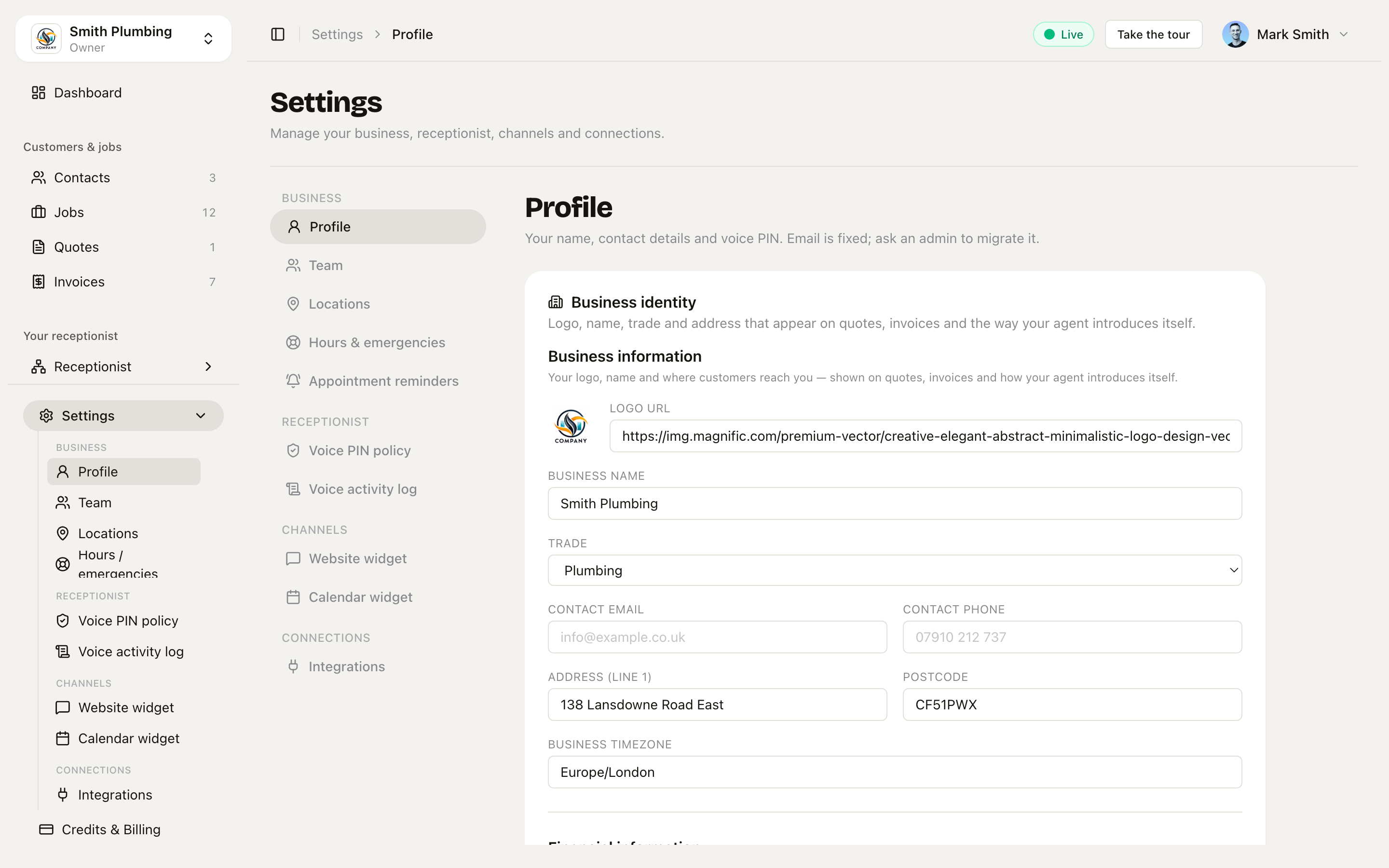 Settings → Profile — your personal mobile (the operator-mode trigger) and your voice PIN live here, one per member.
That's it. The next time you ring the business number from that mobile, you're in operator mode.
The org-wide rules — PIN length, lockout, session window and the invoice ceiling — are set once for everyone under Settings → Voice PIN policy.
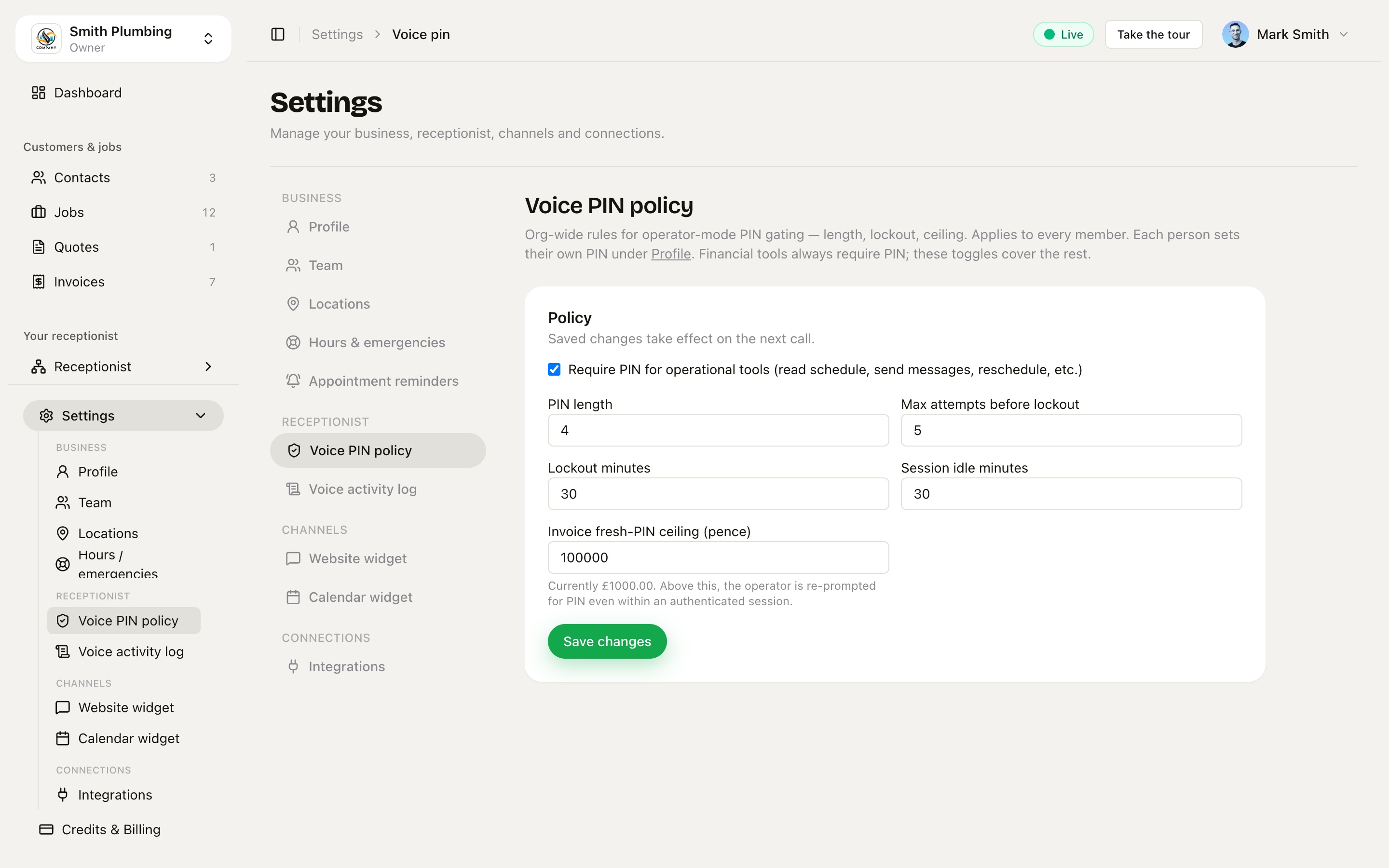 Settings → Voice PIN policy — org-wide PIN length, lockout, session-idle window and the invoice fresh-PIN ceiling.
The greeting
The day briefing is built from your real diary — today's jobs, and how long until the first one:
"Morning Mark — you've got 2 jobs this afternoon. First is in 2h 30min at 135 Bregent. Want me to read the rest, or sort something else?"
Mid-shift:
"Hey Mark, what's up?"
A crew member gets the same briefing, scoped to their own jobs only.
What you can do
| You say | Tool | Class |
|---|---|---|
| "What's on today?" | list_todays_jobs | operational |
| "What's next?" | get_next_job | operational |
| "Did anyone cancel today?" | list_cancellations | operational |
| "What's Tony's address?" | lookup_contact | operational |
| "Tell Tony I'm running 20 minutes late" | send_message | operational |
| "Apologise to the cancellation, blame the van" | send_message (apology template) | operational |
| "Push 4pm to tomorrow morning" | reschedule_booking | operational |
| "Cancel 4pm at Tony's" | cancel_booking | operational |
| "Remind me at 5pm to ring his neighbour" | set_reminder | operational |
| "Note on the Bregent job: bring the long ladder" | add_job_note | operational |
| "Any notes on this one?" | read_job_notes | operational |
| "This job's running an hour over" | extend_job | operational |
| "Note it, extend it, and text the next customer" | confirm_actions | operational |
| "Where's Dave got to?" | lookup_crew_member | operational |
| "When will I get to the next one?" | get_my_eta | operational |
| "Stop tracking me" / "Resume tracking" | set_location_tracking | operational |
| "What's on his invoice?" (summary) | read_invoice_summary | operational |
| "138 Marks Down is done, £516 boiler change" | mark_job_complete | financial |
| "Read me the invoice for 138" | list_invoice_for_job | financial |
| "Add £80 for the trap" / "Take the valve off" | modify_invoice_line | financial |
| "Send the invoice for 138" | finalise_invoice | financial |
| "Mark his £516 paid, card on site" | record_payment | financial |
| "How did yesterday go?" | get_revenue_summary | financial |
| "Who still owes me money?" | list_unpaid_invoices | financial |
| "How long did we spend on that job?" | get_time_on_job | financial |
Voice PIN — when you'll be asked
Tools are classified:
- Financial (reads or writes money or revenue) — PIN always required. No org override. Both reads and writes.
- Operational (reads or writes day-to-day ops) — PIN required by default, but toggleable per-org in Settings → Voice PIN policy.
One exception: when a crew member is in operator mode, the operational-PIN requirement is switched off for them — their caller ID is the gate, and they have no financial tools to protect anyway.
First financial action of a session:
Operator: "Send the bill for 138 Marks Down."
Agent: "Quick check, what's your voice PIN?"
Operator: "Four two seven one."
Agent (PIN verified): "Got it. Total £516. Line one, emergency boiler check. Line two, valve replacement — pending, will be confirmed on John's visit. Send to his main email — confirm?"
Operator: "Yes."
Agent: "Done. Anything else?"
After PIN entry, the session is authenticated for financial use for the org's session idle window — 30 minutes by default, adjustable between 15 and 60. Too many wrong PINs locks you out: 5 attempts by default (adjustable 3–10), for 30 minutes by default (adjustable 15 minutes to 24 hours). All four numbers live in Settings → Voice PIN policy.
Confirmation pattern
Every write action reads back in plain English before executing:
"I'll send £516 to Mark Down at his main email for the emergency boiler change — confirm?"
You say yes/no. The agent only fires the tool on explicit "yes". This catches honest mistakes (wrong amount, wrong customer) as well as somebody trying to replay a recording of you saying "yes".
High-stakes thresholds
Two actions need a fresh PIN even within an authenticated session:
- Completing a job priced over £1,000 (the default — configurable in Settings → Voice PIN policy → Invoice fresh-PIN ceiling)
- Removing a line item from an invoice
AI-drafted invoices across the lifetime of a job
This is the workflow this product enables. Owners stop typing invoices.
During the customer call (customer mode), the agent looks up prices from your services list and KB chunks, talks the customer through what's happening, and appends line items to the job's draft invoice as agreement is reached. Each line is marked:
- confirmed — customer agreed; price is fixed
- pending — depends on a future check; price is provisional with a stated condition ("will be confirmed on Dave's visit")
At the end of the customer call the agent reads the breakdown back to the customer:
"So that's £80 confirmed for the callout, plus up to £60 if the trap needs doing — Dave will confirm when he's there. We'll send a payment link by SMS as soon as the work's done."
During or after the job you can amend by voice ("add £40 for the seal", "drop the trap line, didn't need it") and trigger send ("send the invoice for 138").
On finalise_invoice the agent:
- Requires PIN (financial tool).
- Reads back the full breakdown including pending items and their conditions.
- Waits for your verbal confirmation.
- Generates a Stripe Hosted Invoice (or our PDF with a Stripe payment link), emails the customer, marks
invoices.status = sent, logs to the voice activity log.
"Stop tracking me"
If you've enabled Smart Dispatch, you can also pause crew-app location tracking by voice:
"Stop tracking me."
The agent calls set_location_tracking with paused on (optionally until a time — "until 2pm"). Pings stop within 30 seconds. To resume: "Resume tracking" (requires PIN if operational PIN is on).
Auditability
Every operator action lands in the log with caller phone, member id, tool, arguments, confirmation readback, outcome. You can see this in Settings → Voice activity log — the full screen reference, with the four outcomes (executed, awaiting_confirmation, refused, failed), is at /docs/voice-activity-log.
What this is not
- Not a way to bypass approval flows that already exist in the admin app.
- Not a way to access another org's data — operator mode is org-scoped just like the admin app.
- Not voiceprint biometric authentication (yet).
Threat model (the short version)
We assume the attacker can spoof your caller ID. So:
- Verbal PIN every financial action — a spoofer can't enumerate PINs without hitting lockout
- Wrong-PIN lockout — attempts and duration set by your policy (5 attempts / 30 minutes by default)
- Stolen phone + observed PIN: remove the member from Settings → Team, or clear the personal mobile on their profile — either kills operator-mode access for that number immediately
- Replay of an earlier "yes, confirm": confirmation records are per-tool-call; the handler refuses
confirmed: trueunless a matching readback was issued in the same call within the last few minutes
See ../loyal-receptionist/06-security.md § "Operator-mode threat model" for the full picture.