 Loyal Receptionist
Appointment reminders
A no-show costs you the slot twice — the empty chair and the customer you turned away for it. Reminders text each customer before their appointment with a one-tap link to confirm, reschedule or cancel, so the slot either stays honest or comes back to you in time to refill it.
Reminders are off by default — each one is a text, and texts cost credits (see Billing & credits).
Turn it on
Settings → Appointment reminders (/settings/reminders).
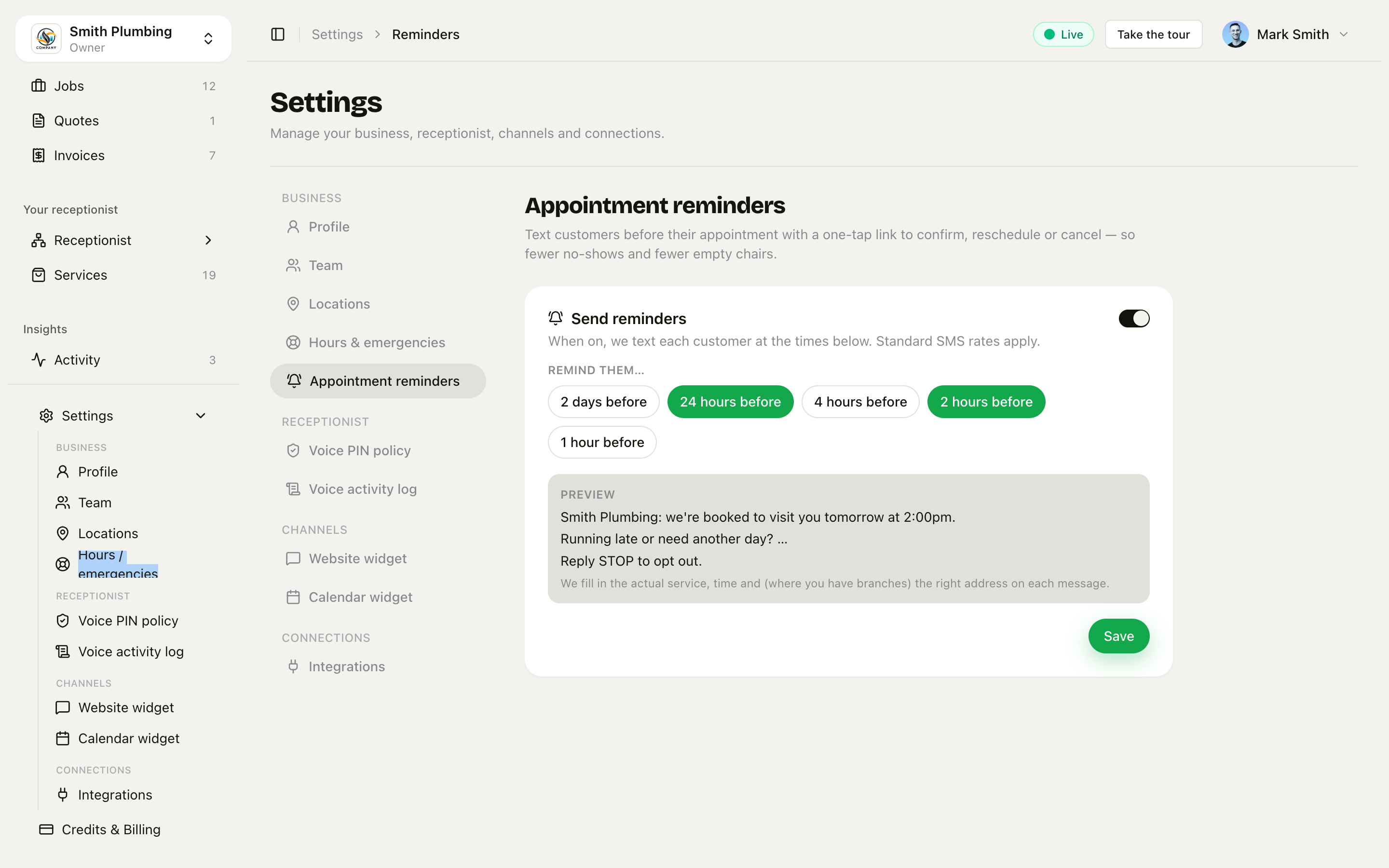 The Send reminders switch, the offset chips, and a preview built for your business.
- Flip Send reminders on.
- Pick when — chips for 2 days / 24 hours / 4 hours / 2 hours / 1 hour before. Pick any combination; the default is 24 hours + 2 hours. At least one is required — the page warns you if none is selected.
- The Preview shows the actual message for your business — your name, and the right shape for how you work. We fill in the real service, time and (where you have branches) the right address on each message.
- Save.
The message shape follows your motion:
- Customers come to you — the text names the practitioner and gives the branch address: "Glow Hair: your cut with Marta is tomorrow at 2:00pm — 12 High St, CF10 1AA. Change or confirm: <link>".
- You go to the customer — the text gives the visit day, no address: "Smith Plumbing: we're booked to visit you tomorrow, Fri 3 Jul. Running late or need another day? <link>".
What the customer gets
The link opens their private job page — the same passwordless page used for site photos, no login, no app. A Your appointment card shows the booking with three choices:
- I'll be there — one tap, the booking is confirmed, and you can see it's confirmed on the job.
- Reschedule — a picker of your real availability.
- Need to cancel? — frees the slot.
Reschedule — they fix it themselves
The reschedule picker is the same availability engine as your public booking page, scoped to the job's branch and service — so the customer can only pick times that genuinely work. Picking a slot moves the booking, counts as confirming it, and re-arms the reminders for the new time. If someone grabs the slot in the meantime, they're told it's taken and shown the picker again — no double-bookings.
Cancel
Cancelling frees the slot immediately and the job moves to cancelled on your board. Cancelled jobs stop getting reminders.
Good to know
- Never double-texts. One reminder per chosen offset per booked time — a re-run of the sender can't send the same text twice.
- Reschedules re-arm. Move the appointment (you or the customer) and every offset fires again for the new time.
- No retroactive texts. A booking made inside a reminder window — say, booked at 3 p.m. for 4 p.m. with a 24-hour reminder configured — doesn't get a stale "see you tomorrow".
- Timing is near, not to-the-second. Reminders are checked every 15 minutes, so a "2 hours before" text lands within a quarter-hour of that mark.
- Only scheduled jobs get reminders — enquiries and completed work are left alone.
Related
- Public booking page — the same availability the reschedule picker uses.
- Arrival windows — the reminder plus the on-my-way text is what keeps a wide window honest.
- Contacts & jobs — where confirmations, reschedules and cancellations land on your board.
- Billing & credits — what a text costs.