 Loyal Receptionist
Job photos & the customer link
Half the wasted trips on a job come down to one thing: the engineer didn't know what they were walking into. Wrong parts on the van, a flue they couldn't reach, a unit ten years older than the customer said. Job photos fix that — the customer snaps a couple of pictures before the visit, an AI reads them against what was booked, and your engineer sets off knowing what's actually there.
There are two sides to it: the customer link they upload through, and the AI photo read you see on the job.
The customer link — one page, no app, no password
Every job can have a single, private link the customer opens on their phone. No login, nothing to download. It's the home for their job:
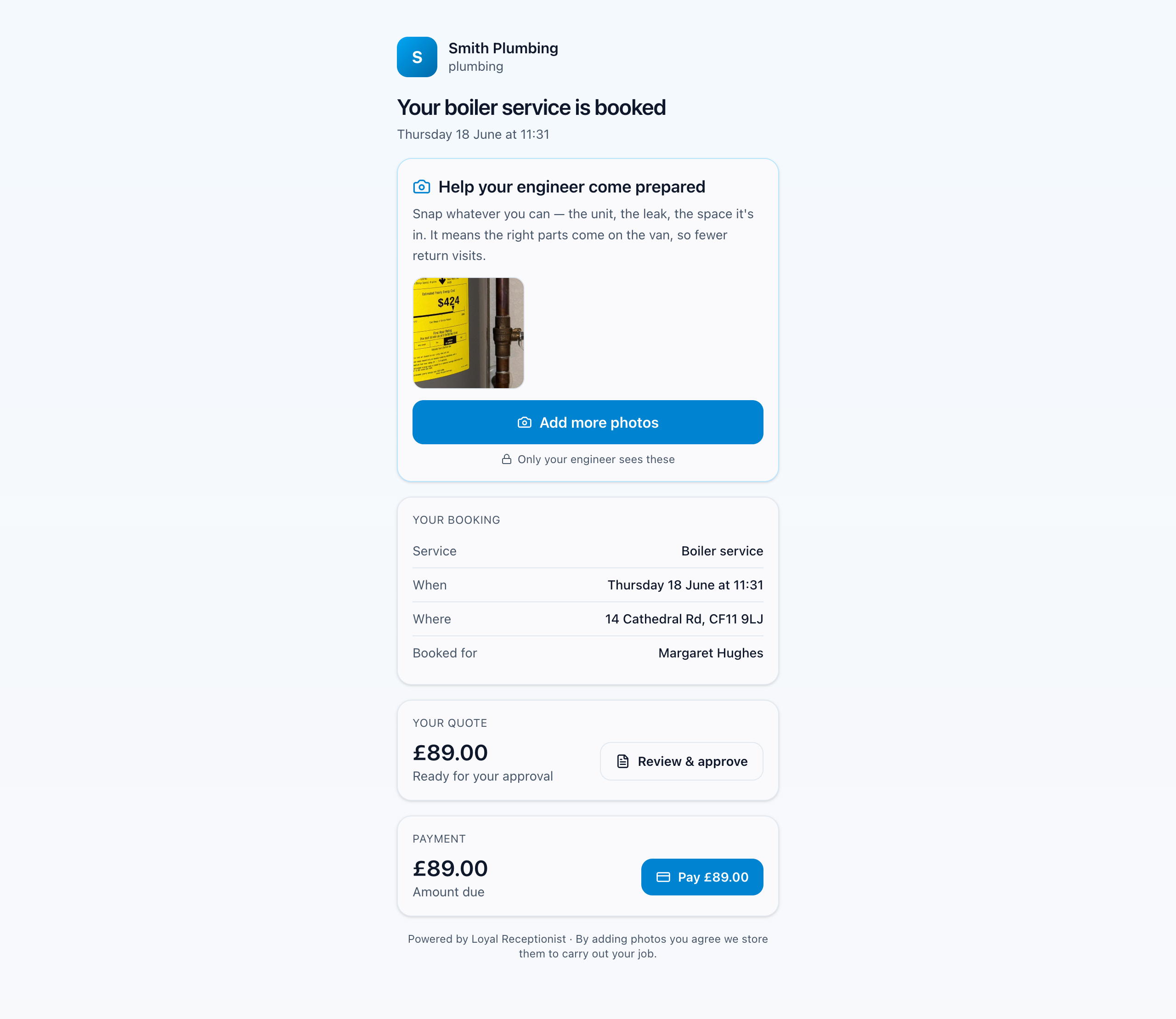 The customer's job link — booking summary, a photo-upload card, and their quote and invoice all in one place.
- Their booking — what's booked, when, and which engineer. If your business books arrival windows, the page leads with the window ("Friday 4 July, 8am–1pm") rather than an exact time — the promise you actually made.
- Appointment actions — three buttons under the booking: I'll be there (confirms), Reschedule (shows live slots; if the one they pick has just gone, they're told "That slot just went — pick another"), and Cancel.
- Add photos — they tap, pick from their camera roll (or take a photo), and it's attached to the job. Only your team sees them.
- Their quote and invoice — if the job has a quote to approve or a bill to pay, those sit right here. The quote card is Review & approve; the invoice card reads Pay £X while there's a balance, then View invoice once settled (and View quote for an approved quote). Both open your existing branded quote and invoice pages — see Billing & credits for how payment lands.
It's the one link to send a customer about their job — booking, photos, quote, pay, all from the same place.
Asking for photos automatically
You decide which services are worth asking photos for — a boiler service or a bathroom fit, yes; a quick drain rod, probably not. On any service (Services → edit a service → Photo request) pick:
- Off — never ask. The default.
- Optional — invite photos. A short prompt tells the customer exactly what to snap (e.g. "Snap the boiler and the flue outside").
- Required — strongly request photos. Same link, firmer wording — for jobs where turning up blind really costs (a bathroom fit, a survey).
When a customer books a service set to Optional or Required, Sarah automatically texts them the link after the booking — no action from you. You can also set the prompt per service so the request is specific to the work.
Importing your services from a website or price list? The AI importer now suggests a sensible photo request for each service it finds (off for routine visits, optional with a tailored prompt for hands-on jobs) — you can change it before you save.
Sending the link by hand
Need to send it yourself — a customer who didn't get the text, or a job you created manually? Open the job, find the Photos section, and hit Send link. It texts the customer the same link. No phone number on file? It still mints the link so you can copy and send it however you like.
The AI photo read
When photos come in, an AI reads them against the job brief — not in a vacuum — and leaves you a short, plain-English summary plus a few findings. You see it in the Photos section of the job:
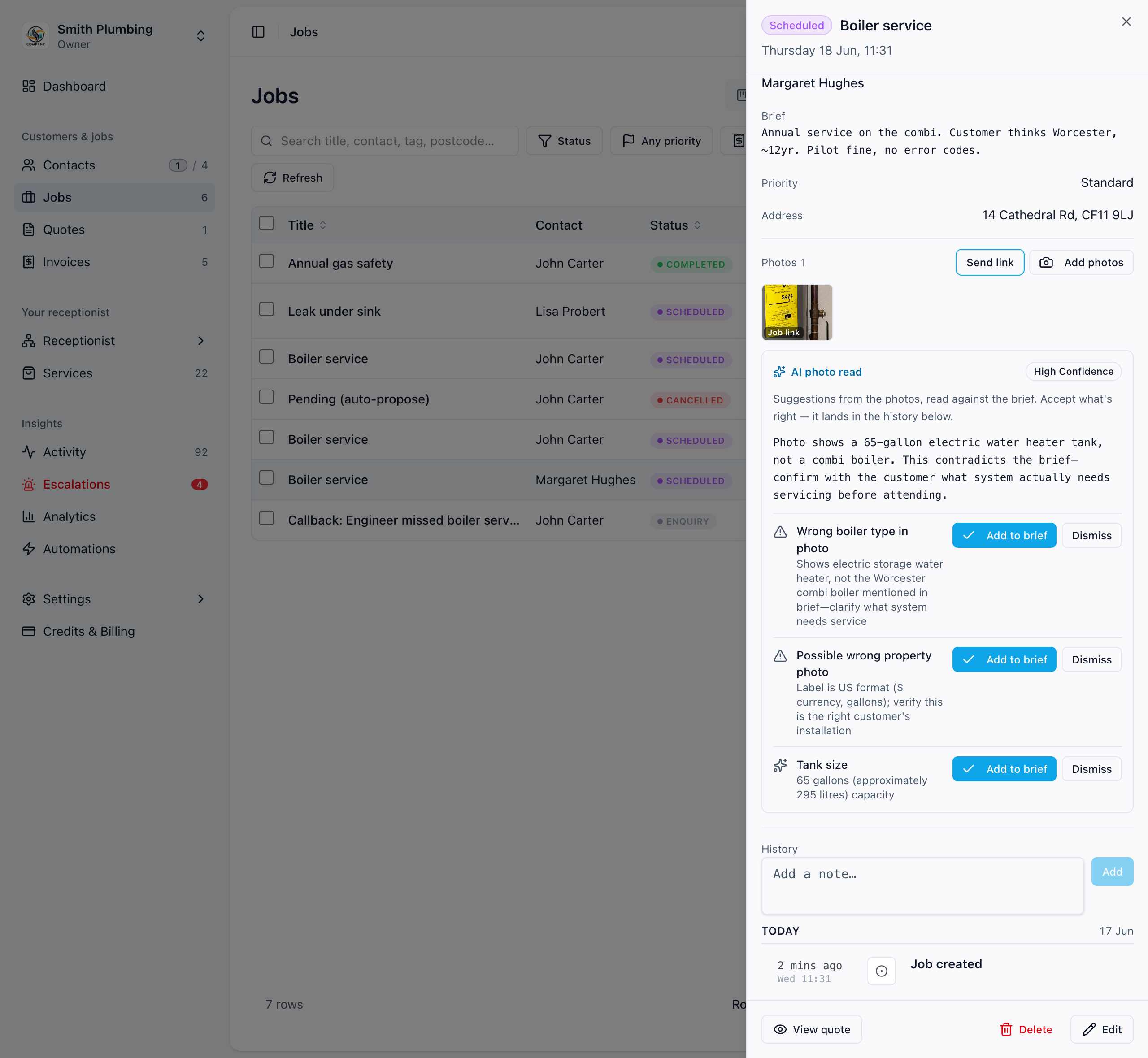 The AI read sits on the job sheet: a summary, findings you can accept or dismiss, and a confidence level.
In the example above the brief said Worcester combi boiler, but the photo was of a water heater tank — so the read flagged it before the engineer drove out with the wrong parts, and even noticed the label looked like the wrong property. That's the whole point.
Each finding is a suggestion, never the last word — you're the judge:
- Add to brief — the finding is folded into the job's history as a note, so it travels with the job and your engineer sees it.
- Dismiss — drop it. (This also quietly tells us how good the reads are.)
A confidence label (low / medium / high) tells you how sure the AI is. Treat a low-confidence read as a nudge to check, not a fact.
Privacy
Photos of someone's home are personal. They're only ever visible to your team (never on a teammate-preview), and the customer's link is a private, signed one that expires after 90 days — nobody can guess their way to it. The photos stay on the job so your team can refer back to them; the customer agrees to you storing them for the job when they upload.
A photo can answer a question
Everything above is about the customer sending photos before the visit. Your crew can take them too, and theirs can be pointed at something specific.
When a service has a before-you-price checklist, each question on the crew's phone is a shot to take. The read is told which question it is answering, so it comes back with an answer rather than a description — and it comes back as a question of its own, for a person to confirm. Nothing is ever stored without somebody tapping.
See Before you price.
In short
Set a service to request photos, and the customer gets a no-login link to send them. The AI reads them against the brief and leaves your engineer a heads-up — so the right parts are on the van, first time.