 Loyal Receptionist
Look at the thing, write down what you see, show the customer, and let them say yes or not now. "Not now" comes back later on its own. It ends "you scratched my car", and the extra work you spot becomes paid work.
Today this is set up for garages. The same parts work for a letting agent's inventory or a builder's "before we started" photos, and are switched on for those businesses when they ask.
The check-in and the hand-back
When a car arrives, open its job on the phone and press Check the car in. It opens the walk-round, not the timer: walk round the car, talk, and take the photos.
- Guided at the top shows the check-in as chips. Tap a chip with a camera to take its photo; it ticks itself.
- Say where you are as you go, the way a garage does: front, nearside (the passenger side), offside (the driver's side), rear, roof, boot, inside, dashboard, under the bonnet, underneath, wheels. A photo taken there is filed under that place, and "nearside" fills the Nearside photo.
- Pro hides the list and just records.
For the film round the car, with a ring that keeps a photo of each side by itself, see Walk round the car. On that walk you do not have to say which side you are at.
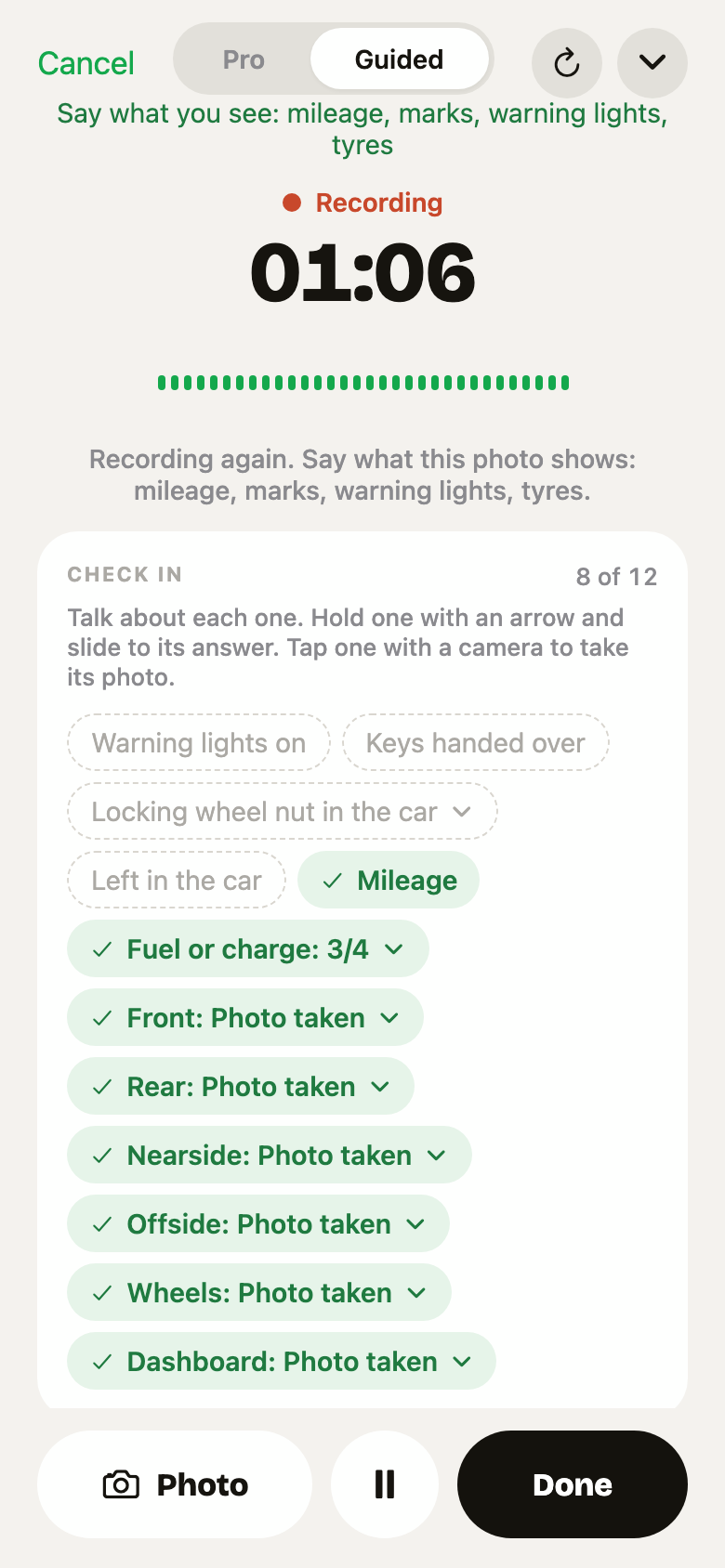 Guided: each photo ticks its chip as it is taken. 8 of 12 done.
The check-in holds:
- The car: mileage, fuel or charge, warning lights, keys handed over, locking wheel nut, things left in the car.
- Photos: front, rear, nearside, offside, wheels, dashboard. Each is one tap: No marks, Can't tell, Type it, or Take a photo.
Any item can also be answered on the job sheet, or said to Sarah (see below).
Press Finish: check in. Three things happen:
- The mileage is saved on the car.
- The customer gets a text with a link to the record.
- On the car's next visit, what you noted is offered back: "Last visit: scratch, bumper. Still right?"
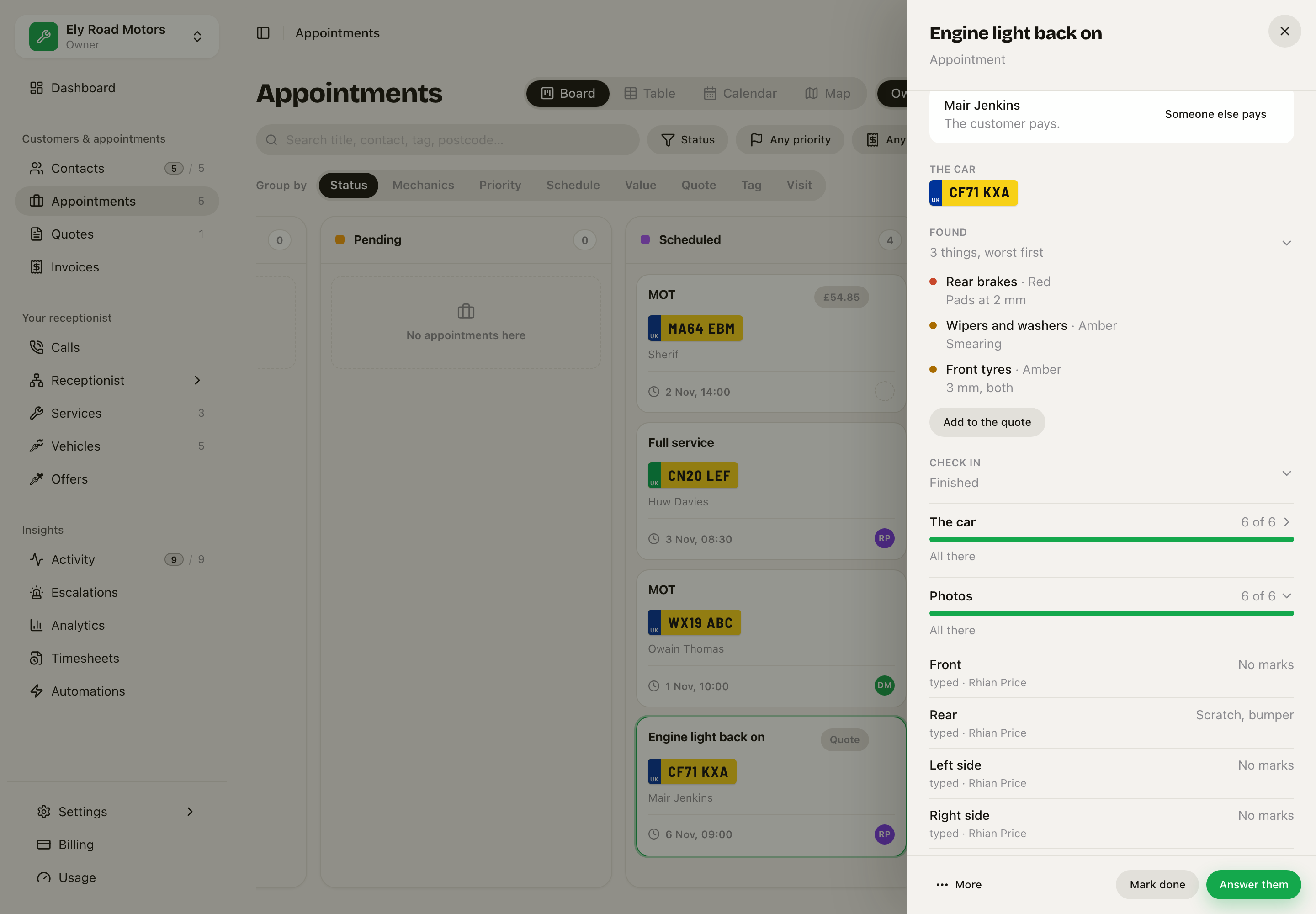 The check-in on the desk: every item with its answer and who gave it.
Hand back stays one quiet line, When the work is done, until the check-in is finished and the work on the job is ticked off. Tap it if you need it early. When the car goes back, fill it in. It shows what is new since the check-in first, in red. Anything not checked yet is left out, not called "gone".
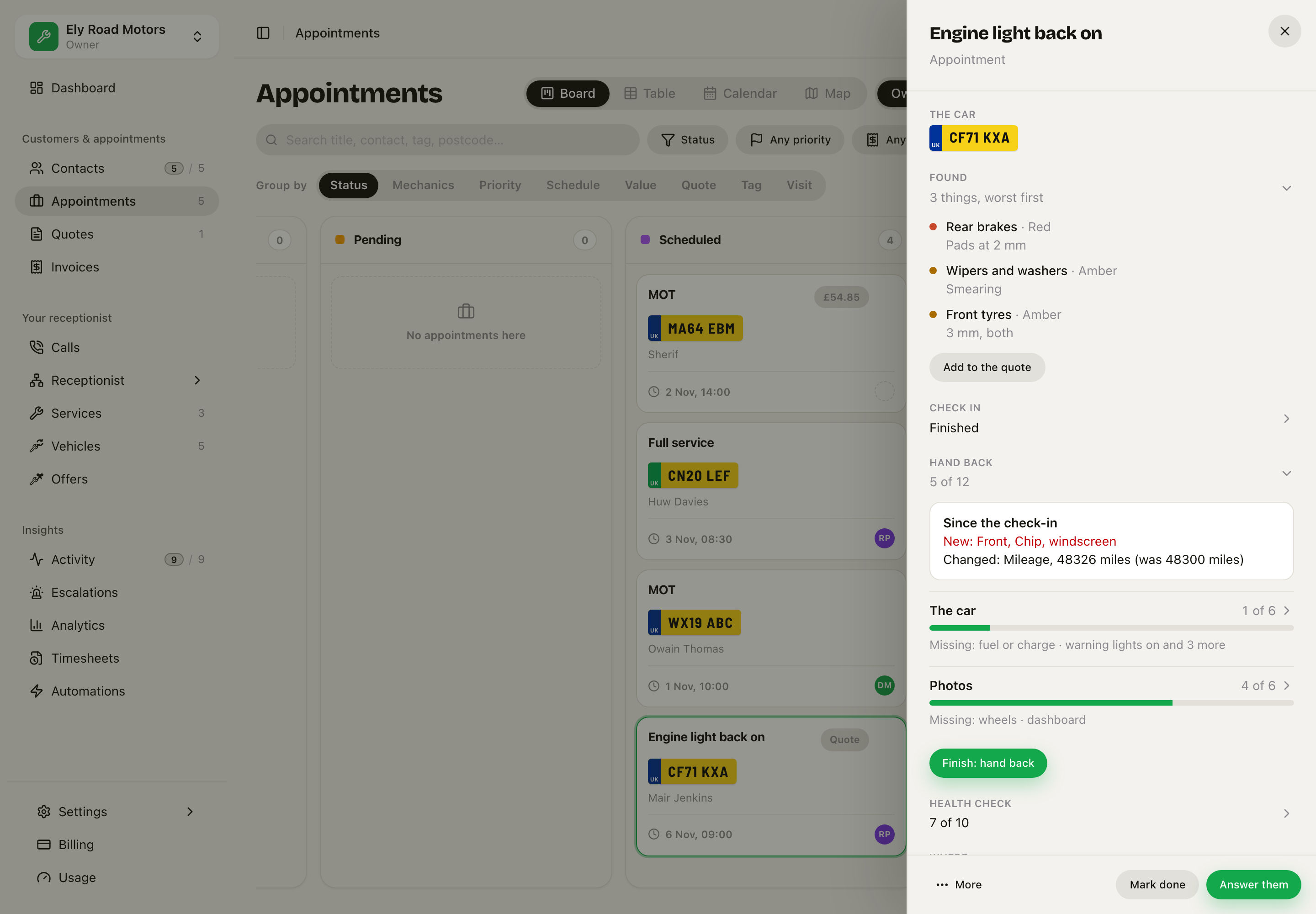 New: a chip in the windscreen. The mileage went up 26 miles.
The customer agrees to the record
The text opens a page with every fact and photo. The customer types their name and taps This is right. The page says plainly that this does not mean they agree to any work or any cost.
They can agree once. After that, the record cannot be changed by anyone.
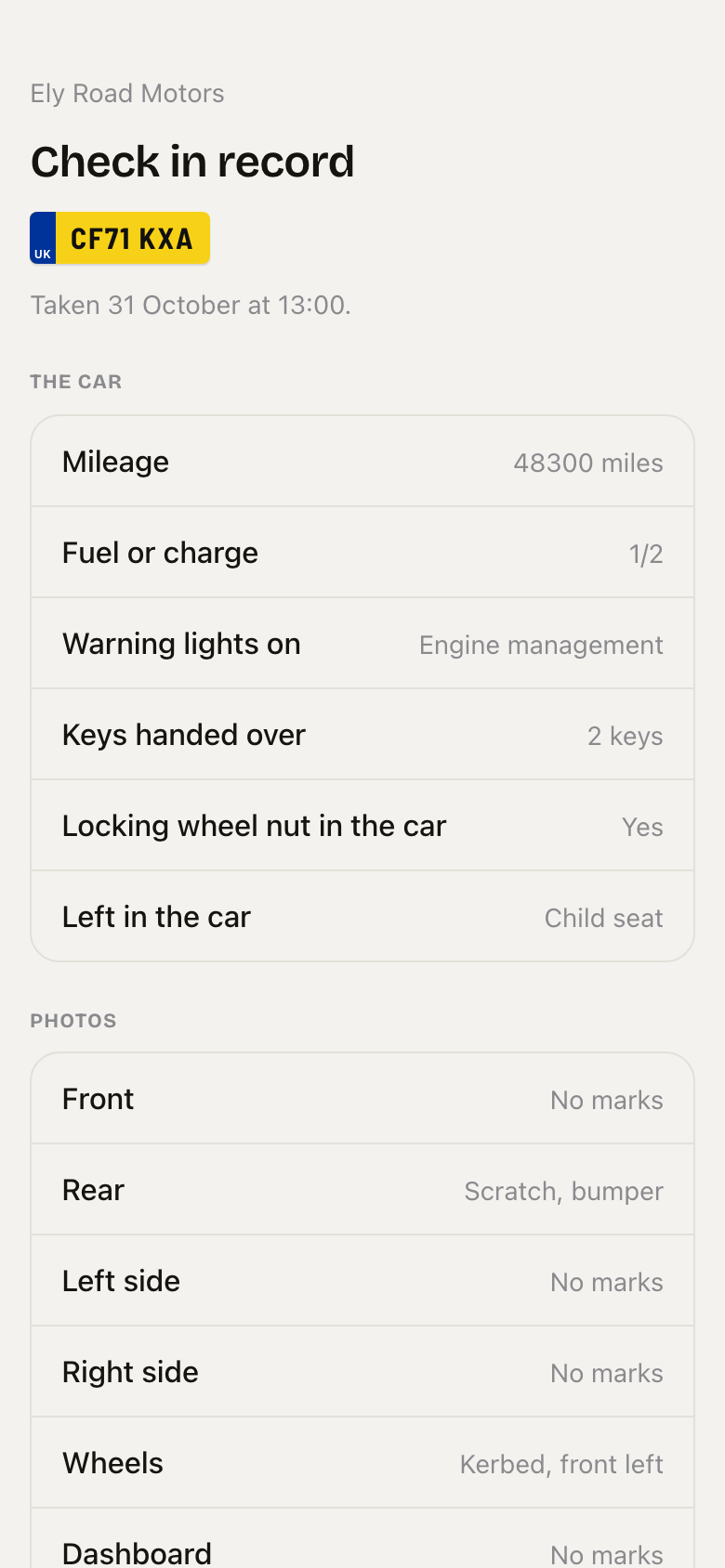 What the customer sees: the plate, the facts, the photos, and This is right.
The health check: green, amber, red
Health check lists tyres, brakes, lights, wipers, battery, fluids, suspension and the exhaust. Each item has three buttons: Green (fine), Amber (plan it), Red (do it now). Add a note if you like; the grade and the note keep each other.
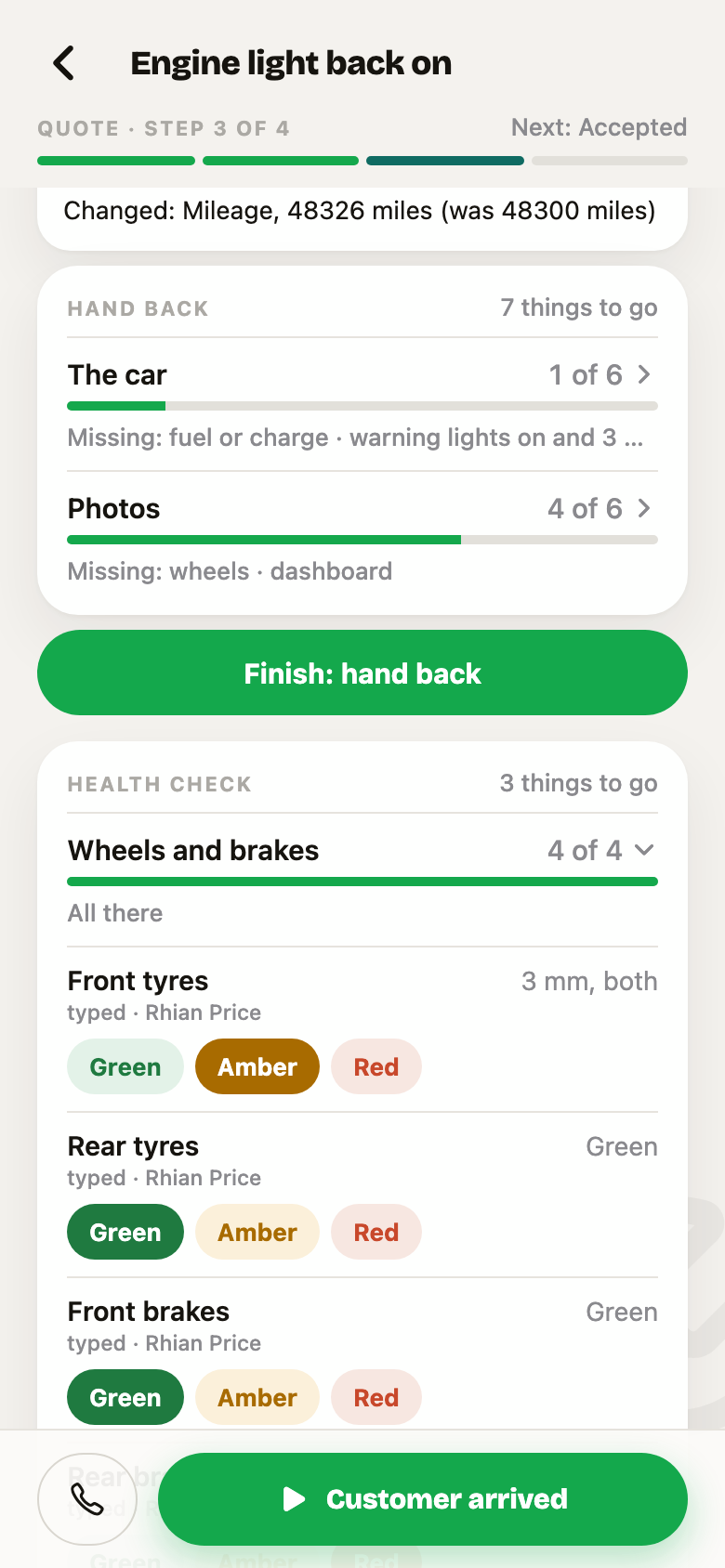 One tap per item. The note stays behind the row.
Say it to Sarah instead
Hands dirty? Open Sarah in the app and talk to her about the job.
- "What's left on the Transit?" She reads what is still open on the check. Name the job by the car, the registration or the customer.
- Answer one at a time as she asks, or say several at once: "Mileage 54210, fuel half, no warning lights, two keys." Each answer is saved straight away. She does not ask "shall I save that?". She says what she saved and asks the next item.
- An answer that does not fit is asked again, not saved. "Yes" is not how many keys. "All fine" is not a fuel level, so she asks for Empty, 1/4, 1/2, 3/4 or Full.
- Name the job by its registration or the customer's name. A word two jobs share, like "MOT", picks no job: she asks which one.
- On the health check, say the colour and what you saw: "rear brakes amber, pads about 5 mil". She saves Amber with the note.
- Answers are saved in the check's own words: "half" is 1/2, "no warning lights" is None, "all fine" on a photo is No marks.
- "Finish the health check." She tells you anything still open and that it goes to the customer, and finishes only on your yes.
- Photos are taken on the phone, never by voice. She tells you which are left.
Found: everything that could become work
Found lists every Amber and Red item, and every photo finding a person accepted, worst first. Green is never on it.
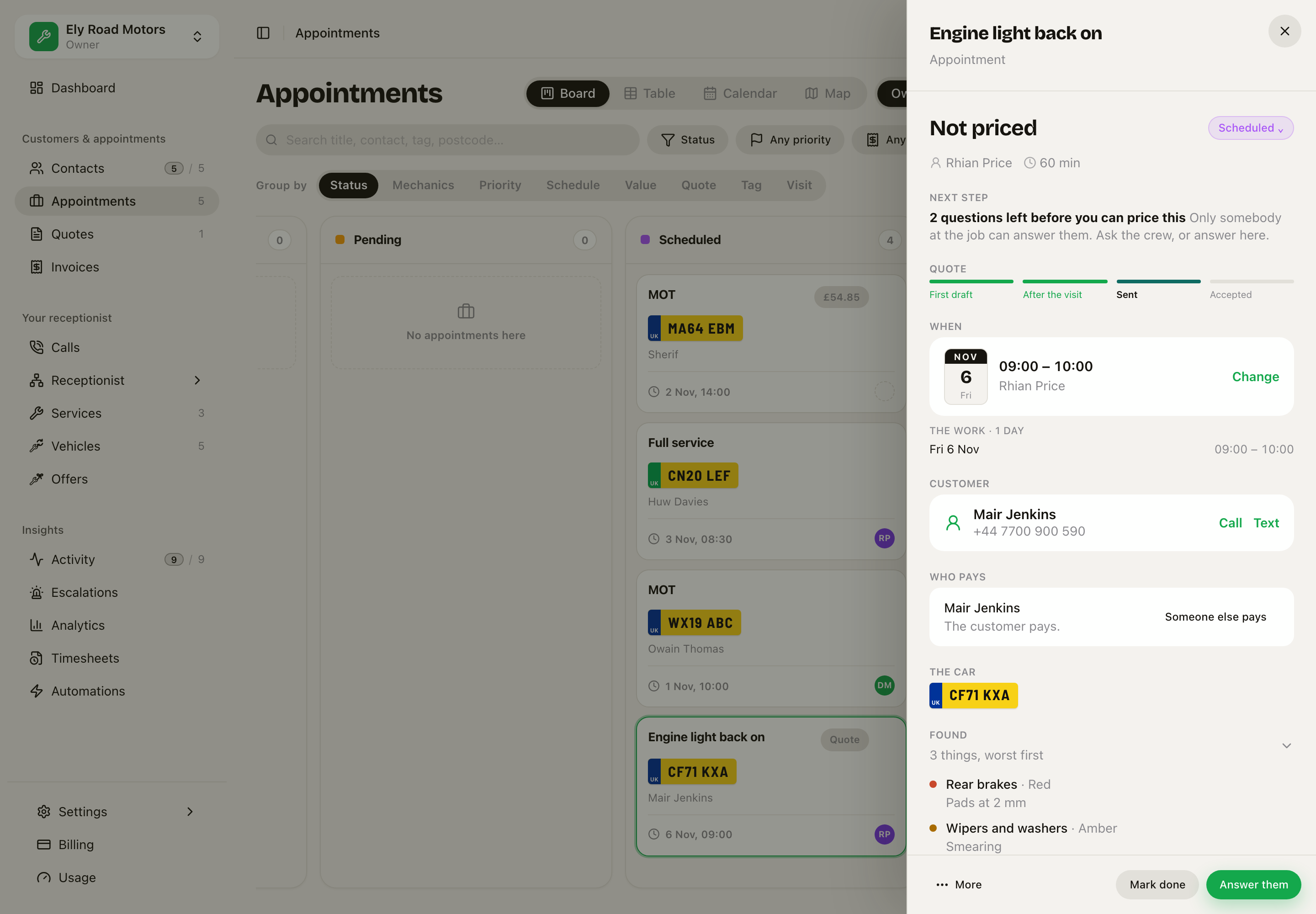 Rear brakes Red first, then the Amber items, each with what was seen.
The customer ticks what they want
Press Add to the quote (owner and office only). Each finding becomes a tick-box on the job's quote, under Found on the check:
- Nothing is ticked for the customer, so the total never moves on its own. Red items are marked recommended; on the quote editor that reads Recommended, marked for the customer, who still ticks it.
- Until the customer ticks something, the quote is shown and texted as "2 options, up to £280", never as £0.00.
- A price comes only from a service on your list whose whole name is in the finding. "Oil leak" never takes the price of "Oil change". With no match, the line has no price, is flagged for you to price, and the customer sees Price to follow.
- A quote already sent is never changed. A new draft is started instead.
Then send the quote as normal. The customer sees each finding worst first, with its colour.
When the customer accepts while the car is still in, what they ticked is added to the job's work list. The work the car came in for (the MOT) stays. The crew tick it off as they go, and it is all on the one invoice.
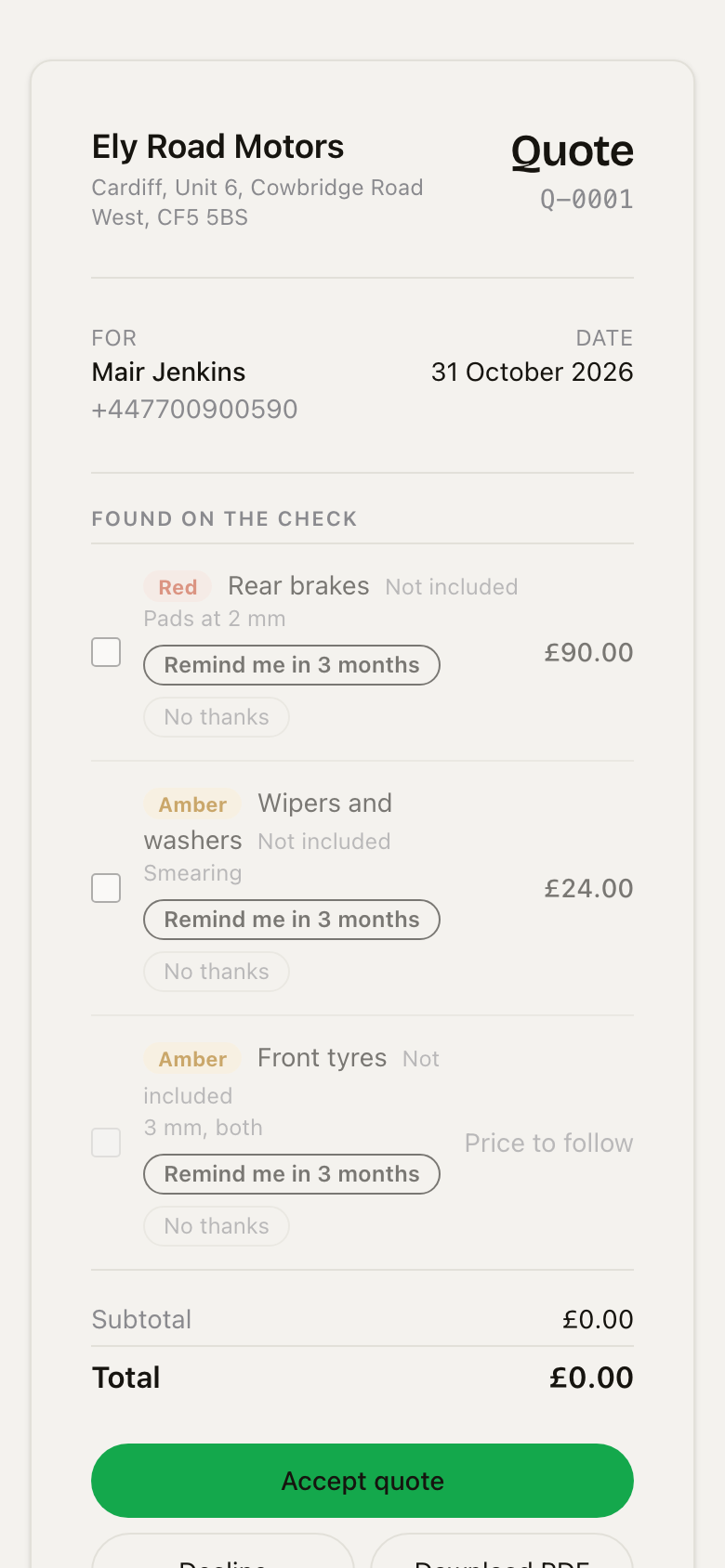 Red brakes first, then Amber. Each one can be ticked, or left with Remind me in 3 months.
Not now comes back
Under each finding they leave unticked, the customer picks Remind me in 3 months (picked for them) or No thanks.
- Remind me puts it on the car's Comes round list. Three months later your reminders text them: "Last time we saw Blue Fiesta we noted front tyres, and you said not now. Want us to sort it?"
- No thanks is kept on the quote and never asked again.
Reminders must be switched on for your business, the same as MOT reminders.
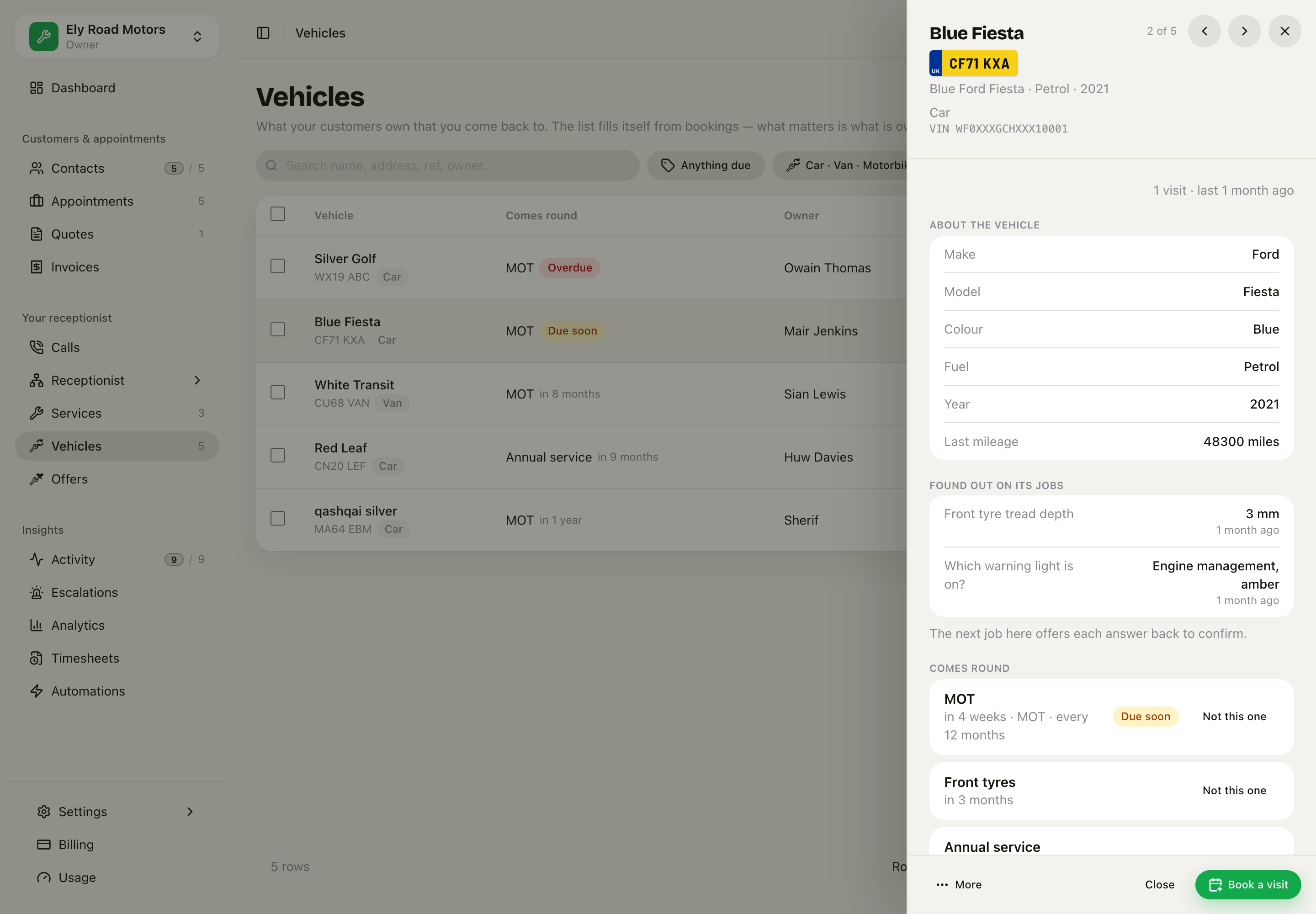 The MOT, the front tyres they said not now to, and the service.
Your car is ready
Turn on All done on Settings › Messages. When a job is marked done, the customer gets one text, in your words or the ones it starts with. For a garage:
"Hi Mair, your car CF71 KXA is ready to collect. Ely Road Motors"
It goes once per job, and greets the customer by first name. It waits until morning if the job is finished during your quiet hours, and it is never sent about a job finished more than 18 hours ago. Edit the words in the box, and use {{plate}} for the registration.
If you send the pay link after marking the job done, the two become one text: "Hi Mair, your car CF71 KXA is ready to collect. Ely Road Motors Invoice INV-0001 (£334.85), pay here: …" The separate All done text is then not sent.
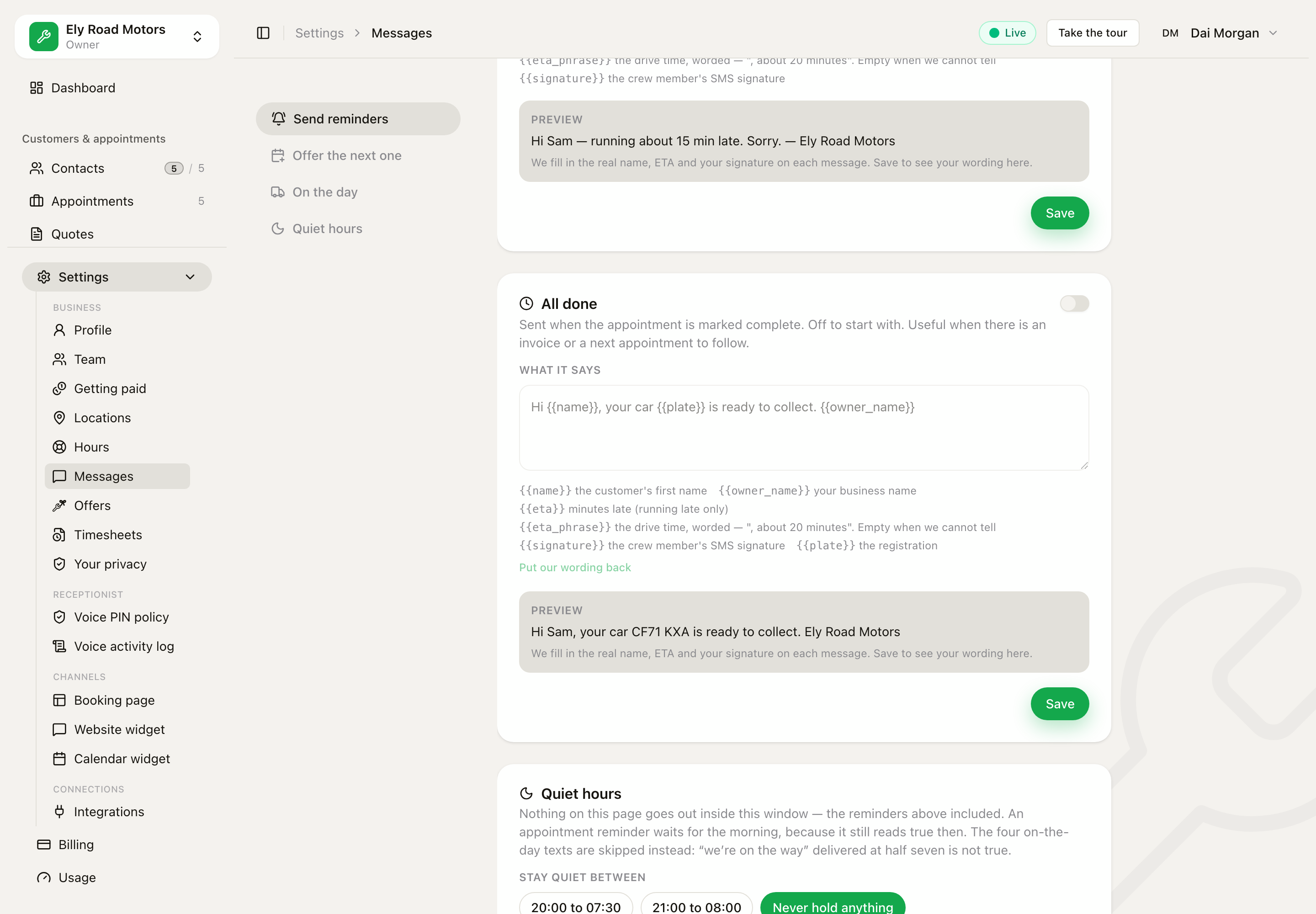 The preview reads exactly what Mair will get.
The MOT result and the free retest
On a job for an MOT, the job has an MOT result: Pass or Fail, what it failed on, and the advisories. Finish it and:
- A Fail puts MOT retest on the car, due 10 working days later: the free partial retest window.
- Repaired in the same visit? The job now has an MOT retest record. Answer Pass and finish it: the retest is closed and the customer is sent the retest record. The first result, which they may have agreed, never changes.
- Retested on another visit? A Pass on that job's MOT result closes it too.
- The car's next MOT date counts from the day the job is marked done, not the day it was booked.
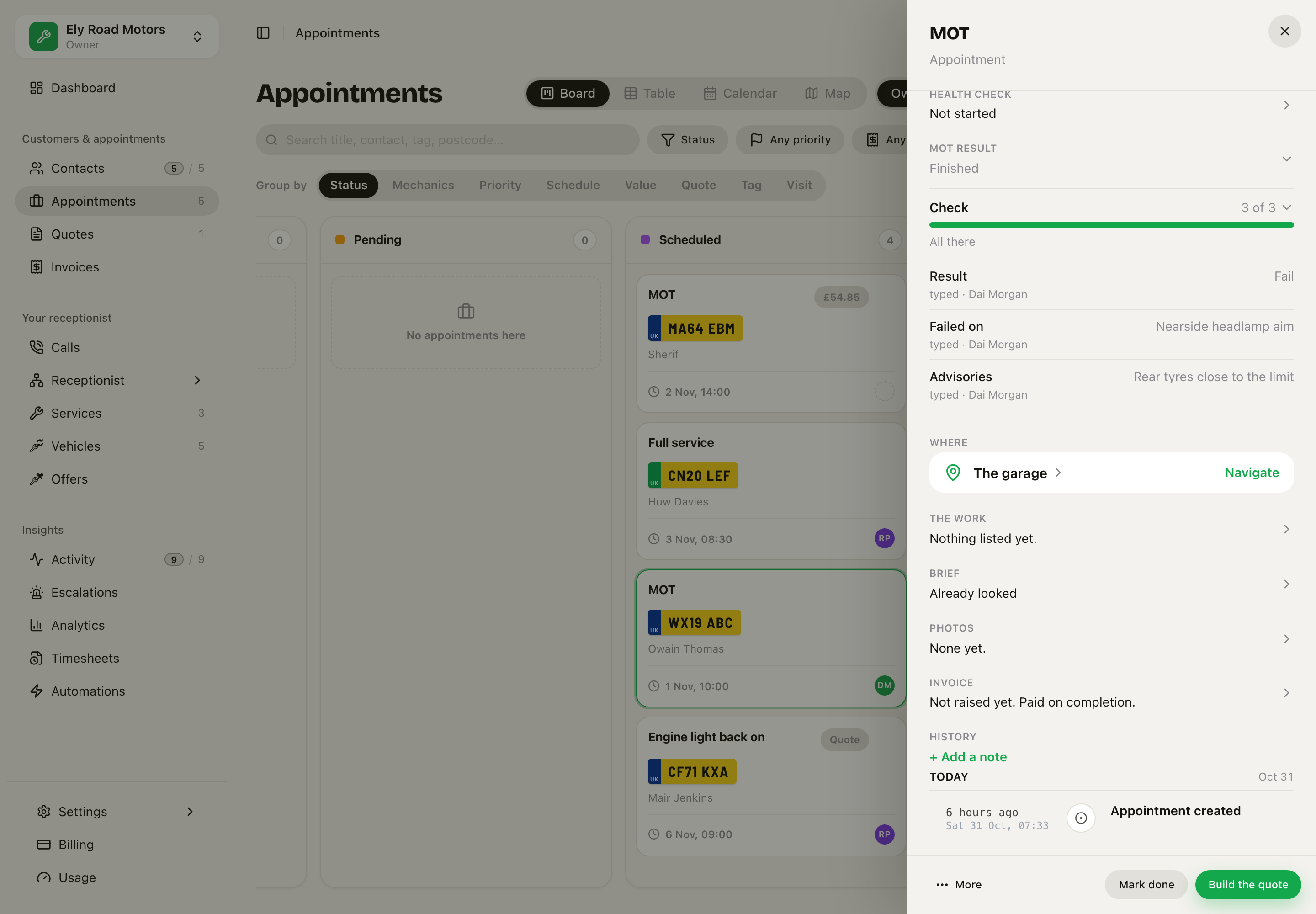 Failed on the headlamp aim. The retest is now due on the car.
Who can do what
- Crew fill in checks and grades on their own jobs.
- Only the owner and the office add findings to a quote.
- Everything shows only for a business that has these checks set up.