 Loyal Receptionist
Listings — the stock Sarah talks about
Some of what you sell never runs out. A boiler service, a haircut, a will. Those are services, and they live on the Services page.
Some of what you sell does run out. A house. A vacancy. A boiler deal this month. An ex-display shower enclosure. A car on the forecourt. Callers ask about those by name — "is the Station Road one still available?" — and the answer changes every day.
That is what Listings are for. The page is called by your trade's own word: Properties for an estate agency, Vacancies for a recruiter, Offers for a plumber, a salon or a law firm, Stock for everyone else.
What Sarah does with a listing
- Answers by name. A caller says "the Cathedral Road flat" or "ref THW-1041"; Sarah finds it from their words and reads back the price, the facts and the status — in your words. Under offer. Let agreed. Sold. She never guesses a price or a status; the list is the truth.
- Says how popular it is. "It's popular — five people have called about it this week, the last one about half an hour ago." Only once three people have asked in a week, never a name, and you can switch it off.
- Books the viewing. The service, the address and the postcode come off the listing, so nobody types them. A property that is under offer or sold cannot be booked, whatever anybody says on the phone — Sarah offers to note their interest instead.
- Notes interest. "Tell me if it comes back." One tap on your side to ring them when it does.
- Takes a status from you by phone. "Sarah, Station Road is under offer." Same change, same record, as pressing the button.
The page
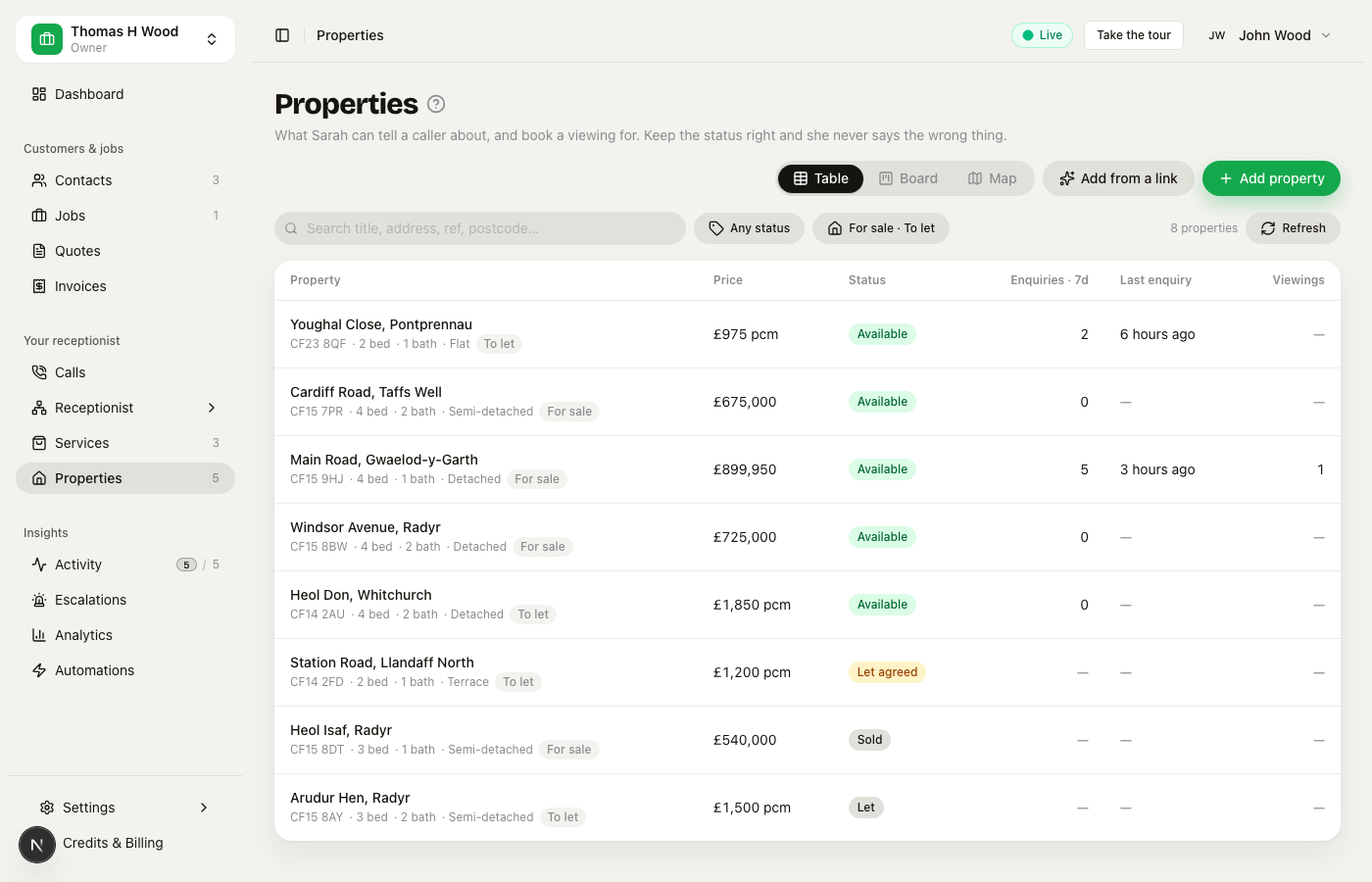 The table view: title, price, status chip, enquiries this week, last enquiry, viewings
Table is the default: every listing, its price, its status, how many asked this week and when the last one rang. Board is one column per status — drag a card when an offer is accepted. Map puts a pin on every listing with a postcode, coloured by status, with the price on the pin and this week's enquiries inside it; hover for the photo and the facts.
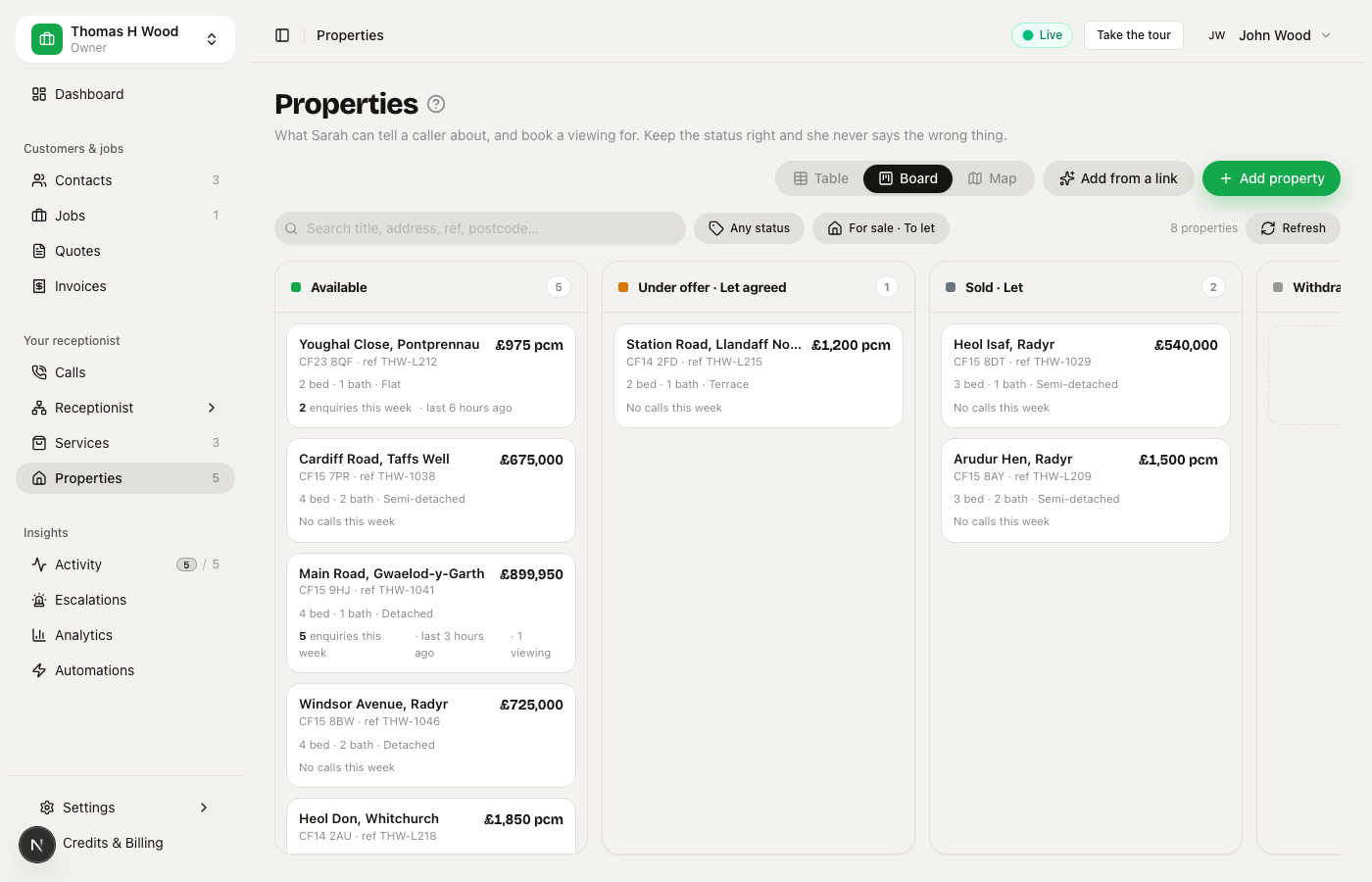 The board: Available, Under offer, Sold, Withdrawn, one card per property
The sheet
Click a row and the sheet slides in.
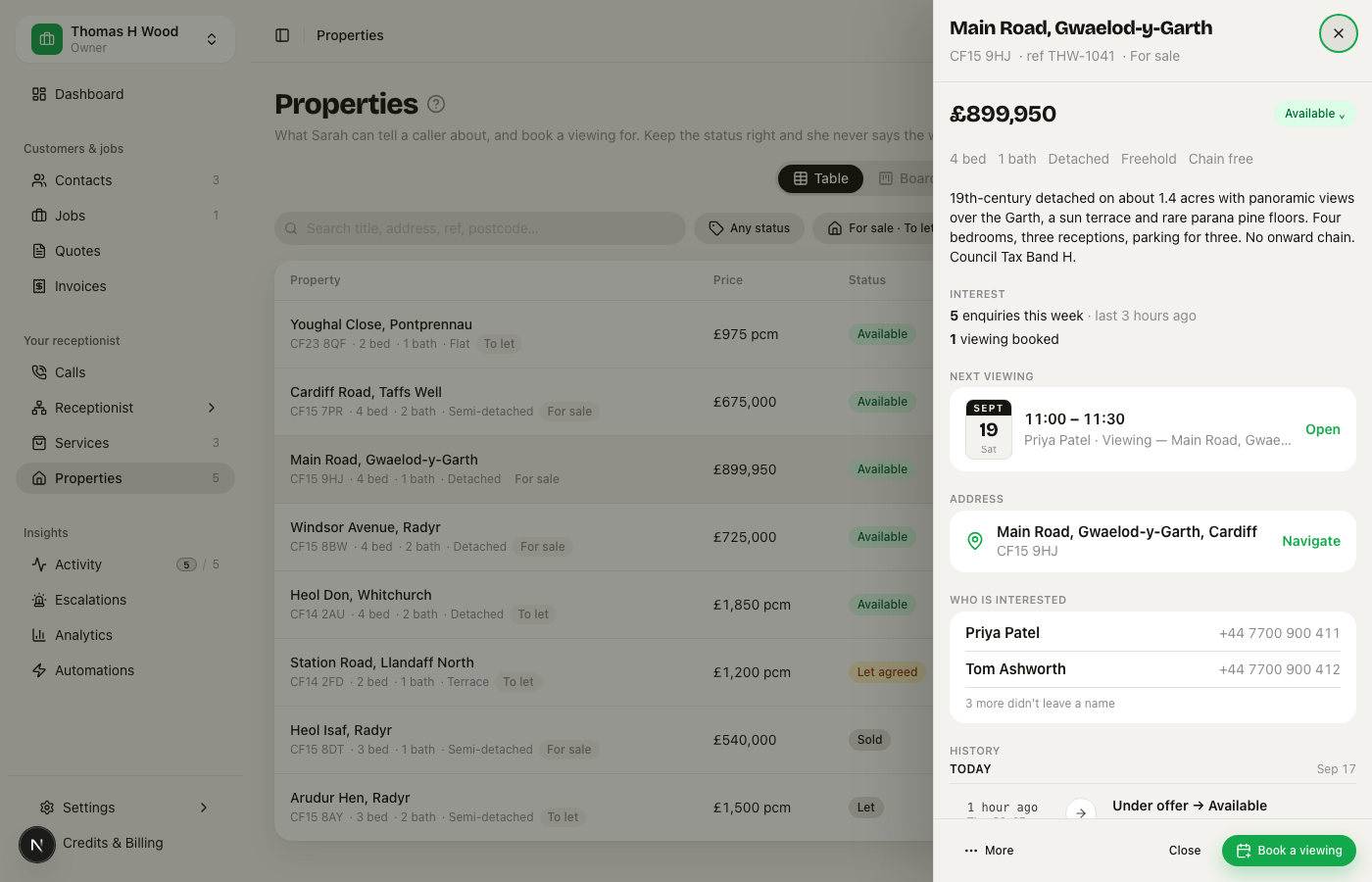 The listing sheet: price, status, facts, interest, the next viewing as a calendar page, the address, who is interested, and the history
- The status, one tap. Only the moves that make sense are offered: a sold house can be reopened (the sale fell through), a withdrawn one can come back, but nothing jumps straight from Sold to Under offer.
- Interest — enquiries this week and all time, viewings booked, how many want to hear if it comes back.
- Next viewing — a calendar page you can spot from across the room.
- Who is interested — names and numbers. Click a name for the contact.
- History — every call that asked (with Sarah's summary), every viewing booked and how it came in, every status and price change with who made it and how. Same timeline as a contact's page. Nothing is stored twice.
- Book a viewing opens the ordinary job form, pre-filled from the listing.
Getting listings in
Three ways, from the top of the page:
- Add from a link. Paste the page — your own site, or a portal — and the reader pulls the title, price, address, facts and photo into the form. You see every value before you save. Some portals block readers; the form says so and you type it in.
- Type it. Five fields. Thirty seconds.
- The status is the thing to keep right. Everything else can wait.
Keep it in sync
Once a listing has a link, you can have it re-read daily, twice a day or — on your own website only — hourly. Portals allow a daily read; asking more often gets everyone blocked, so the option is simply not there for a portal link.
A read never changes your listing on its own. It proposes: an amber chip on the row — "Page says under offer · price now £695,000" — and one tap applies it or leaves it. A page that has gone proposes "withdrawn?" and waits for you. If you trust your portal more than your inbox, switch a listing to apply and it will change the status and the price by itself, and only those two.
Check the source now is under the sheet's More menu.
Your own details fields
The details — Bedrooms, Bathrooms, Type, Tenure — start as your trade's list. Press Fields at the top of the page to make them yours: rename one, hide one, add one (text, number, yes/no, or a pick-list), and choose whether it shows as a chip and gets said on calls. Twelve at most; every field is a few more words from Sarah on every call.
Three things you can rely on: rename changes the word and never the data underneath; remove hides a field and never deletes what was typed against it (it sits under Hidden to come back); Reset to defaults is your trade's list again, with nothing typed lost.
You rarely need to design this by hand. When you Add from a link, the reader fills your fields and then says what else the page stated — "This page also has: EPC rating · C, Parking · Driveway" — and one tap adds them as fields, values and all. It never adds a field by itself.
Your booking page
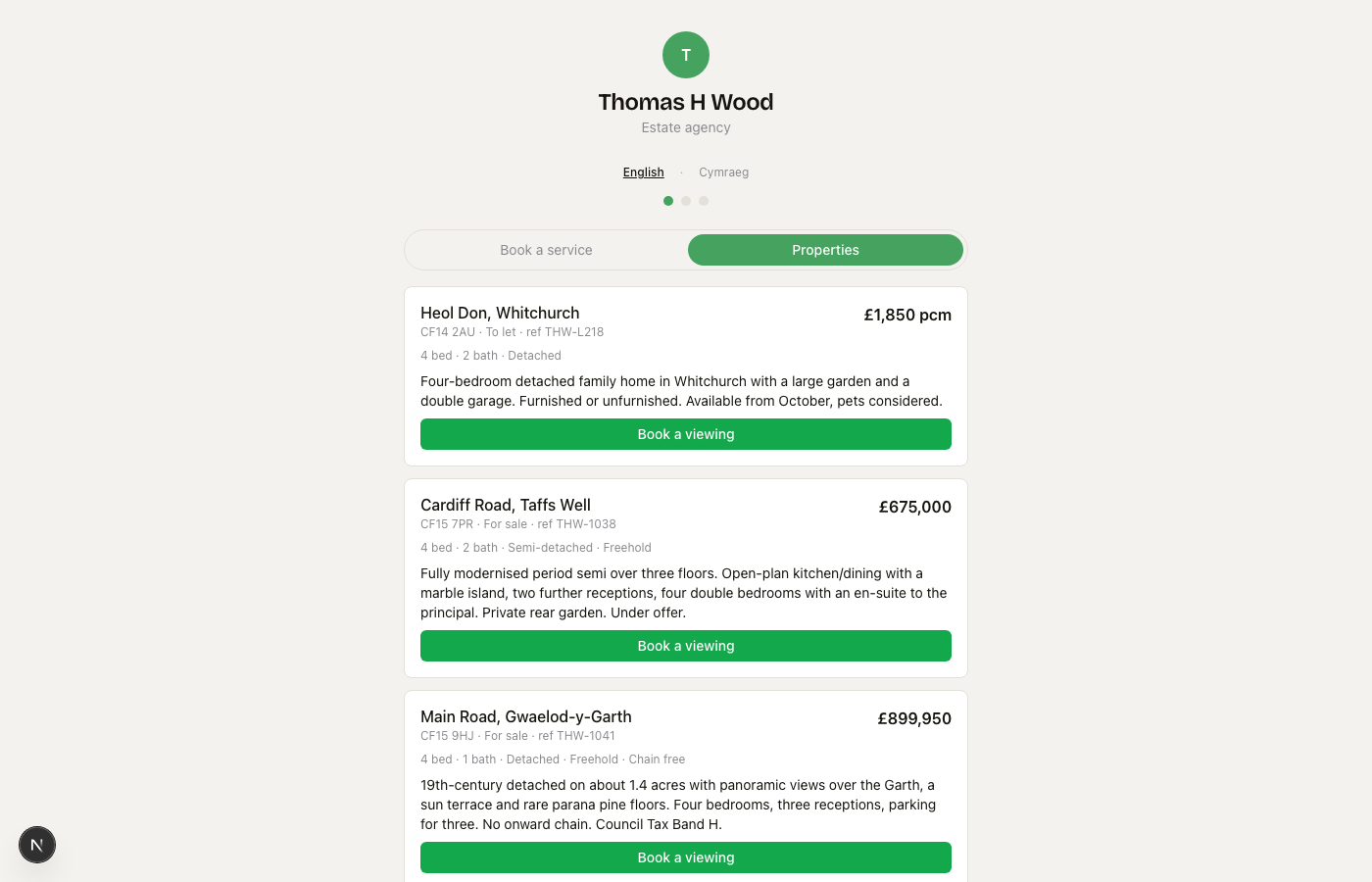 The public booking page with a Properties tab and Book a viewing on each card
Your public booking page gets a tab named in your trade's word, showing what is
open, each with Book a viewing straight into your diary. A portal can link to
one property directly: /book/your-slug?listing=<id>. Portal → your page →
viewing in the diary, no phone call at all.
On the phone
The crew app carries the listing on a viewing: the address, the key-safe line, what the caller said. A short list lets anyone change a status in a corridor. No board, no import, no sync on the phone — those are desk work.
Who can do what
| Owner / admin | Crew | |
|---|---|---|
| See the list, the sheet, the history | ✓ | ✓ |
| Change a status | ✓ | ✓ |
| Add, edit, delete, import, sync | ✓ | — |
| See a caller's phone number | ✓ | — |
What it is not
It is not a CRM for buyers or candidates — they are contacts, their calls are calls, their appointments are jobs. It is not a portal feed (Rightmove, Reapit, Alto) — that is a later way in, behind the same page. And a listing is not a service: if it never runs out, it belongs on Services.