 Loyal Receptionist
Voice activity log
When your AI ran an invoice for £516, who said yes? When a fresh PIN was demanded, how many times did it get rejected? The voice activity log answers both, in one screen.
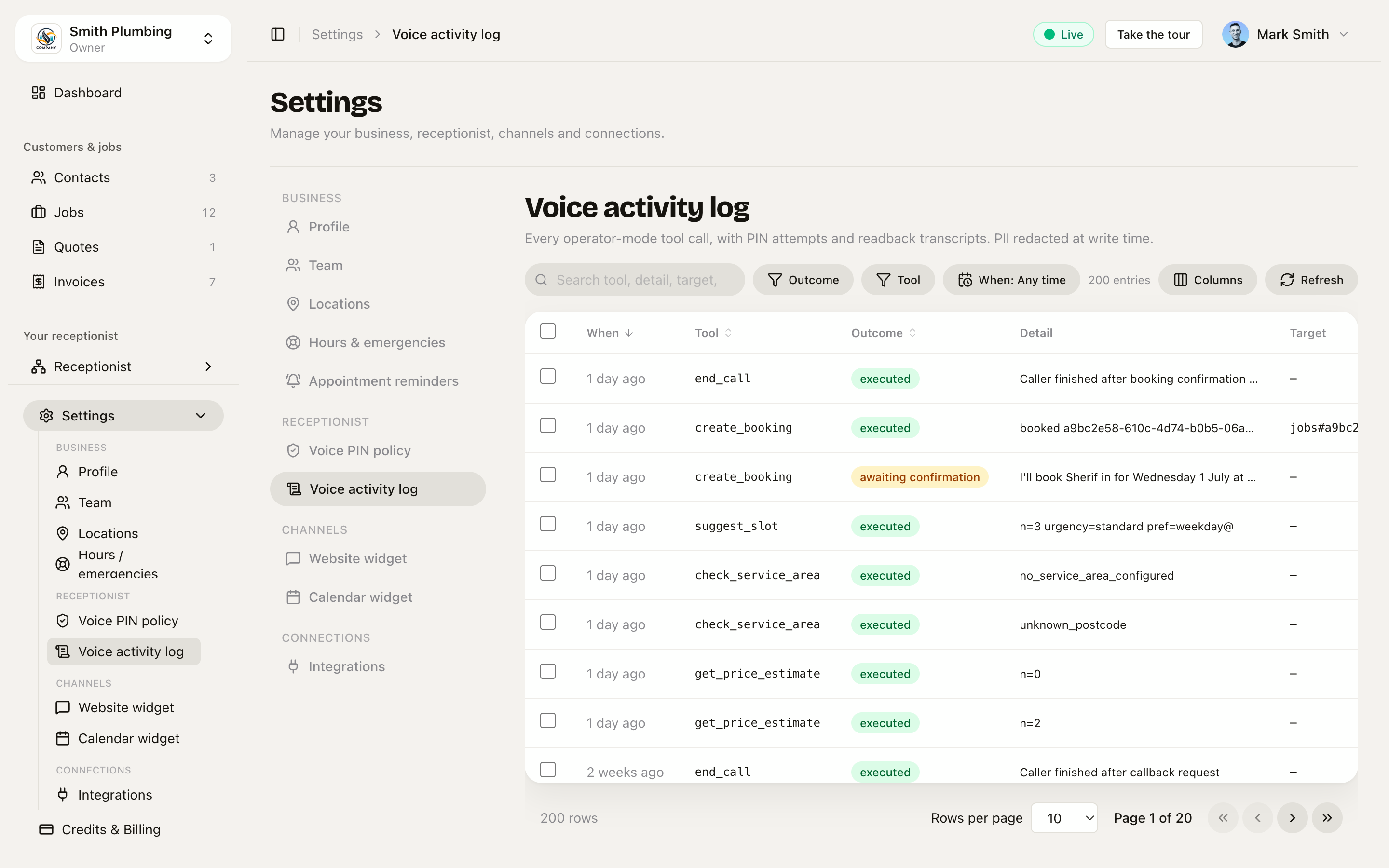 Every operator-mode tool call, newest first. PII redacted at write time.
Where to find it
Settings → Voice activity log (linked from /docs/voice-pin-and-operator-mode).
Owners and admins see the whole org's log. Crew see it too — it's in their sidebar — but scoped to their own actions only, so an engineer can check what they did by voice today without seeing anyone else's. Roles are covered in Team & roles.
What each row shows
| Column | Meaning |
|---|---|
| When | Relative time. Hover for the absolute timestamp. |
| Tool | The voice tool that ran — e.g. finalise_invoice, set_reminder, mark_job_complete. |
| Outcome | One of executed, awaiting_confirmation, refused, failed. See below. |
| Detail | The agent's readback for awaiting_confirmation rows, or the failure reason for refused/failed. PII (names, phone numbers) is redacted. |
| Target | <table>#<short-id> — e.g. invoices#a7b3c2d1. Click to jump. |
| Call | Hidden by default (turn it on via Columns) — links the row to the call it happened on. |
Click any row to open a detail drawer with the full entry — arguments, outcome, readback, target and call — without leaving the list.
The four outcomes
| Outcome | What it means |
|---|---|
| executed | The tool ran. Side effects landed. The row carries the full (redacted) arguments. |
| awaiting_confirmation | The agent read the action back to the operator and is waiting for verbal yes. The handler returns this on confirmed: false. No side effects yet. |
| refused | The handler refused to run. Reason in Detail — typically replay_or_missing_confirmation (the confirmed: true came too late or with the wrong call id), pin_required, or pin_lockout. |
| failed | The tool tried to run but errored — e.g. Stripe API down, contact not found. Detail has the error code. |
Why the readback transcript is the killer feature
If a customer disputes "I never agreed to £80 for the trap", the log shows:
awaiting_confirmation —
I'll add £80 for the trap to invoice INV-0042 for Mark Down — confirm?executed —
Added £80 line "Trap replacement" to invoice INV-0042.
That's not "the AI did it" — that's an exact transcript of the readback the operator said yes to. The dispute ends there.
Filtering
The screen loads the latest 200 entries and filters them right there: a search box (matches tool, detail, target, call id), and Outcome, Tool and When dropdowns across the top. Columns shows/hides fields (including the Call column), and the list pages rather than one long scroll. Your filter, column and page-size choices are remembered per browser, so the screen opens the way you left it.
The same data is on the API if you'd rather query it:
GET /api/v1/settings/voice-activity-log
Returns the latest 200 entries (crew get their own rows only). There are no query parameters — filter the response client-side, the same way the screen does.
Deleting entries
Owners and admins can tidy the log from the screen: tick the rows you want gone (bulk select) and hit Delete. Crew can't delete anything — their view is read-only.
What's not in here
- Customer-mode calls (those land in
/docs/conversations-and-activity) - Admin app actions — this log is voice only
The voice activity log is operator-mode only — the high-stakes by-voice actions, with their readback transcripts, in one place.