 Loyal Receptionist
Getting in touch
A quote goes out and nobody answers. An invoice sits unpaid for a week. A caller rings off before anyone picks up. These are the messages that make money, and they are the ones nobody has time to send.
Sarah sends them now. Something happens, a block appears in her diary with the exact words, and unless somebody stops it, she sends it. When the customer texts back, Sarah answers, and she can book the work. Anything she cannot handle comes to you.
Go to Receptionist › Getting in touch.
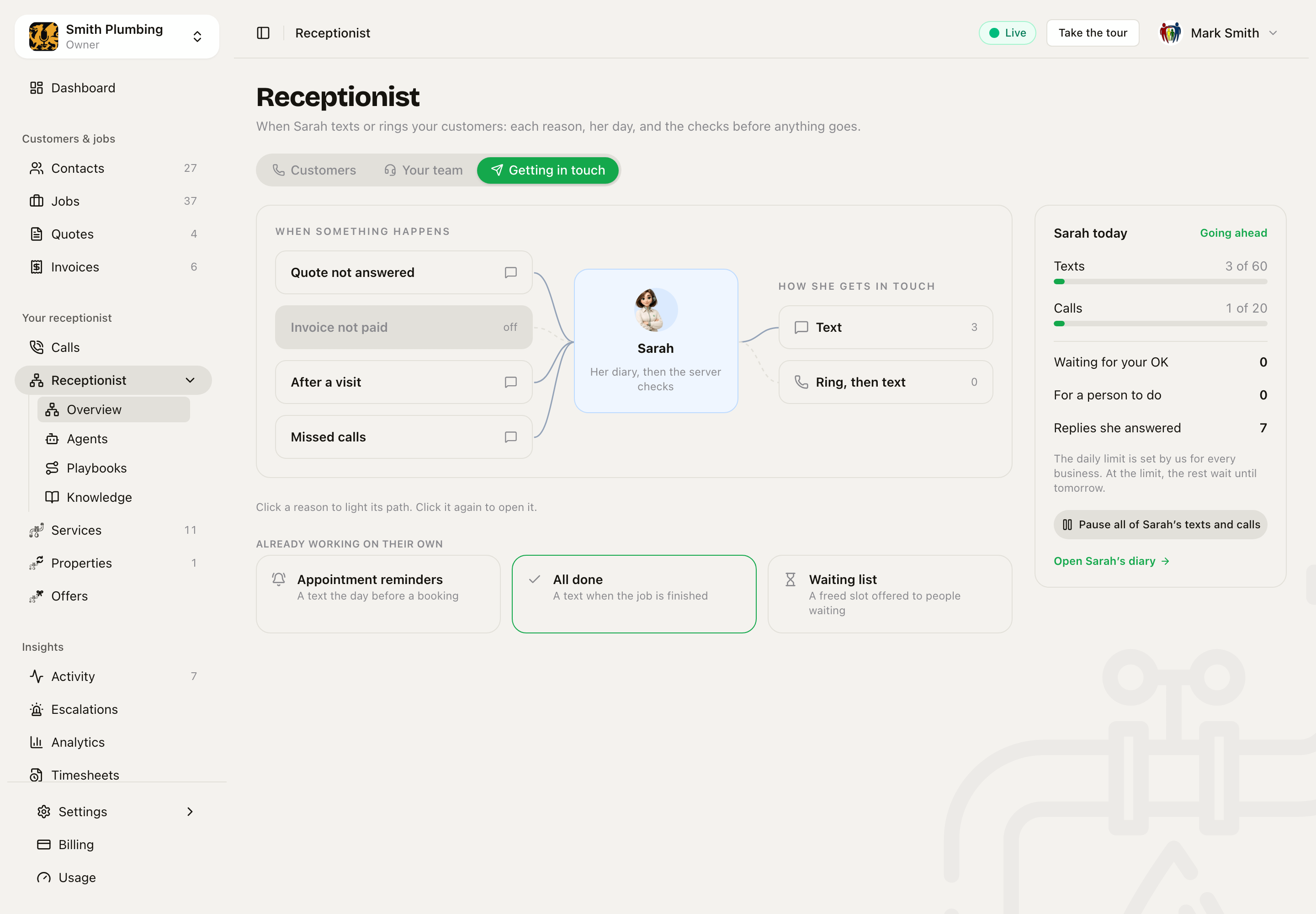 The reasons on the left, Sarah in the middle, how she gets in touch on the right. Sarah today shows what she has sent.
The reasons
Each card on the left is a reason to get in touch:
| Reason | When | Waits | Who |
|---|---|---|---|
| Quote not answered | A quote is sent and nobody has said yes or no | 3 days | The customer on the quote |
| Invoice not paid | An invoice is sent and not paid | 7 days | The customer on the invoice |
| After a visit | A visit ends (for an estate agent, a viewing) | 1 hour | The customer |
| Missed calls | A caller rings off with nothing done | 10 minutes | That caller |
| Price reduced | You lower a property's price (only if you have listings) | No wait | Everyone who viewed it and said yes to news |
Each reason is Off, Text or Ring, then text. A reason only acts on things that happen after you switch it on. Switching on Quote not answered never texts everyone who had a quote last month.
Just before she sends, Sarah checks the reason is still true. If the quote was accepted or the invoice was paid in the meantime, the block closes as No longer needed.
Under the map, Already working on their own shows the texts that already go out: appointment reminders, the All done text and the waiting list. Click one to open its own settings.
Open a reason
Click a reason once to light its path to Sarah and to Text or Ring. Click it again to open it.
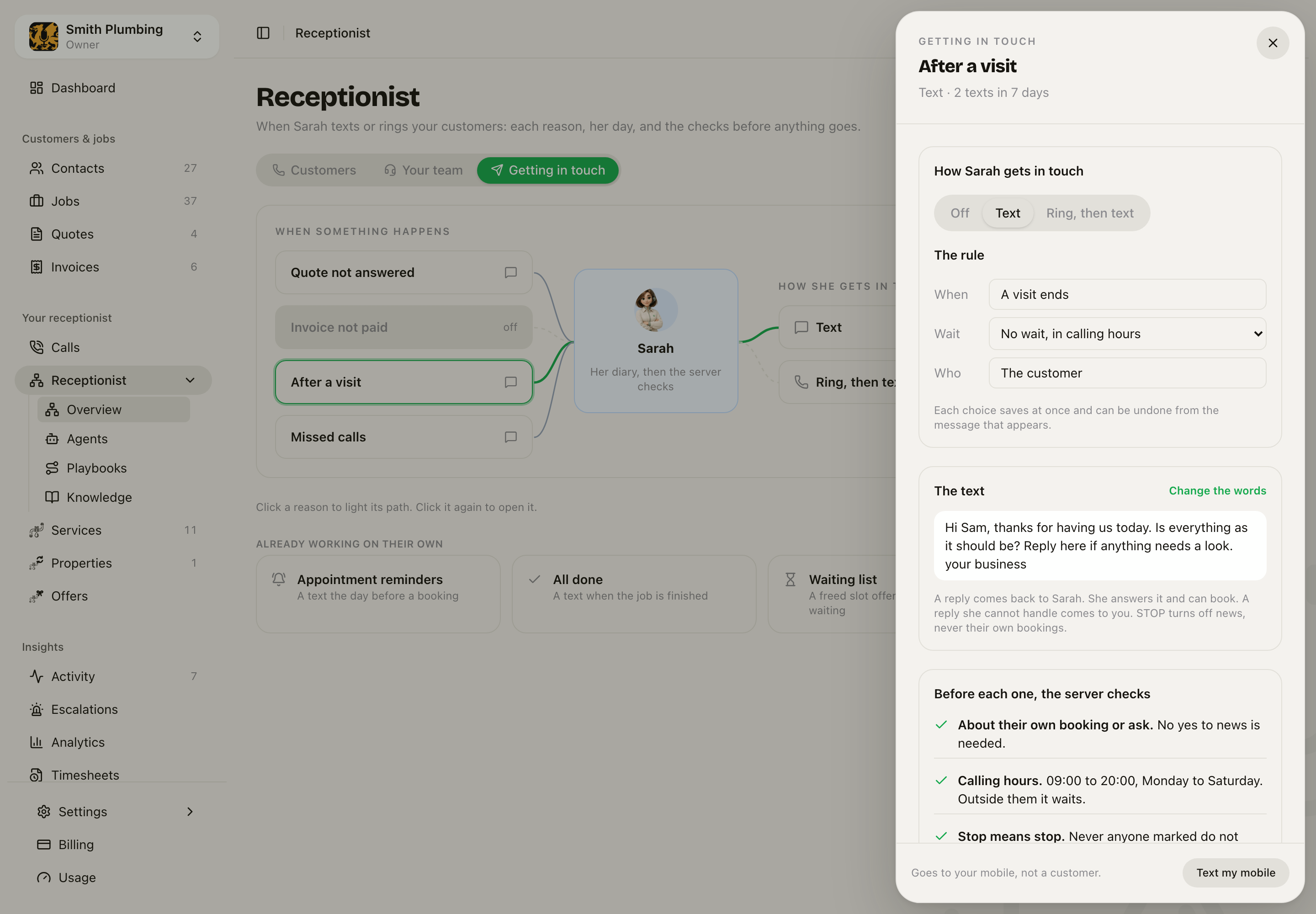 After a visit, open: how Sarah gets in touch, the rule, the text, and the checks before each one.
- How Sarah gets in touch. Off, Text, or Ring, then text.
- The rule. When it starts, how long to Wait, and who it goes to.
- The text. What the customer will read. For a call, What she should find out is one line. She talks to get the answer; there is no script.
- Before each one, the server checks. The checks below, and how many of your first three OKs you have given.
- Coming up. The blocks planned for this reason this week. Each one opens its block.
- Text my mobile. Sends the text to your own mobile, not a customer, so you can read it on a phone first.
Every choice saves at once, and the message that appears has Undo. If you switch a reason Off by mistake, Undo within 10 minutes puts its planned blocks back.
Change the words
Press Change the words and the card turns over. Type your own, and press a chip such as + First name or + Business name to put that detail where your cursor is. Below it you see what a customer will read.
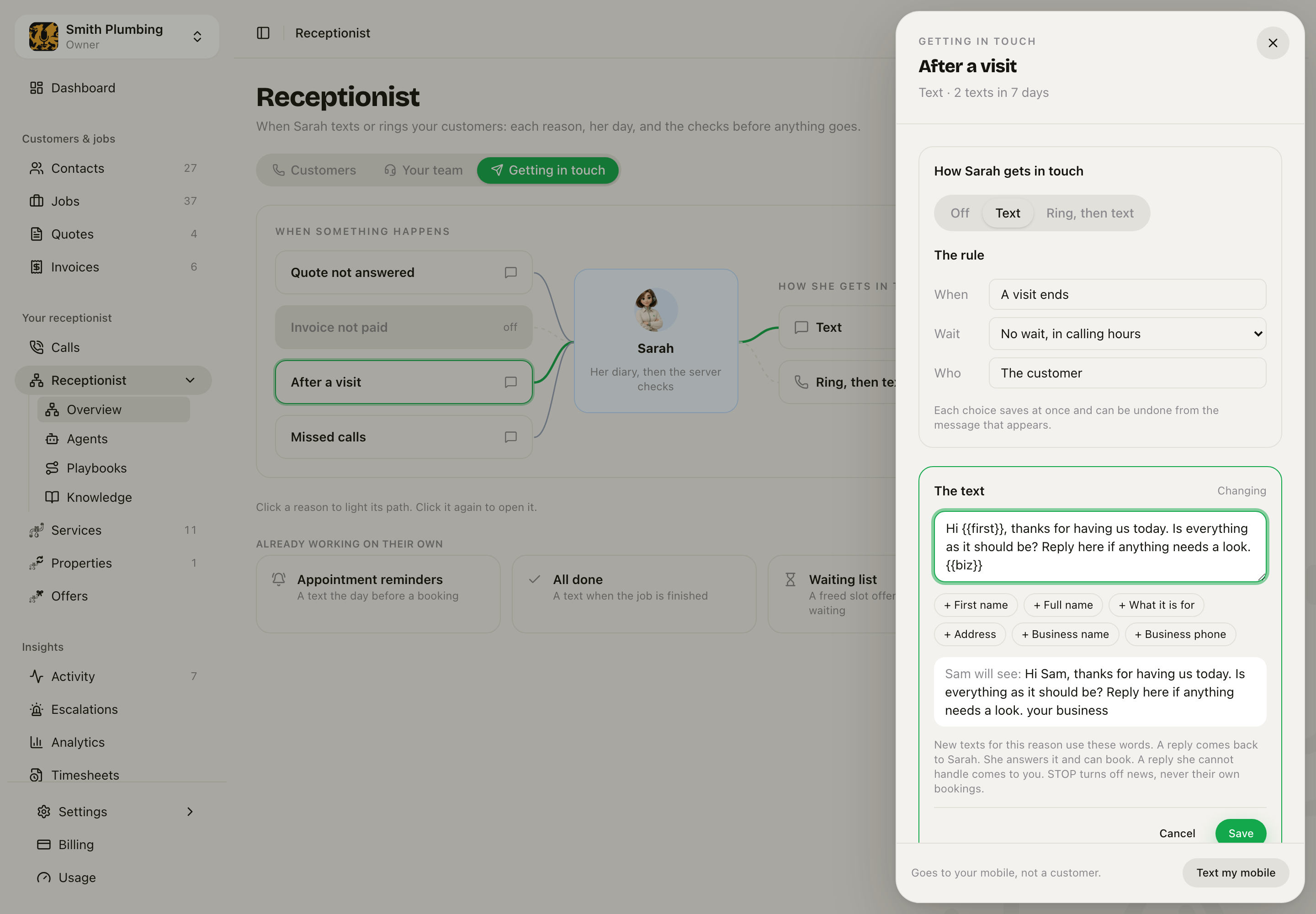 Change the words: your text, the detail chips, and what Sam will see.
Save uses your words for every new text for this reason. Back to our words puts ours back.
The checks before anything goes
Sarah does not decide these. The server checks them before every text and every call:
- Your first 3. The first three of each reason wait in Sarah's diary for your OK. After that she goes ahead by herself.
- Calling hours. 09:00 to 20:00, Monday to Saturday, in your time zone. Outside them it waits for the morning.
- One message a day. If another reason already reached that person today, this one waits until tomorrow.
- Stop means stop. Never anyone marked do not contact.
- News needs a yes. Price reduced and other news go only to people who said yes to news, and only by text.
- A daily limit. 60 texts and 20 calls a business a day. At the limit, the rest wait until tomorrow.
Sarah today, on the right of the page, shows texts and calls against the limit, how many wait for your OK, how many need a person, and the replies she answered. Pause all of Sarah's texts and calls stops everything at once. Nothing goes out until you press it again.
Sarah's diary
Every text and call Sarah will make is a block in her diary. Go to Jobs › Calendar › Day. Sarah has her own column after your team, at the time each block will really go.
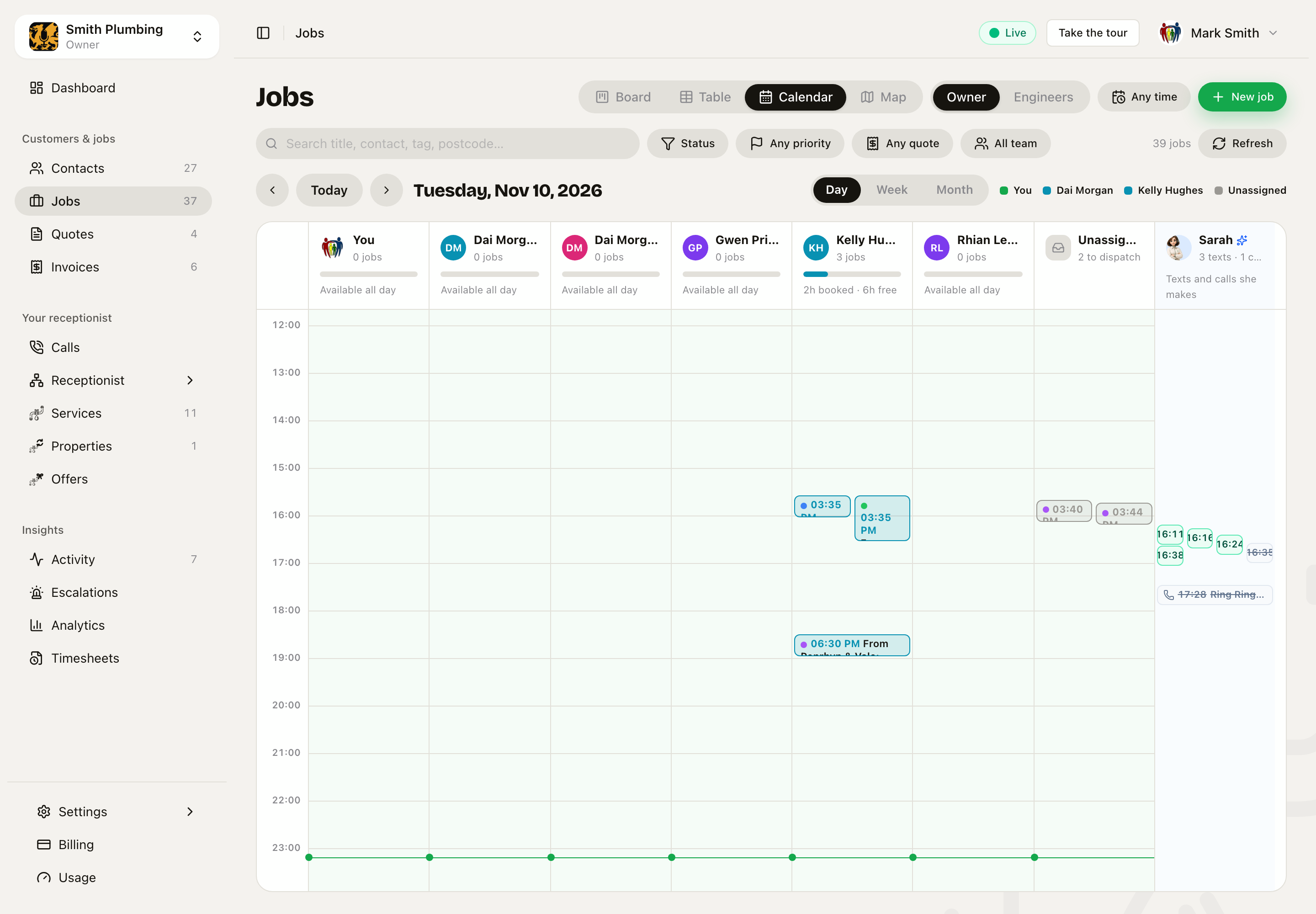 Sarah's column in the day view. Each block is a text or call, at the time it goes.
Sarah's column shows for owners and admins when a reason is on, or when she has a block that day. She is not a member of your team. She takes no seat and is never given a job.
Click a block to open it.
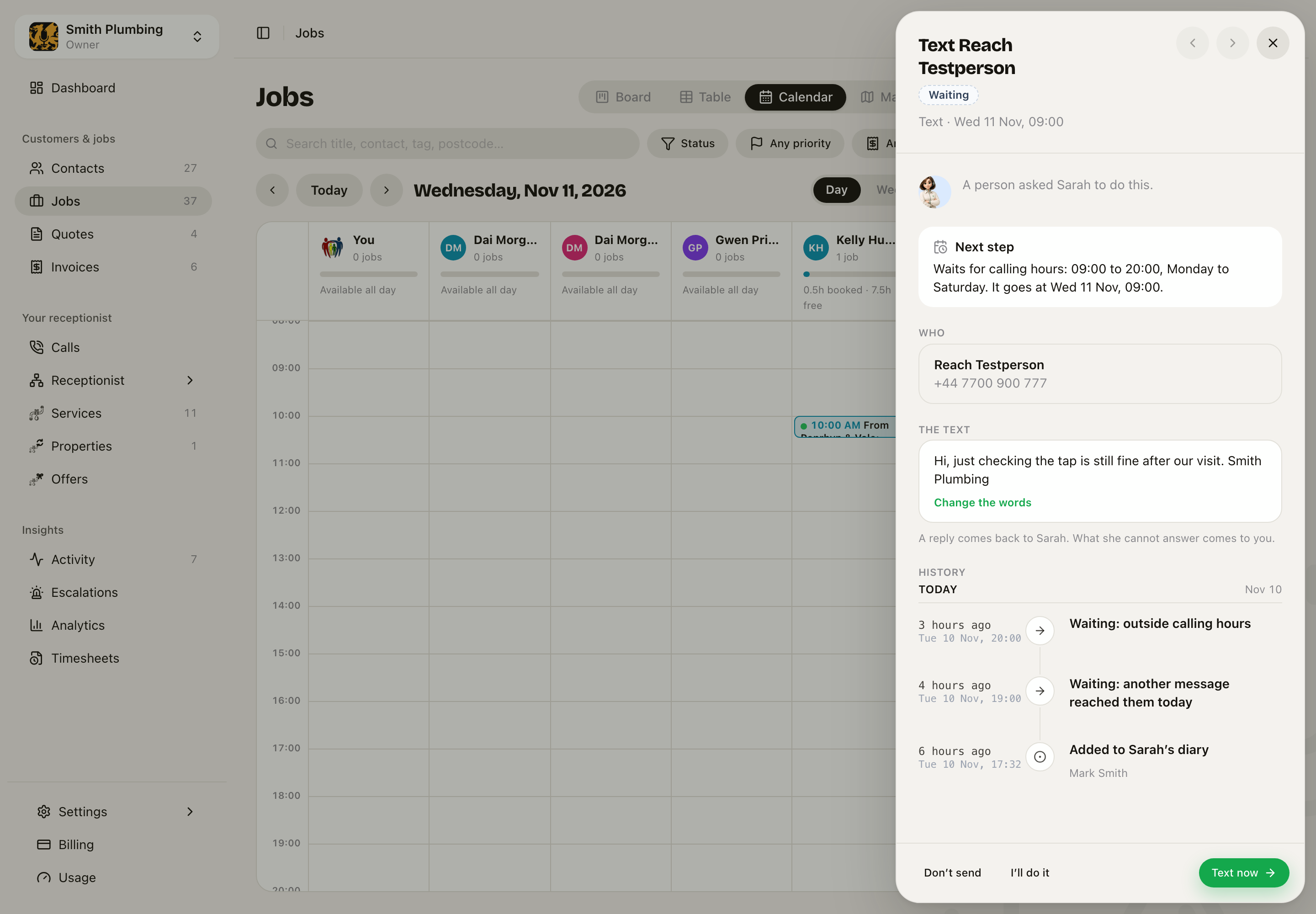 A text waiting for calling hours. It goes at 09:00 unless somebody changes it.
- OK. On one of your first three, lets it go.
- Text now or Ring now. Sends it now, still inside the checks.
- I'll do it. You do it yourself. Sarah will not.
- Don't send. Stops it, with Undo.
- Change the words. For this one block only.
The History at the bottom says who made it, when it waited and why, and what came back. Use the arrows at the top to step through her day.
When they reply
A reply to one of Sarah's texts comes back to her. She answers it, with real free times, and she can book the work. A booking is marked on the block, and the job is in your diary.
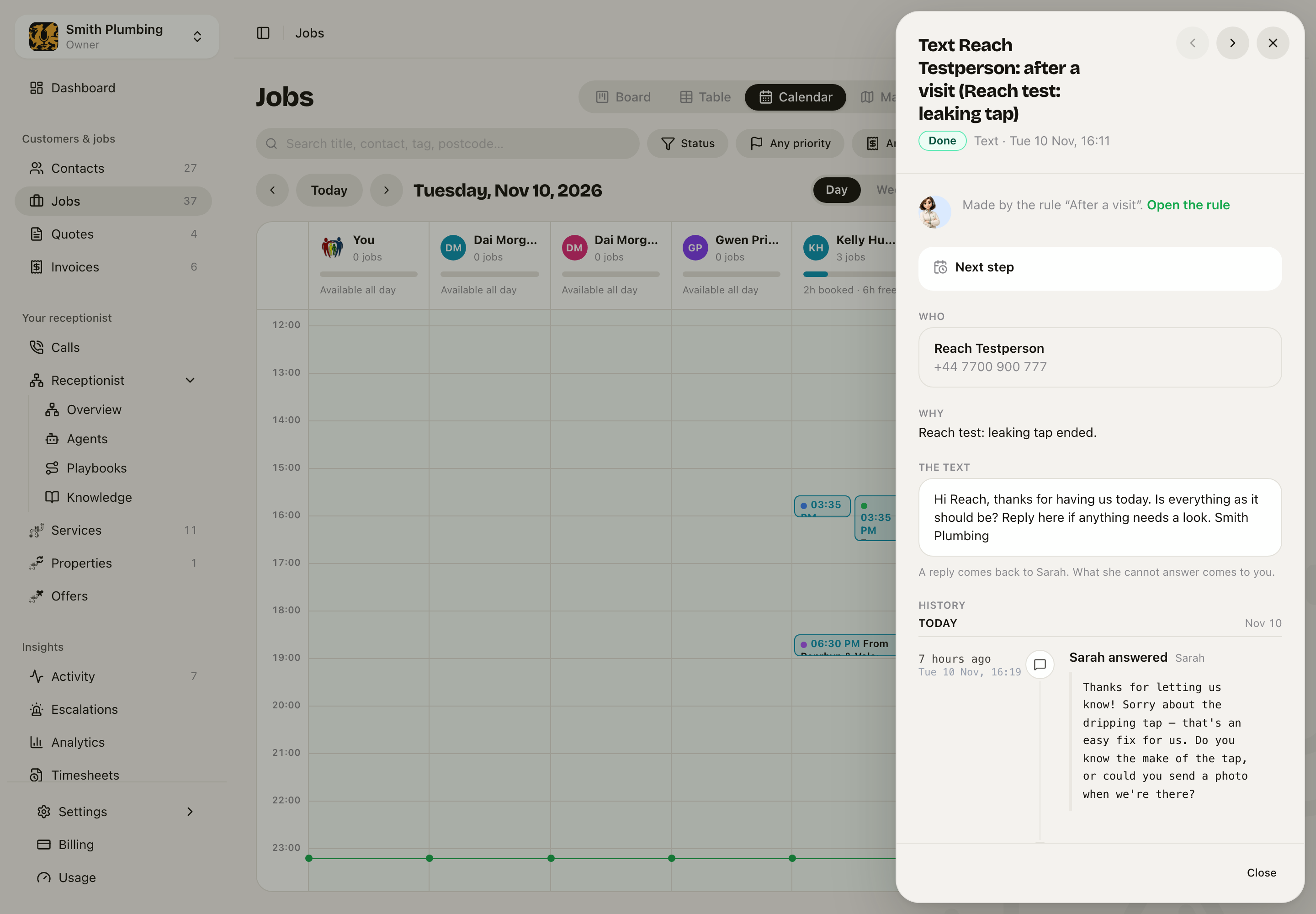 The customer replied that the tap drips. Sarah answered and asked one question.
If she cannot answer, or the customer asks for a person, it comes to you.
If someone replies STOP, they get no more news. Texts about their own bookings and quotes still go to them.
When she rings
With Ring, then text, Sarah rings from your business number. The first thing she says is that she is an AI assistant at your business, and that the call is recorded if you record calls. Then she asks the one thing the reason is for.
- No answer. She tries again an hour later. If there is still no answer, she sends the text, and the block comes to a person.
- "Ring me Thursday after 5." She says the time back and puts a new call in her diary for then. It still waits for calling hours.
- When the call ends, the block shows a one-line summary of what was said.
If the customer's language is Welsh and your agent speaks Welsh, she opens and talks in Welsh.
Ask Sarah about one customer
On a customer's sheet, the Sarah card lists what she has done and will do for them. Ask Sarah gives her one job for this person.
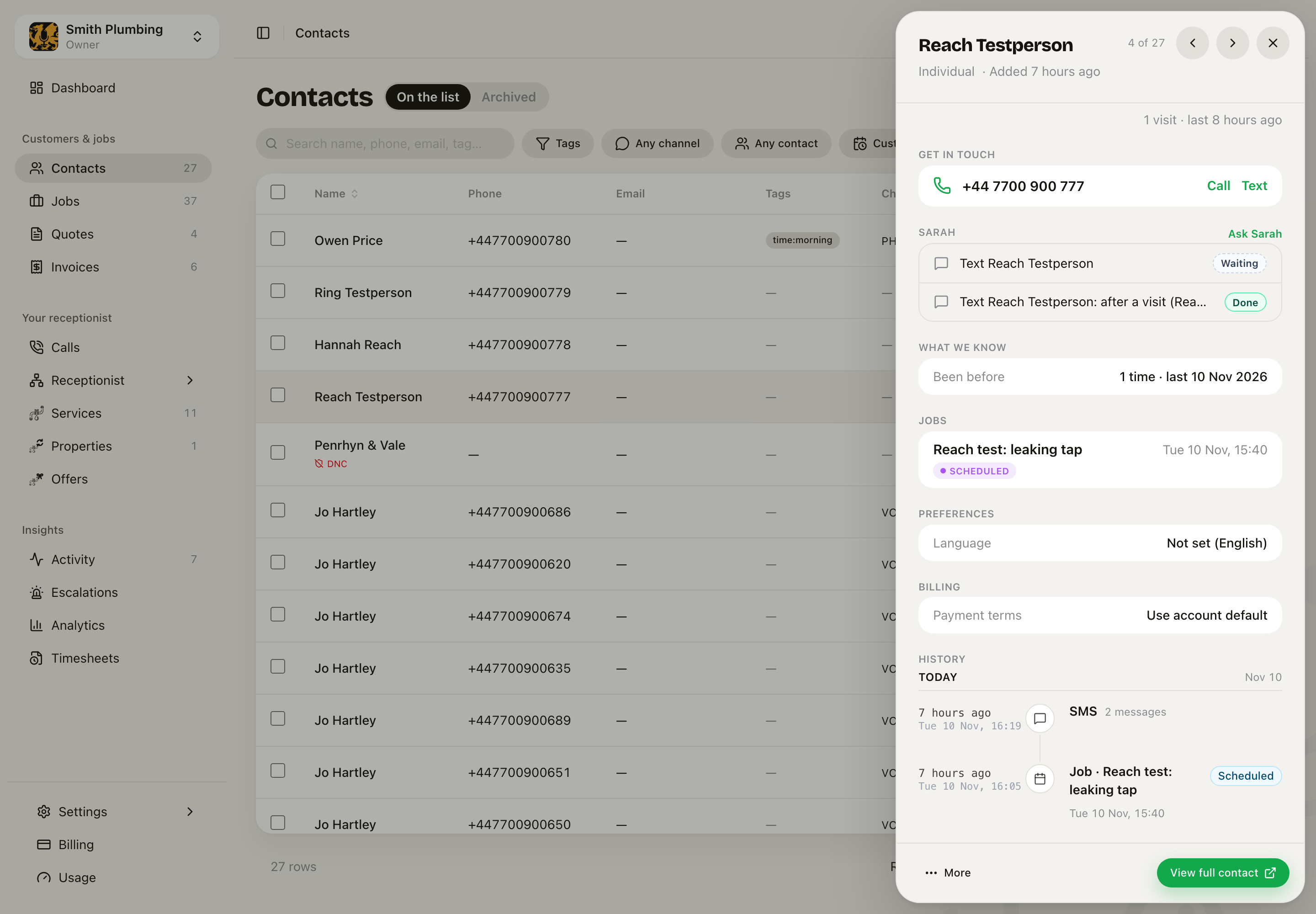 The Sarah card on a customer: one text waiting, one sent.
Pick Text and write the text, or Ring and write in one line what she should find out. Leave When empty for now, or pick a time. Put it in her diary adds the block. The same checks apply.
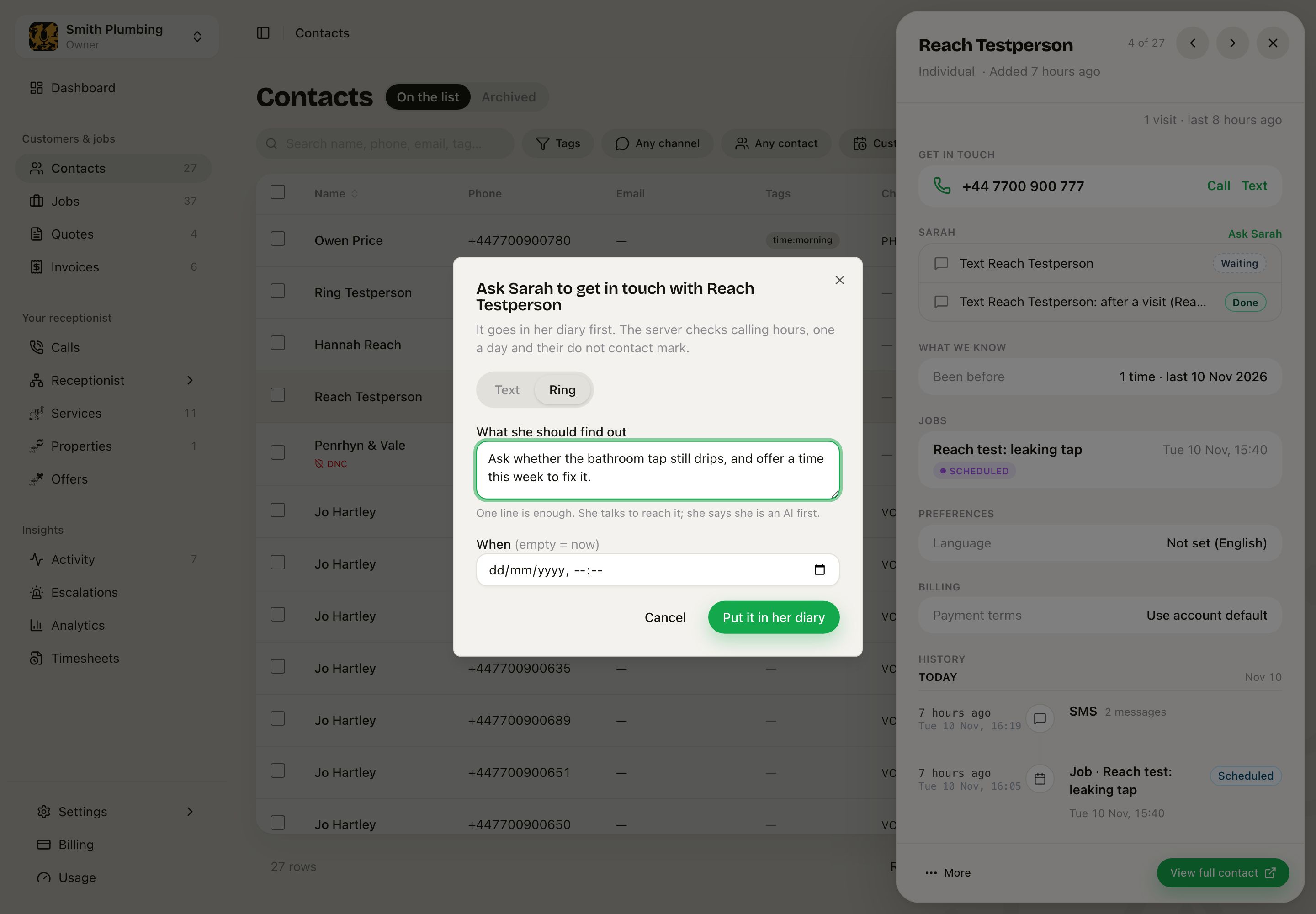 Ask Sarah to ring: one line of what to find out.
Happy to hear news
If your business has a news reason, such as Price reduced, the Sarah card also has Happy to hear news. Switch it on only when the customer has said yes. The card shows the date they said yes. A STOP turns it off and shows that date instead.
Asking to hear about one property is not a yes to all news.
For clinics and practices that check who they are speaking to
If your callers have to prove who they are (on most clinics and solicitors), Sarah does the same when she gets in touch:
- On a call, she opens with "Hello, it's Sarah, an AI assistant. Could I speak to Cerys, please?" First name only, and no business name. She asks for the date of birth or postcode. Only when that matches the person the block is for does she say where she is calling from and why.
- If somebody else answers, the check fails, or they hang up before the check, she says nothing about why she rang. The block comes to a person with the reason.
- When they text back, or use the website chat, she asks for the check before she gives any detail.
- The first text goes before anyone is checked, and others may see a shared phone. The reason's drawer warns you. Say who it is from, never what it is about: "Hi Sam, it's your practice. Please ring us when you can."
The old Automations and Follow-ups pages
Automations and Follow-ups now open this tab. Rules you made there came across as reasons, set to Off. Switch them on here.
Related
- What Sarah does with a call: calls coming in.
- Appointment reminders: the text the day before a booking.
- Fill cancellations from your waiting list.
- Quotes and Getting paid.
- For clinics.