 Loyal Receptionist
Playbooks
A playbook is a SITUATION your agent handles differently. Not a different voice. Not a different name. Same Sarah — different rules, different opener, different end-of-call.
Live at /intents in the sidebar (badged as Playbooks). Wire one to an inbound number on /agents/[id] → Routing & channels, or to a page on your website with data-intent="…".
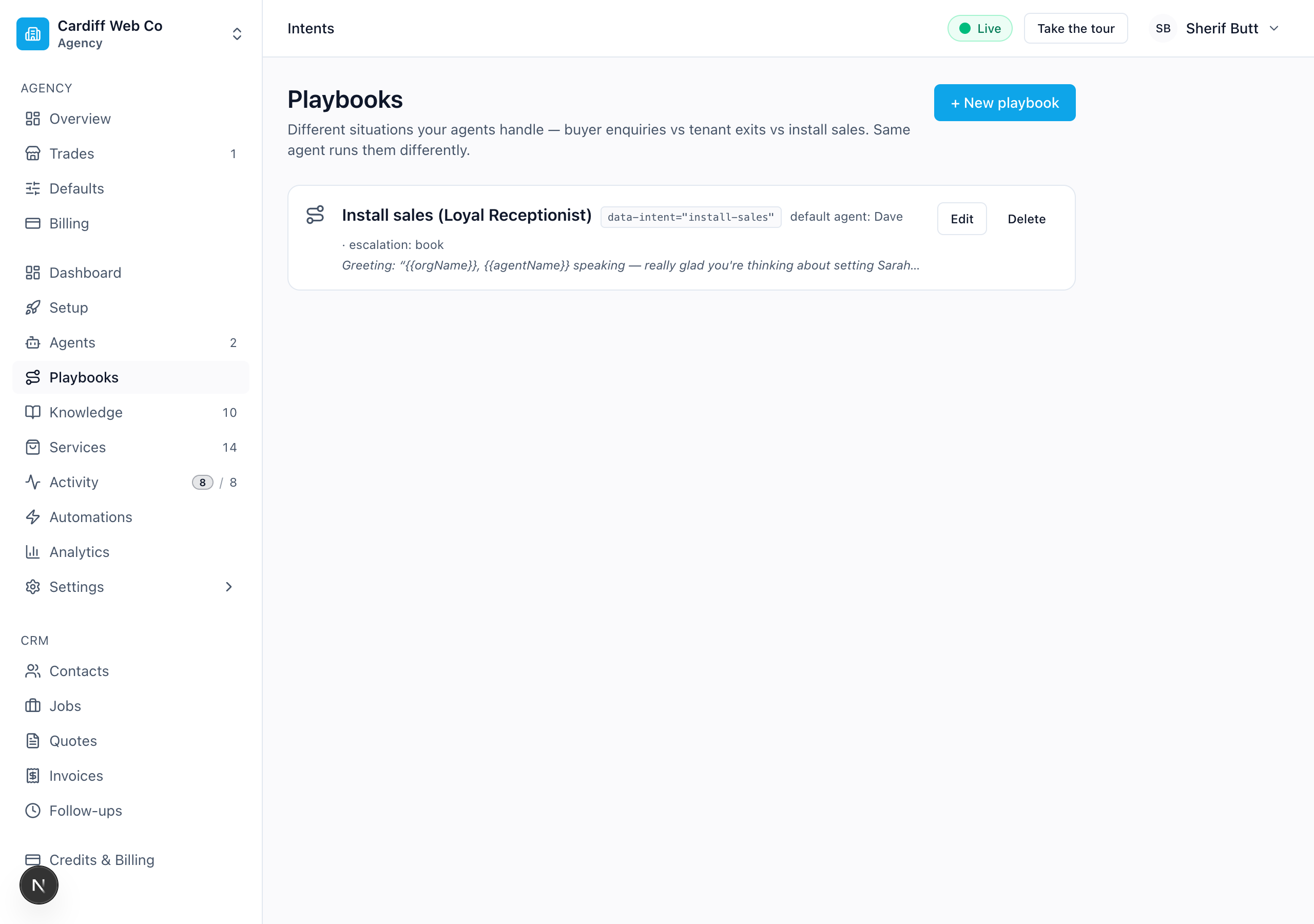 The Playbooks page. Each row shows the slug used in data-intent / phone-number routing, the default agent, the escalation path, and a preview of the greeting opener.
Why playbooks exist
You can already give yourself a second agent (Sarah for general + Dave for install — see Agents & services). That works when the persona is different — a different voice, a different name, a different professional role.
But most of the time you don't want a second persona. You want the same Sarah, behaving differently for one type of call:
| Real-estate Sarah handles… | …with a different… |
|---|---|
| Buyer enquiry | opener ("how can I help with your purchase?"), questions (budget / postcode / chain), escalation (book a viewing) |
| Tenant exit | opener ("sorry to hear you're moving on"), policy (deposit, notice, damage), escalation (callback from property manager) |
| Rental enquiry | opener ("looking to rent?"), questions (move-in date, pets, employment), escalation (request callback) |
Cloning Sarah three times so each one had different opening rules would be a mess — three copies of her voice, three copies of her behaviour chunks, three places to update when her knowledge changes. A playbook lets you keep ONE Sarah and bolt the situation-specific rules on top.
What a playbook controls
Each playbook can override six things for the call it's running:
- Greeting opener — the first thing the agent says. Supports
{{agentName}},{{orgName}},{{prospectOrgName}},{{contactName}}so it reads naturally. - Late-prompt rules — situation-specific behaviour ("when the caller mentions a property they want to buy, ask budget + postcode + chain. NEVER quote a price"). Layers AFTER the agent's own override, so the playbook wins.
- Default agent — which of your agents this playbook prefers, when the channel didn't pin one.
- Escalation path — what the agent should do when it can't fully serve the caller: Book a slot, Request callback, or Transfer to human.
- Available tools — restrict which voice tools the agent can use on calls running this playbook. Leave all unchecked for no restriction (every mode-appropriate tool); tick a subset to lock the playbook to those tools only.
end_callis always available — you can't accidentally trap the agent in a call it can't end. - Playbook-scoped knowledge — when you tag a fact in
/knowledgewith this playbook, it only fires on calls running it. Lets your buyer-enquiry playbook quote different stamp-duty rules from your tenant-exit one without duplicating Sarah's KB.
Everything else — voice, services catalogue, business hours, org-wide facts — is inherited from the agent and the org.
Creating a playbook
/intents → + New playbook. A drawer slides in from the right, grouped into three fieldsets — Identity, Behaviour, Routing & tools.
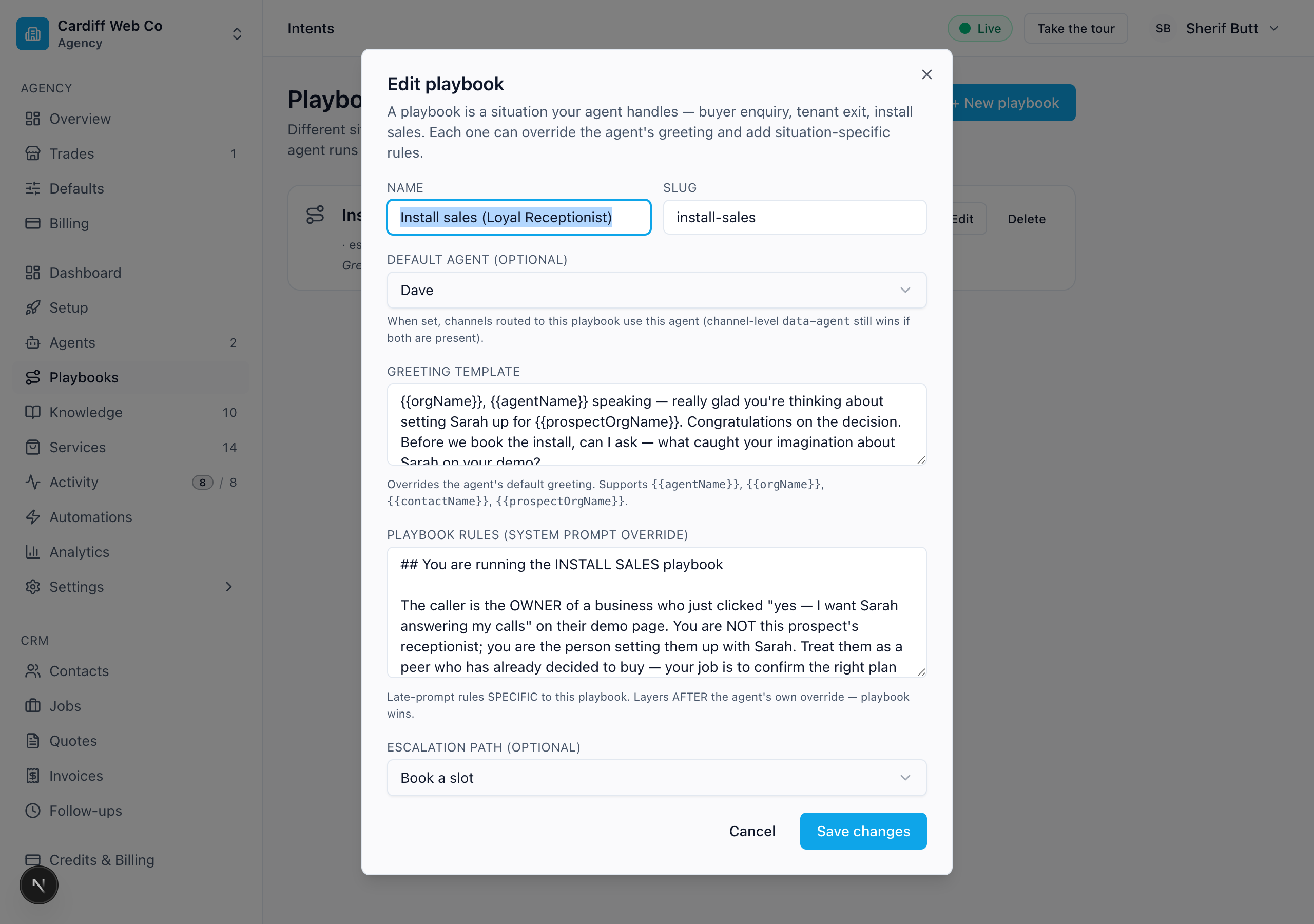 The editor — name, slug, default agent, greeting template (with placeholder substitution), playbook rules, escalation path, and the available-tools grid. Save and the next call uses it.
| Field | Why it's there |
|---|---|
| Name | What you see in the list (e.g. "Buyer enquiry"). |
| Slug | Lowercase handle — buyer-enquiry. Used in phone_numbers.intent_id and in data-intent="…" on the widget. |
| Default agent | Optional. When a channel routes to this playbook without naming an agent, fall back to this one. (Channel-level data-agent still wins if both are present — that's the rule: channel pins the persona, playbook pins the situation.) |
| Greeting template | First line the agent speaks. {{agentName}}, {{orgName}}, {{contactName}}, {{prospectOrgName}} substitute at call time. |
| Playbook rules (system prompt override) | Late-prompt rules SPECIFIC to this playbook. This is where the differentiating logic lives — the qualifying flow, the "never quote a price", the escalation order. |
| Escalation path | What the agent does when it can't book directly. Pick the one that matches the call's outcome — viewing booking is Book a slot, callback-from-a-human is Request callback, complaints / out-of-scope is Transfer to human. |
| Available tools (optional) | A two-column checkbox grid of the customer-mode voice tools, each with a hint ("Two-step confirm + book a slot"). Leave all unchecked for no restriction; tick a subset to lock the playbook to those tools only. end_call is always available — you can't trap the agent in a call it can't end. |
Hit Create playbook and it's live on the next call. No restart, no redeploy.
Wiring a playbook to a channel
Two channels can fire a playbook:
Inbound phone numbers
/agents/[id] → Routing & channels tab. Each DID has an AGENT and a PLAYBOOK picker side-by-side:
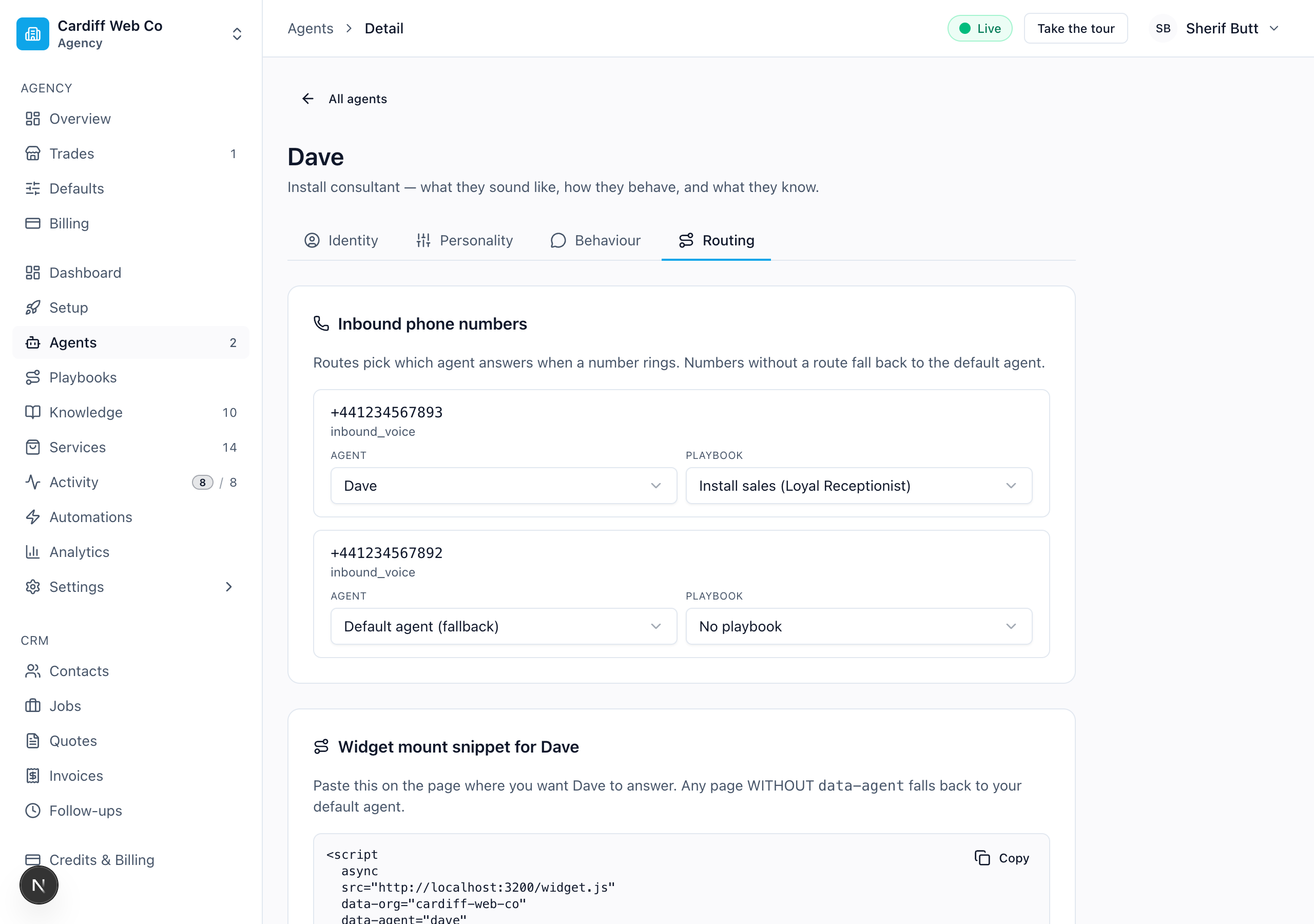 Routing & channels — each inbound number gets an AGENT picker and a PLAYBOOK picker. The install DID +441234567893 is wired to Dave + Install sales; the main line stays on the default agent with no playbook.
- Leave PLAYBOOK as No playbook for everyday calls — the agent uses its default behaviour.
- Pick a playbook to wire the number to a specific situation — e.g. a sales line goes to Install sales, the main line stays generic.
You can mix and match: AGENT = Dave + PLAYBOOK = Install sales for a sales line; AGENT = Default + PLAYBOOK = No playbook for the main line; AGENT = Default + PLAYBOOK = Buyer enquiry for an estate-agency website widget.
Website widget
Add data-intent="<slug>" to your widget mount. Same Sarah, page-specific situation:
<!-- Buyer enquiry on the listings page -->
<script
  async
  src="https://app.loyalreception.co.uk/widget.js"
  data-org="cardiff-properties"
  data-intent="buyer-enquiry"
></script>
<!-- Tenant exit on the move-out page -->
<script
async
src="https://app.loyalreception.co.uk/widget.js"
data-org="cardiff-properties"
data-intent="tenant-exit"
></script>Combine data-agent and data-intent when you want both pinned — e.g. your sales landing page routes to Dave running the Install sales playbook:
<script
  async
  src="https://app.loyalreception.co.uk/widget.js"
  data-org="cardiff-web-co"
  data-agent="dave"
  data-intent="install-sales"
></script>
When both attributes are set, the channel's agent wins for persona (voice / name) and the channel's playbook wins for situation rules. Leave either unset to fall back to the org default or the playbook's default agent.
Worked example — the install funnel
The seed ships one playbook on Cardiff Web Co (install-sales) wired to Dave. It's how the "yes, install Sarah" flow on the demo email actually works:
- The prospect clicks the CTA in their demo email. The link is
/demo/<token>/install. - That page mounts the widget with
data-agent="dave"+data-intent="install-sales". - Dave greets them — but the greeting comes from the playbook: "Cardiff Web Co, Dave speaking — really glad you're thinking about setting Sarah up for
{{prospectOrgName}}. Congratulations on the decision. Before we book the install, can I ask — what caught your imagination about Sarah on your demo?" - The playbook's late-prompt rules drive the rest: qualify briefly (team / volume / scope), recommend a plan band from the Plan tiers knowledge entry, offer a bundle as the close, two-step
create_bookingagainst Sarah's diary, 30-day money-back mentioned before close.
Dave's own agent-level persona instructions are deliberately slim — "You are Dave, the install consultant for the Loyal Receptionist product (sold by Cardiff Web Co). The playbook for the current call is layered on top of this — follow whichever rules the playbook block lists." The playbook carries the install-specific rules, so the same Dave could in future answer a different inbound number running a different playbook without his persona drifting.
Playbook vs agent — when to add which
Use the persona / situation test:
| Question | If yes, add… |
|---|---|
| Should it sound like a different person? Different voice, different name? | Agent (16 — Agents & services) |
| Same Sarah, but the call is about a fundamentally different topic with different rules? | Playbook |
| One inbound line for property buyers, another for property renters, both answered by Sarah, both with their own qualifying flow? | Two playbooks, same agent |
| One inbound line for general bookings (Sarah), another for sales (Dave with a different voice)? | Two agents |
| One sales line, where Dave qualifies for install AND triages "I just want a quote for the website itself"? | One agent (Dave), two playbooks (install-sales + website-quote) — Dave hands off between them mid-call with transfer_to_intent (see Mid-call handoff) |
The shortcut: cloning Sarah is heavy (voice, KB, behaviour). Adding a playbook is light (one row, four fields). Default to a playbook unless the persona genuinely needs to change.
Mid-call handoff — same call, new playbook
Sometimes a caller pivots mid-conversation. They started on your general playbook asking about hours; ten seconds in they say "actually, I'm thinking about getting Sarah to answer my own business". Sarah doesn't need to send them back to the website — she can transfer the call to the install-sales playbook in place.
Mechanically:
- Sarah recognises the pivot and calls
transfer_to_intent({intentSlug: 'install-sales', briefContext: 'Caller runs a plumbing business with 4 engineers — interested in installing Sarah.', confirmed: false}). - Sarah speaks the transition line ("Right — let me put you onto our install sales side. Want me to switch over now?").
- Caller says yes. Sarah calls the tool again with
confirmed: true. - Sarah speaks the close-out ("All set — picking up under the Install sales playbook.").
- Her next response runs under the new playbook's rules — different opener, different qualifying flow, different escalation path. The conversation history stays — Sarah doesn't forget the caller's name or what they said, she just gets a new set of rules to follow.
What gets carried across: caller identity (name, phone, email), what tools have already been called this call (e.g. a get_price_estimate result), and the briefContext summary Sarah wrote. The new playbook receives ALL of it as a fresh set of system instructions — it never has to re-ask.
Honest scope: the agent's voice does NOT change mid-call. If you have Sarah (female UK English) running the general playbook and a Dave (male UK English) install-sales playbook, the transfer keeps Sarah's voice for the rest of the call — only her rules change. A true voice/persona swap mid-call would require disconnecting the call and dialling back, which feels worse than continuity in our testing. If you genuinely need different voices for different situations, run them on different inbound numbers (different DIDs → different agents) instead of relying on mid-call transfer.
What's NOT in a playbook (yet)
Most of the deferred v2.1 items have shipped. What's left:
- Per-playbook escalation handler — the escalation path you set on a playbook (book / callback / human) is stored but the runtime doesn't yet route differently based on it. If your buyer-enquiry playbook says "request callback" and your tenant-exit one says "transfer to human", the agent currently uses its own default escalation logic regardless. On the roadmap.
- Voice/persona swap on mid-call transfer — as above, a true voice change mid-call isn't supported. Workaround: separate DIDs for separate personas.
Editing & deleting
Edit any playbook by clicking Edit on its row in /intents. Saves apply to the next call — no restart.
Delete is a soft delete (the row stays for audit, just hidden from lists and /resolve). Any phone number or widget mount pointing at a deleted playbook falls back to its agent's default behaviour — no broken calls.
Common gotchas
- Playbook fires but greeting still sounds generic. Check the playbook has a Greeting template set — empty means the agent's own greeting wins. Use
{{prospectOrgName}}carefully — if the call didn't come in with a prospect name, that placeholder is empty (you'll hear an awkward "for ." in production). - Playbook ignored. Check the channel actually carries the slug — for widgets,
data-intent="…"on the<script>tag; for phone numbers, the PLAYBOOK picker in/agents/[id]→ Routing & channels. Visit/intentsand check the playbook isn't soft-deleted. - Two playbooks, both want to be default for the same channel. Pick one — channels can carry at most one playbook. If a single channel genuinely needs to split mid-call, that's the transfer-to-intent feature, not two-playbooks-at-once.
- Playbook rules contradict the agent's own override. Playbook wins — it's the later block in the prompt. If you don't want the playbook to override, soften the agent's override or write the playbook rule to defer ("when the agent persona says X, follow X").
Where this fits
| Layer | Lives at | What it does |
|---|---|---|
| Mode (customer / operator) | Inferred from from-number | Picks which tools are unlocked and PIN-gated |
| Agent (persona) | /agents + data-agent / phone_numbers.agent_id | Picks voice, name, persona override |
| Playbook (situation) | /intents + data-intent / phone_numbers.intent_id | Picks opener, late-prompt rules, escalation path |
| Identity (overlay) | Looked up from caller phone / prospectOrgName | Personalises greetings and the prompt's contextBlock |
To see all four axes resolved for a real channel — and hear the result in-browser — use the Receptionist hub. The architecture is documented in full at docs/loyal-receptionist/conversation-routing.md if you want the developer's view.