 Loyal Receptionist
Integrations
Loyal Receptionist is the front door. Your back office stays where it is. The integration sits in the middle: the moment the AI books a job, it lands in your existing trade tool.
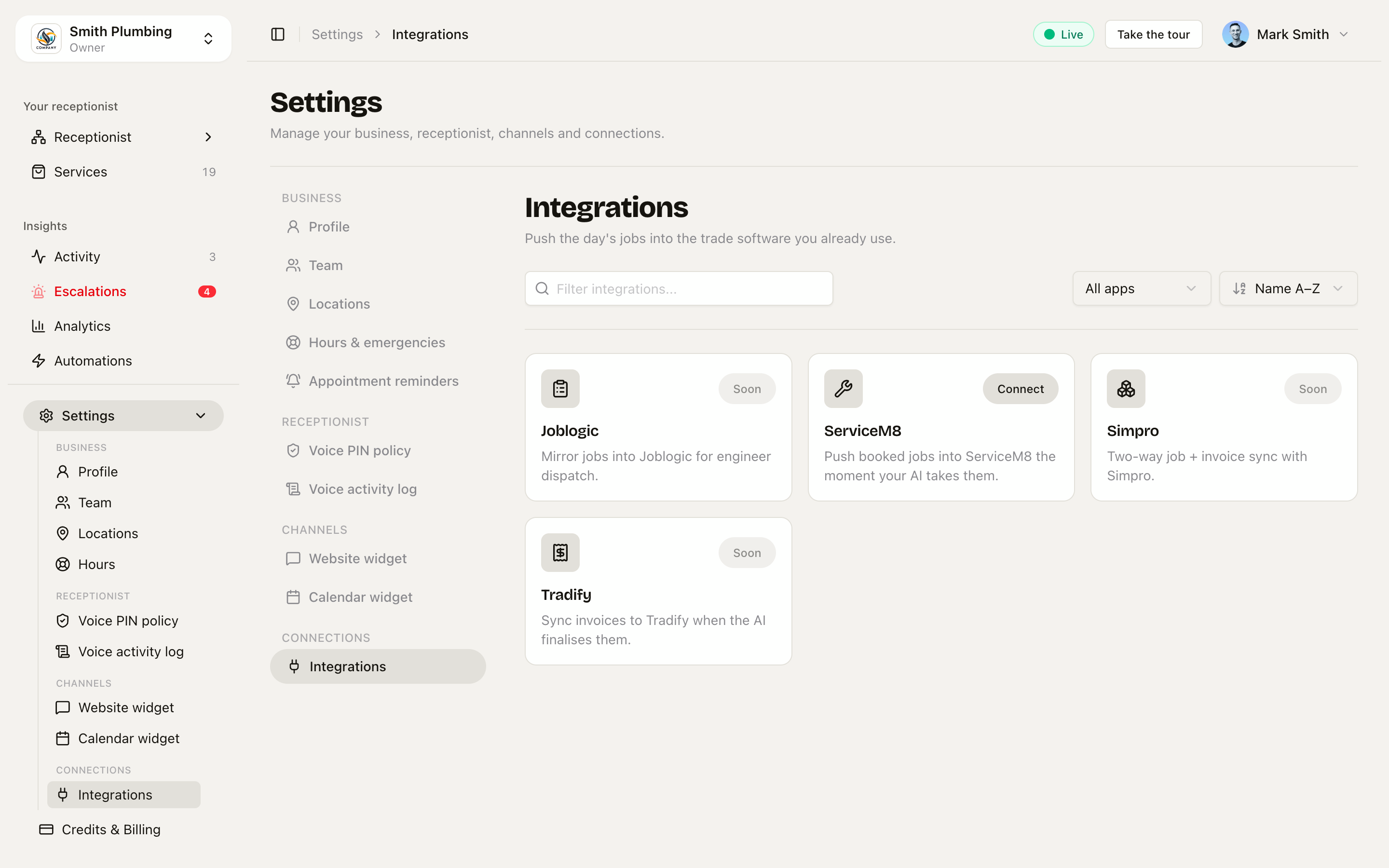 Connect ServiceM8 today; Joblogic, Tradify and Simpro are on the roadmap.
Finding your way around the page
Settings → Integrations lists every provider as a card. A toolbar at the top keeps it manageable as the catalogue grows:
- Search — filter by name
- Filter — All / Connected / Not connected
- Sort — A→Z or Z→A
Each card shows its connection status: Connected, not connected, or error — the error state means the connection needs attention (usually a re-connect after the provider revoked or expired the token).
Live today
ServiceM8
What it does: Every job that lands in scheduled is pushed to ServiceM8 as a new Job with customer, address, scheduled time and quote price. If you mark the job complete in Loyal Receptionist, ServiceM8 is updated to match.
Wire it up:
- Settings → Integrations → ServiceM8 → Connect
- You're redirected to ServiceM8's OAuth screen — sign in and approve.
- You land back on the settings page with the card showing Connected. From here, jobs sync automatically — book something and check it arrives.
What gets pushed:
- Customer (created or matched by phone/email)
- Job (title, description, address, scheduled time, status)
- Quote (line items if the AI drafted them)
What doesn't get pushed (yet):
- Photos / attachments
- Engineer assignments
- Custom fields you've set up in ServiceM8
Disconnect: Settings → Integrations → ServiceM8 → Disconnect. The OAuth token is revoked on ServiceM8's side and we wipe our credential row. Already-pushed jobs stay in your ServiceM8 account.
On the roadmap
| Integration | What it'll do |
|---|---|
| Joblogic | Mirror jobs into Joblogic for engineer dispatch + asset tracking |
| Tradify | Sync invoices to Tradify when the AI finalises them |
| Simpro | Two-way job + invoice sync — pull engineer availability from Simpro to drive your AI's slot picking |
If you need one of these now, email us — we prioritise integrations by paid-customer demand.
How sync conflicts work
If you change a job's status in your trade tool, we don't pull it back yet — the integration is one-way (Loyal Receptionist → trade tool). Two-way sync arrives with Simpro; until then, treat Loyal Receptionist as the source of truth for status and use the trade tool for fulfilment.
Auth and security
- OAuth 2 against the provider; we never store your trade-tool password
- Tokens are encrypted at rest with
AES-256-GCM, keyed off the org and rotated on every refresh - Disconnecting wipes the token immediately and revokes it on the provider side
- Each push is logged in
audit_logwithaction: integration.push.{provider}
Custom integrations
We don't have a public webhook API yet, but every job/invoice state change fires an internal event. If you need a custom integration (Zapier-style webhook, your own ERP), email us — we'll wire it up.