 Loyal Receptionist
Automatic timesheets
Your crew already have a Start and Stop button on every job. That works, it always will, and nothing on this page is needed to use it.
This is the convenience on top: the phone notices the van stopped at a job, and drafts the hours. The crew open their day, glance at the times and tap That's right. Three seconds instead of remembering Tuesday on Friday afternoon.
The rule the whole feature is built on: a machine's guess is not a wage. A drafted session is a record of where somebody was. It is not hours, it is not money, and it is not on anyone's pay until the person who did the work confirms it.
Before you can switch it on
Working out somebody's day from where they went means tracking a person, and the law asks you to write down what you thought about first. So the switch is behind a short assessment.
Go to Settings → Timesheets. You will see Before you switch tracking on.
Most of it is already filled in — what the app stores, for how long, what the server refuses to do. That half is read-only, because you must not be able to write down something the software does not actually do.
You add four things:
| Question | What it is really asking |
|---|---|
| Why do you want the automatic timesheet? | The business reason, in your words |
| Who will see where your crew have been? | Usually you and the office, nobody else |
| How will you tell your crew? | They have a notice in the app; say how you will talk to them too |
| What happens to somebody who does not want it? | The honest answer is "nothing" — they tap Start and Stop instead |
Then who on your team you talked to, and your name. Sign it, and the switch unlocks. It takes about ten minutes and you can download the finished document as a file.
Review it once a year. The page tells you when it is due.
Timesheets by hand are never gated. An org with no assessment loses the convenience, not the feature.
How a stop becomes a draft
- The van crosses into the job's area. A visit opens, and nothing else happens yet.
- Ninety seconds later they are still there. Now it counts: the customer gets the "we have arrived" text, and a draft session opens.
- They drive off. The visit closes, the session closes, and the job's history gets one line —
On site 08:10 – 09:55 · 1h 45m.
That ninety-second wait is the whole trick. Driving past a job on the way to another one is not arriving at it. Without the wait, every van that passed a customer's house texted them to say the engineer had turned up.
You can raise the wait on Settings → Timesheets if your crew park up and hang about before starting.
Ticking the hours
On the phone. Open My day. A job with a draft shows an amber pill like 1h 45m?. Tap it.
At a desk. Open Timesheets. Any amber +2 to tick opens the same panel.
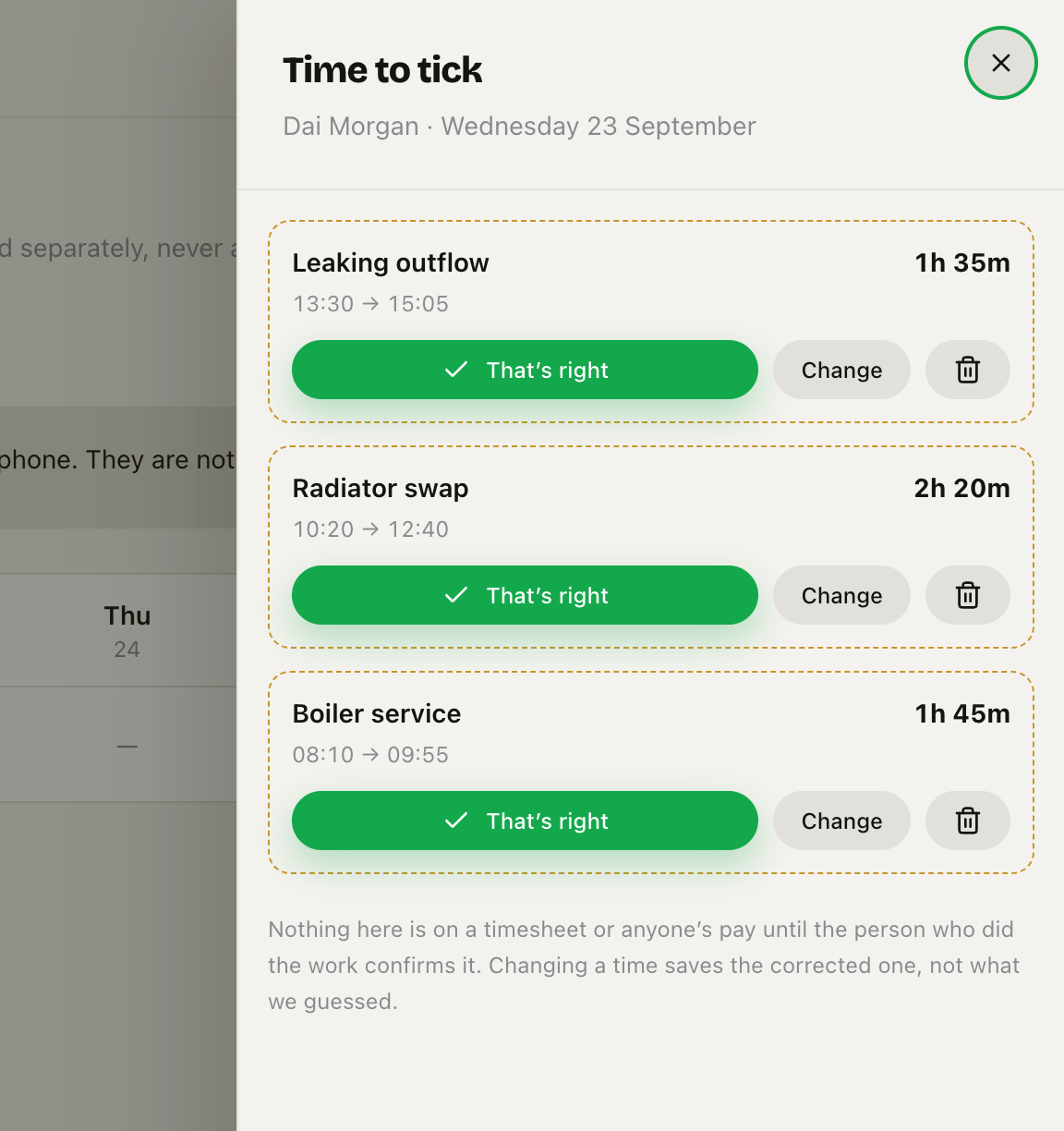 Every drafted session, dashed and amber because none of it is on a timesheet yet. Three answers each.
Three answers:
- That's right — it goes on the timesheet as recorded.
- Change — set the real times, then Done, then confirm. Your version is saved, not ours.
- Bin — that was not work. The job history keeps a note saying so, and nobody is paid or billed for it.
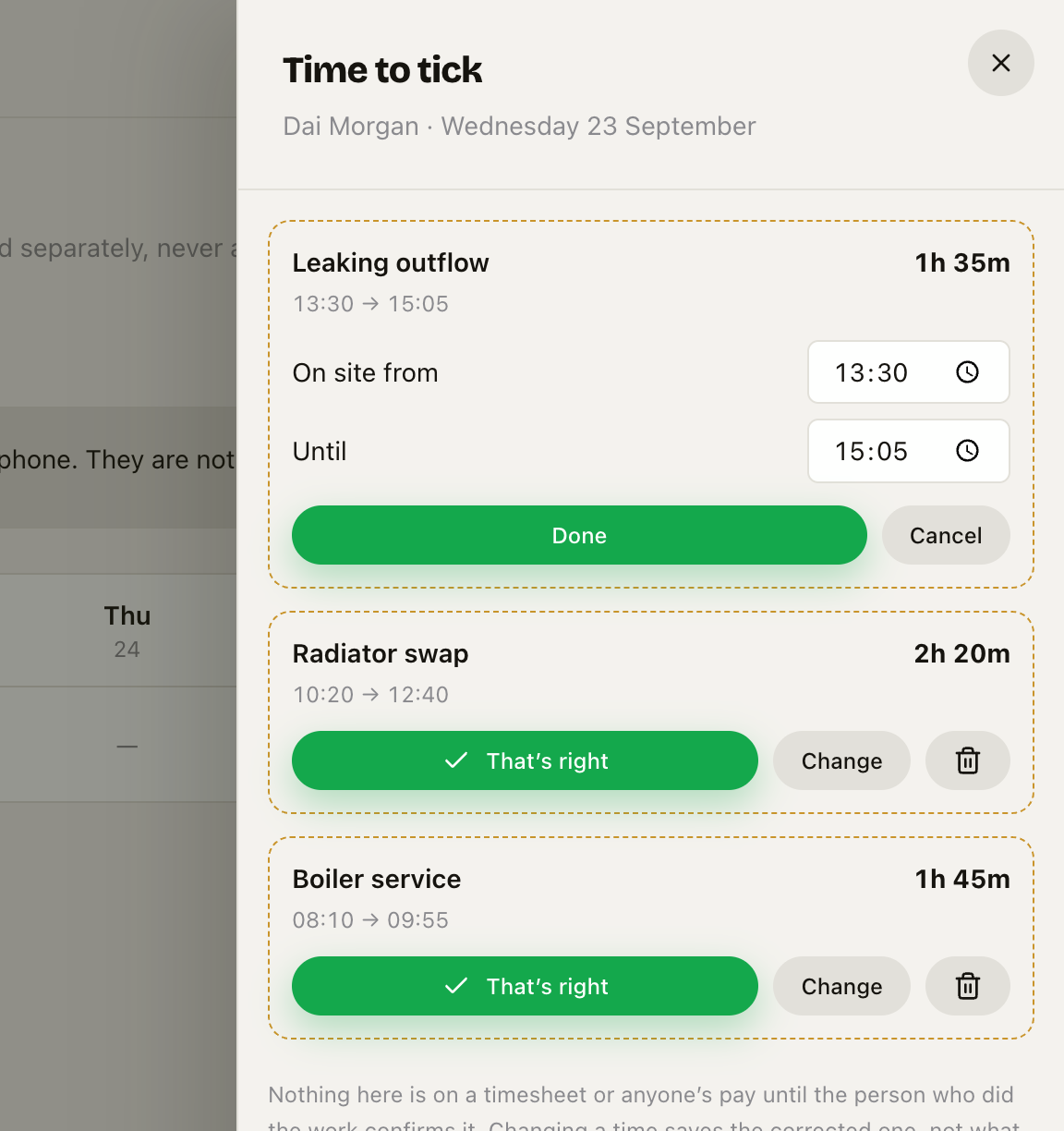 Change swaps the three buttons for Done and Cancel, so there is never a confirm button next to a half-finished edit. Type the time or use the picker.
While you are correcting one, that session shows Done and Cancel and nothing else — there should never be a confirm button sitting next to an edit you have not finished. Done keeps your times and brings the three answers back; Cancel throws the change away. Either way nothing is signed until you press That's right.
Nothing is silent. Whichever you pick, the job's history records the decision and who made it. That is the record if a week's hours is ever queried.
Only the worker can sign
An owner sees the whole crew's week. An owner cannot tick, correct or bin anybody else's time — the server refuses it, not just the screen.
That is deliberate. A timesheet is the worker's own claim about their hours. If somebody else can sign it, it stops being "Dai says he worked this" and becomes "somebody says Dai worked this", which is worth nothing to either of you. And a bin button in the wrong hands quietly takes an hour off a wage.
If somebody cannot tick — the phone is in a van, they have left the business — you are not stuck. Turn off Block the export until everything is ticked on Settings → Timesheets, and the week exports with the unsigned time left out. That is honest. Signing it for them would not be.
The week
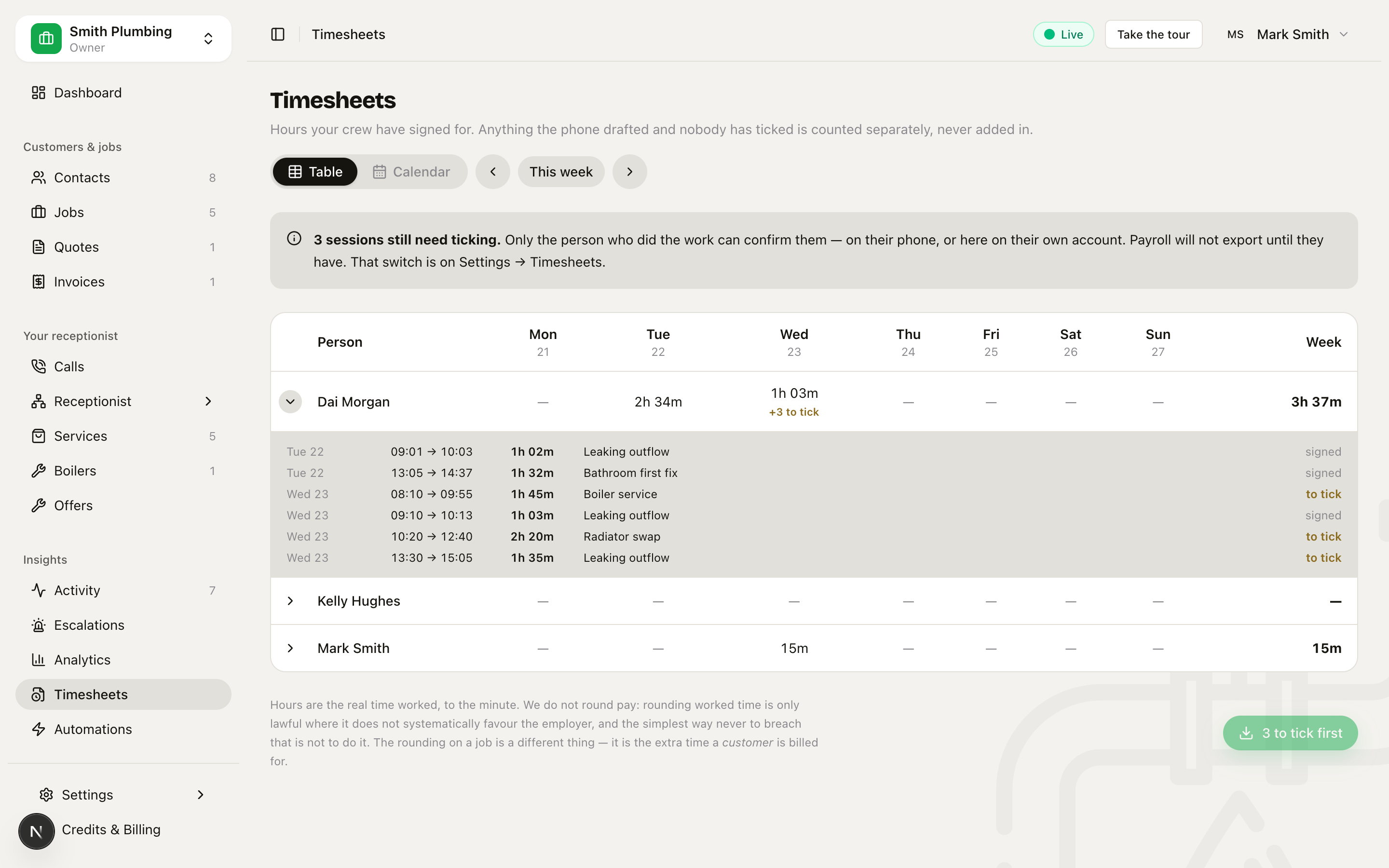
Timesheets in the sidebar. Rows are people, columns are days.
Every figure is signed time. Unticked sessions are counted beside the hours and never added into them — one number covering both would read as hours worked, and half of it would be a guess.
- The chevron on the left of a row opens it up, listing every stop that week with its times. A day cell is a sum; this is what it is made of.
- Calendar draws the same week against a clock. Solid green is signed. Dashed amber is waiting to be ticked.
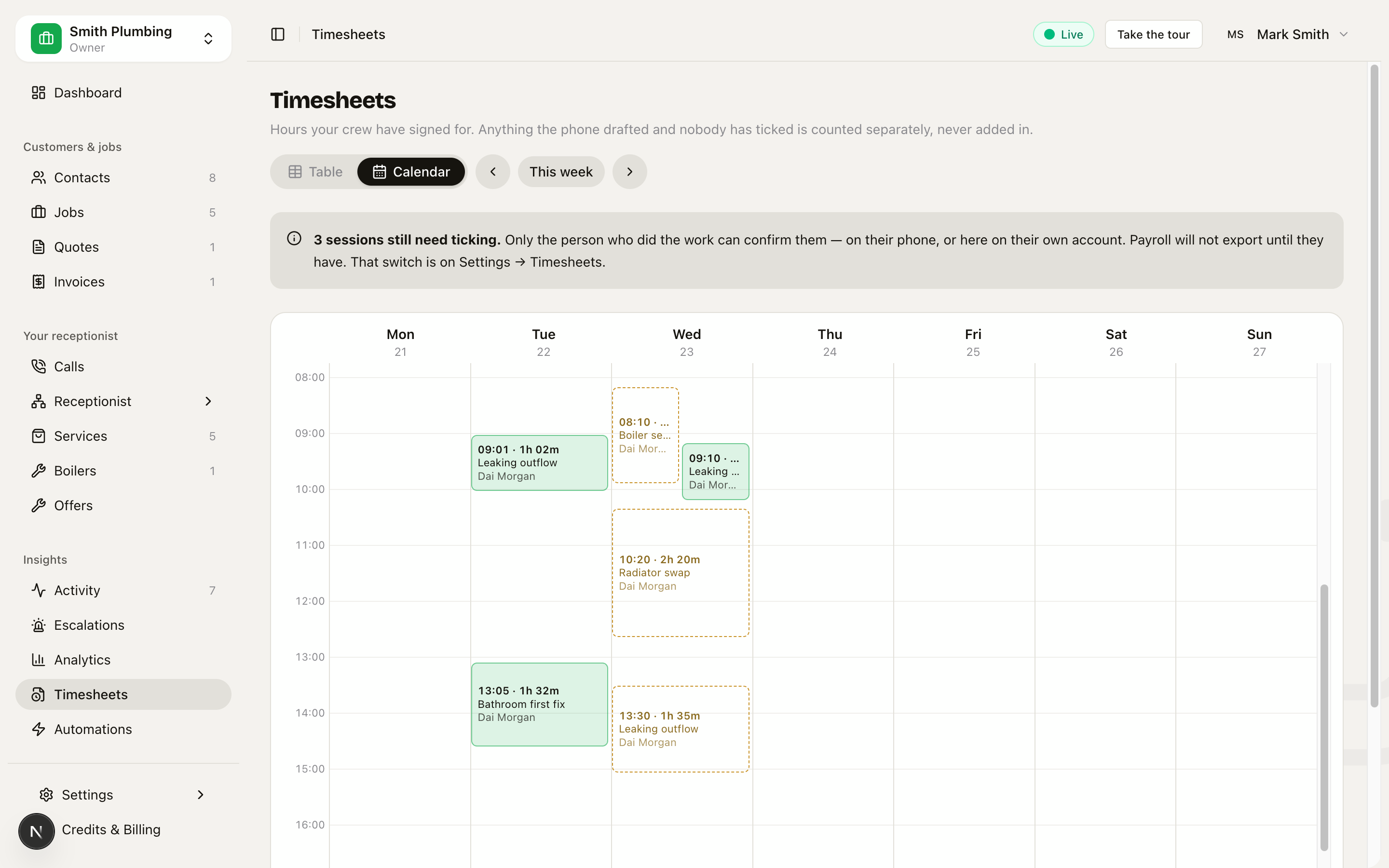 The same sessions plotted against the time of day. Two stops that overlap sit side by side; everything else runs full width.
- Export the week gives you a CSV for payroll. It refuses to run while anything is unticked, unless you turned that guard off.
Your crew see this page too, showing only their own row. Their hours are their own business and they should not have to ask the office what the week came to. The payroll export stays with the office, because that file is everybody's.
Pay is never rounded
Hours are the real time worked, to the minute.
Rounding worked time is only lawful where it does not systematically favour the employer and never drags pay below the minimum wage. The simplest way never to breach that is not to round at all.
The rounding you have seen on a job is a different thing — that is the extra time a customer is billed for, and it never touches pay.
What your crew see about all this
Every person has Settings → App recordings — a plain-English page about what is recorded, written for them rather than for you. It is not a consent form, deliberately: consent from an employee is rarely freely given, and a tick box implying somebody could refuse, where refusing might cost them, is worse than none.
The button on it records that they were told, which is the thing the assessment asks about. Your Settings → Timesheets page lists who has read it and when.
Related
- Tracking your time — the crew's own page
- Location & privacy — what is shared, when, and how to pause it
- Time tracking & field invoicing — billing the overage and invoicing from the van
- Smart dispatch — the geofences this is built on