 Loyal Receptionist
Agents & services
Two related surfaces:
/agents— your AI receptionists. One by default; add more when you want different personas for different lines (e.g. Sarah for general bookings + Dave for sales install calls). Each agent has its own voice, knowledge, behaviour, and the routing handle that decides which one answers which channel./services— the bookable things you sell, with price, duration, billing cadence (one-off vs recurring), included labour, and everything else that shapes a booking. Your agent quotes from this list.
The Agents page
The listing shows every agent on the org as a card — avatar, name, a Default badge on your fallback agent, the data-agent="…" routing badge, plus language and channel badges. Three buttons per card: Hear voice, Try a call, Configure.
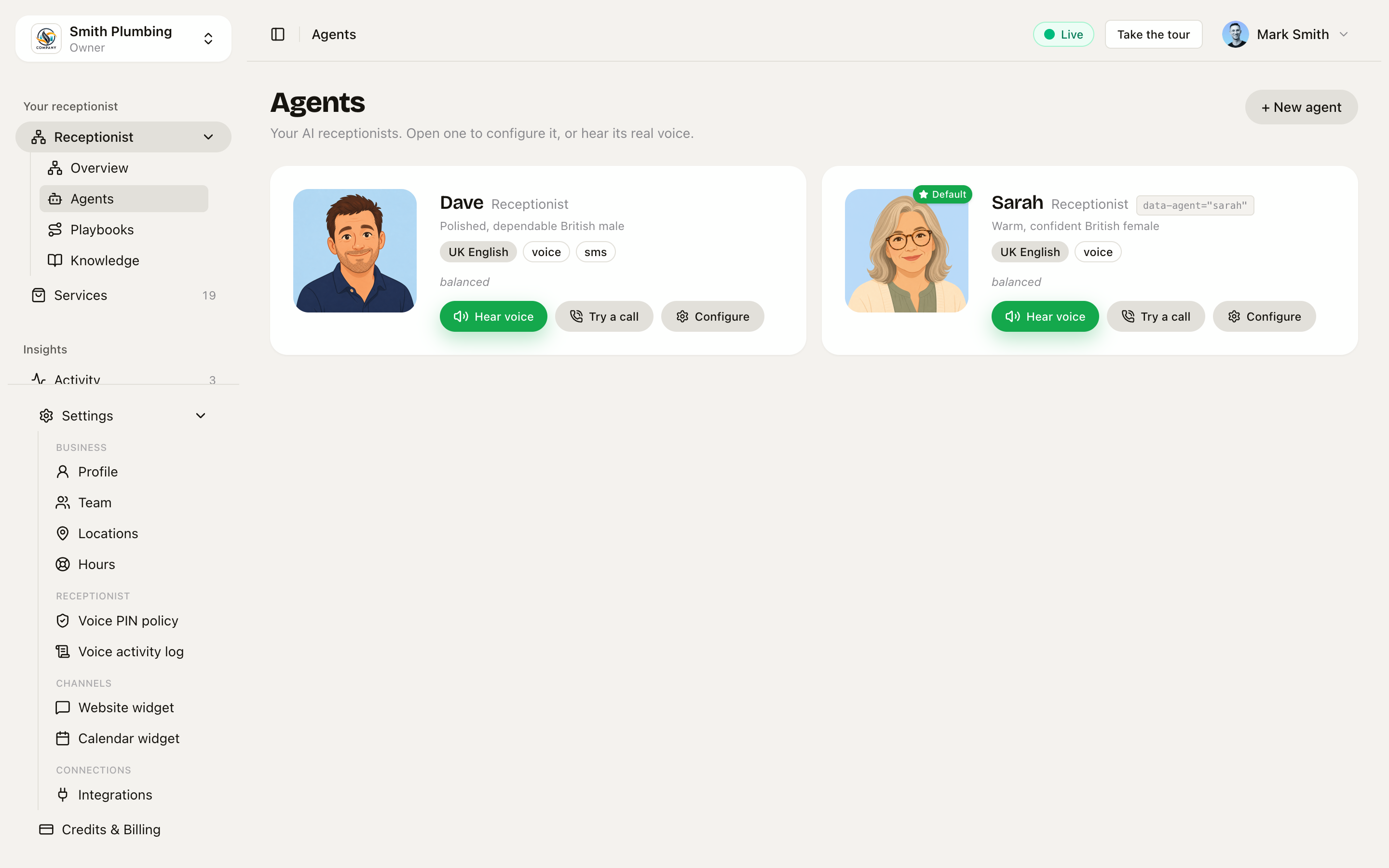 Agents listing — face, role, routing badge, hear-voice + try-a-call + configure buttons.
Tap Hear voice to audition
Each agent's voice has a recorded sample. Hear voice plays a short clip of how they sound — useful for picking which voice fits your business before you commit. Stop with the same button.
Try a call (in-browser mic test)
Try a call opens a dialog and starts a real WebRTC call to your agent — same code path as a live phone call, just with your laptop's mic instead of the PSTN. You'll be asked for microphone access on first click.
What you can verify:
- The greeting names your business correctly
- The agent quotes from your
/knowledgechunks (try asking "what's your callout fee?") - Your services come back when you ask "what do you do?"
- The personality matches what the sliders say
Transcript streams inline. End the call with the red End call button.
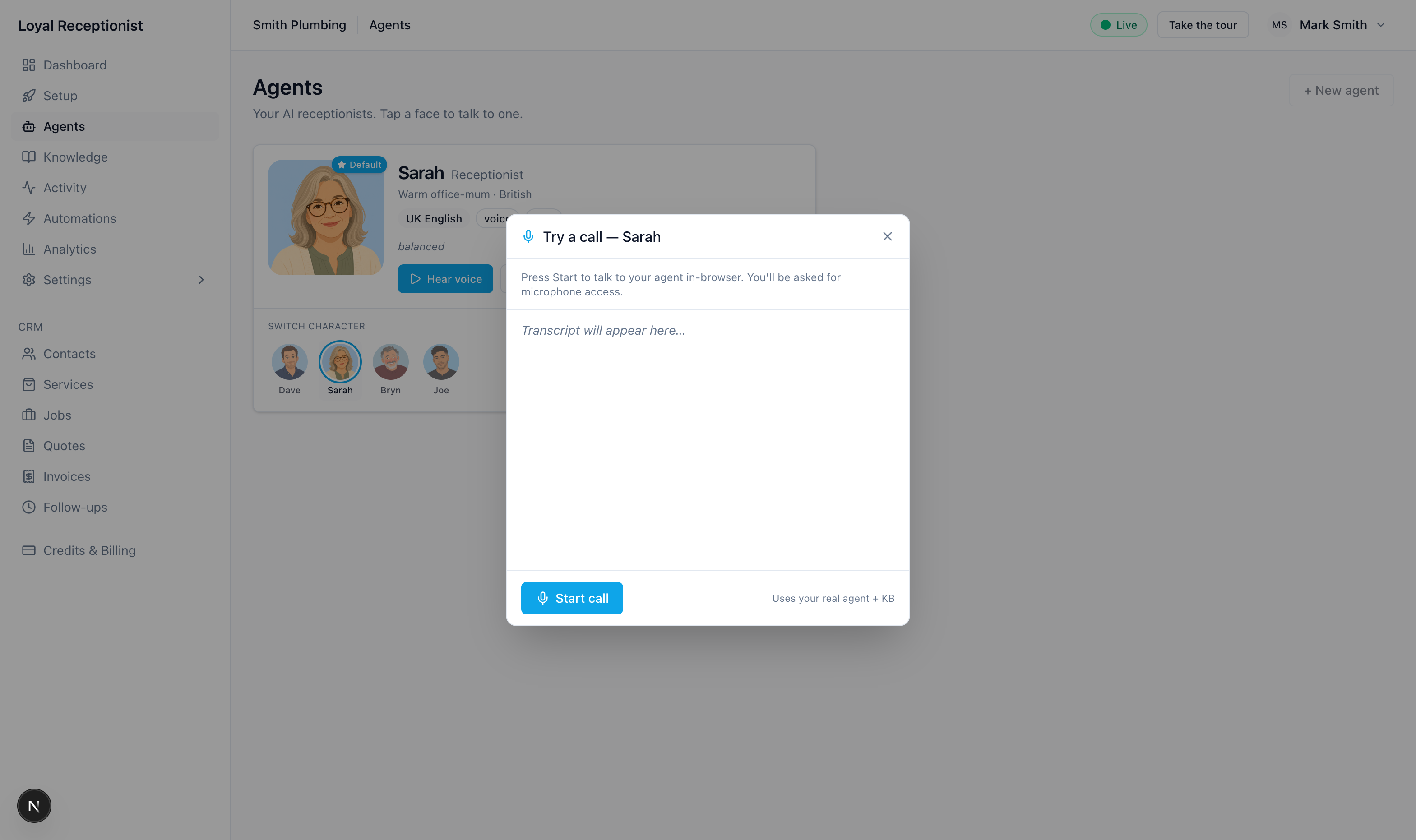 Try a call — live WebRTC against your real agent + KB. Transcript streams as you talk.
Adding an agent
+ New agent opens a dialog with a Start from a character picker — Sarah, Dave, Bryn, or Joe. Picking one pre-fills the name, voice, accent, personality, and avatar so you're not starting from a blank form. Everything is editable afterwards on the detail page.
Running more than one agent
A single Sarah handles 99% of trades fine. But for some businesses, a second agent earns its keep immediately:
- A receptionist + a dedicated sales agent (different voice, different opener, different KB)
- A general booking agent + a complaints/escalations agent
- A residential agent + a commercial agent on the same business
Add a second agent on /agents. Each one carries its own:
- Voice (Cartesia voice ID — see the Identity & voice tab below)
- Routing slug (e.g.
sarahordave) — the handle that picks which agent answers a particular channel - Behaviour chunks (this agent's specific tone, opener, sign-off)
Org-wide knowledge (the facts about the business) is still shared across every agent. And when the situation changes but the persona doesn't, reach for a playbook instead of a second agent.

The agent detail page
Click Configure on an agent card to open /agents/[id] with four tabs: Identity & voice, Personality, Behaviour, Routing & channels.
Identity & voice
The tab opens with a Character row — the same four faces from the New agent dialog. Picking a different one asks "Apply the X character?" and, on confirm, sets the name, voice, personality, accent, and avatar in one move. Knowledge, routing, and custom instructions are left untouched — useful when you want to A/B which voice your customers respond to without rebuilding anything.
Below it, the individual fields:
| Field | What it does |
|---|---|
| Name | What the AI calls itself ("Joe", "Dave"). Said in every greeting. |
| Role label | Optional — "Receptionist", "Office manager", "Install consultant". Shown to customers. |
| Routing slug | Lowercase handle (e.g. dave) used in widget mounts as data-agent="dave" and in phone-number routing. Optional — single-agent tenants can leave it blank and traffic falls back to the default agent. |
| Accent | UK English / Welsh-English / Cymraeg. Picks which voice model your provider routes to. |
| Voice ID | Cartesia voice UUID (e.g. ef191366-f52f-447a-a398-ed8c0f2943a1). Pick one at play.cartesia.ai/voices, or just apply a character above. Use the play button next to the field to hear the voice before saving. If the value isn't a Cartesia UUID, an amber warning appears under the field — live calls would fall back to the server's default voice (the classic "Dave answers in Sarah's voice" bug). |
| Languages | Tick English and Cymraeg to make the agent bilingual — the public booking page gets a Cymraeg toggle and the agent will switch to Welsh on calls when the caller asks. |
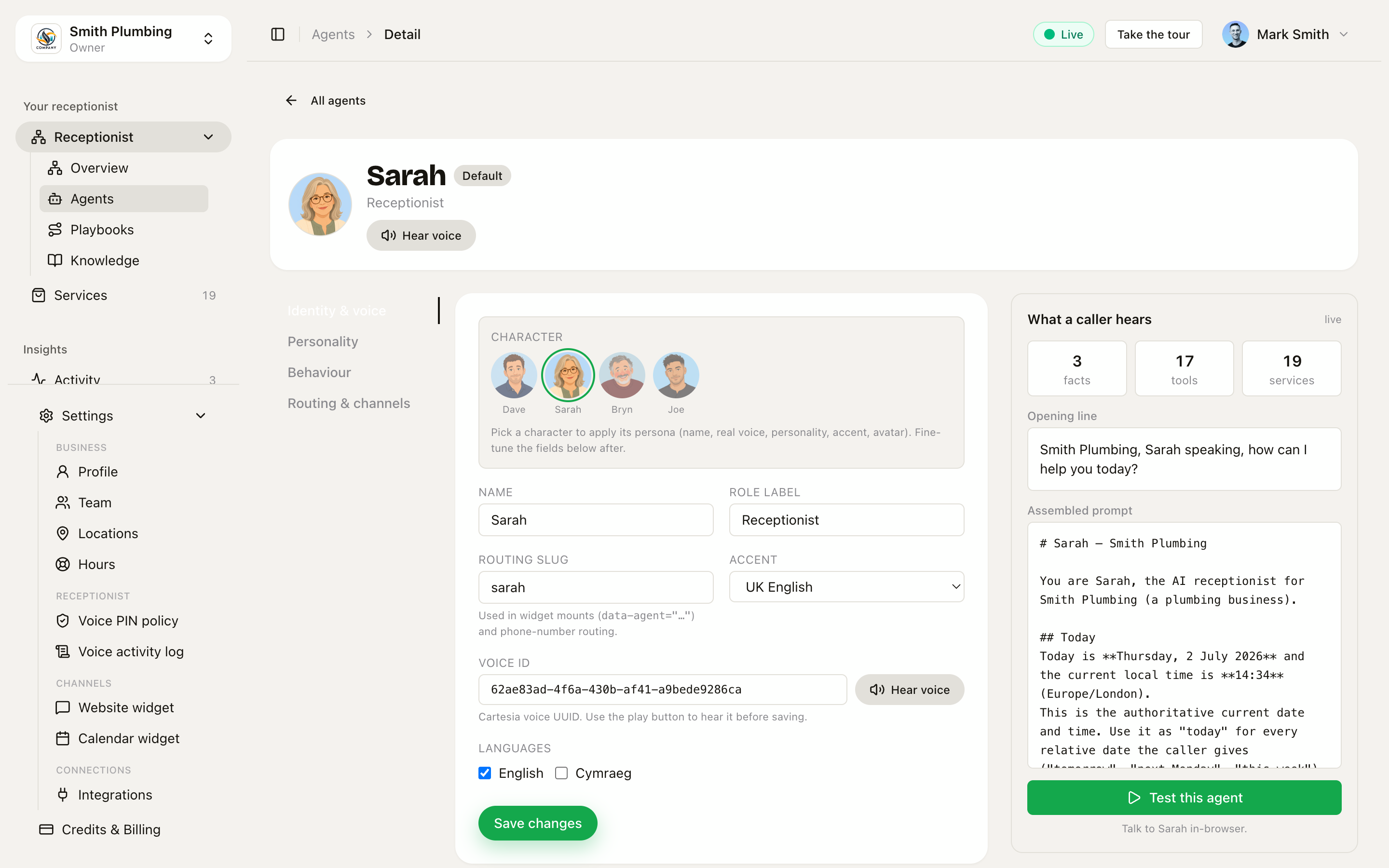 Identity & voice tab — routing slug + Voice ID with inline preview. A non-UUID value shows an amber warning instead of failing silently.
Personality
Three sliders, 0–100:
| Slider | What changes |
|---|---|
| Brief ↔ Chatty | At 0 the agent says "Cardiff, 9-5, £80, can I book you in?". At 100 it adds two sentences of context first. |
| Formal ↔ Casual | Affects whether the agent calls you "mate" or "sir". |
| Strict ↔ Forgiving | At 0 the agent sticks rigidly to policy. At 100 it'll bend rules for edge cases ("yeah we can squeeze you in tomorrow morning"). |
These map to phrases injected into the prompt. They don't change pricing or scope — they change how it sounds.
Behaviour
Free-text chunks that change how this agent talks, not what the business is. Examples:
- "Always ask for the customer's postcode before confirming a booking."
- "Pronounce 'Caerphilly' as 'car-FILL-ee'."
- "Sign off with 'cheers, talk soon' on SMS."
- "If the caller mentions Bryn (the owner), put them through directly."
Don't put pricing or policies here. Those belong in /knowledge so a second agent inherits them. If you're not sure, the rule is: facts go to org Knowledge, tone goes to Behaviour.
Same chunk format as the knowledge base (Label, Body, Priority 0–100 — this tab keeps the numeric priority; the /knowledge page uses the four named tiers). Top 20 by priority across both surfaces are injected into the prompt.
Routing & channels
Wires this agent to channels. Two surfaces:
Inbound phone numbers — every DID on the org is listed, and each row has an Agent picker and a Playbook picker side-by-side. Orgs with more than one branch also get a Branch picker per number, so a call to the Cardiff line lands on the Cardiff diary — see Locations & venues. Pick Default agent (fallback) to send a number to your isDefault agent.
Getting numbers in and out:
- Buy a number — search and buy a UK number in-app; it's live on the AI within a minute of purchase.
- Add existing — register a number you already own, or re-add one you previously removed.
- Removing a number doesn't cancel it — it's parked at Twilio, and you can re-add it any time from Add existing.
- Forwarding setup — each number row expands a helper with the standard UK mobile forwarding codes pre-filled with the AI number:
*21*<number>#(forward every call),*61*<number>#(only when unanswered),*67*<number>#(only when busy),#21#(turn forwarding off). Landline and VoIP carriers set forwarding in their own portal instead.
Widget mount snippet for <agent> — copy-paste this <script> tag onto the page where you want THIS agent to answer. The only difference from your default widget snippet is the data-agent="dave" attribute. Pages without data-agent use the org's default agent.
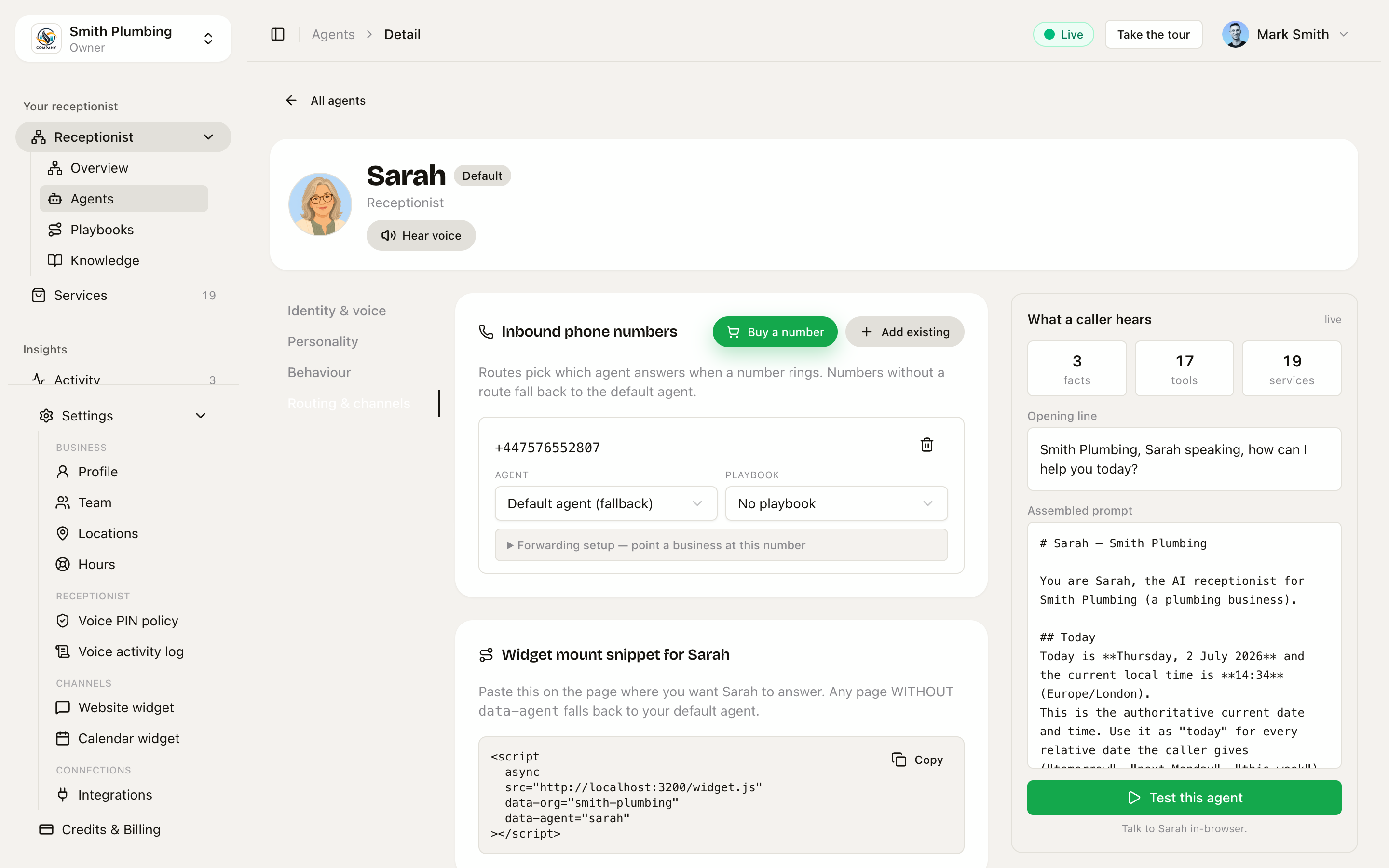 Routing & channels — re-route any DID to this agent, buy or register numbers, copy a widget snippet pre-filled with this agent's slug.
Use cases:
- A second phone line for sales — assign your sales DID to Dave; main line stays on Sarah.
- An install/onboarding page on your site — mount the widget with
data-agent="dave"on that page only. - Different agents per branch/team — extra DIDs per branch, route each to the right agent and branch.
When you switch a number's routing, the change applies immediately to the next inbound call — no restart needed.
The Services page
/services is your bookable catalogue — and it's how Sarah knows what to quote when a caller asks "how much?"
The top of the page has three ways to build the catalogue: Add service for a blank form, Import from doc or URL to have the AI pull services out of a price list or web page, and Detect packages to group your big jobs into the smaller ones they're made of — see Packages & sub-tasks.
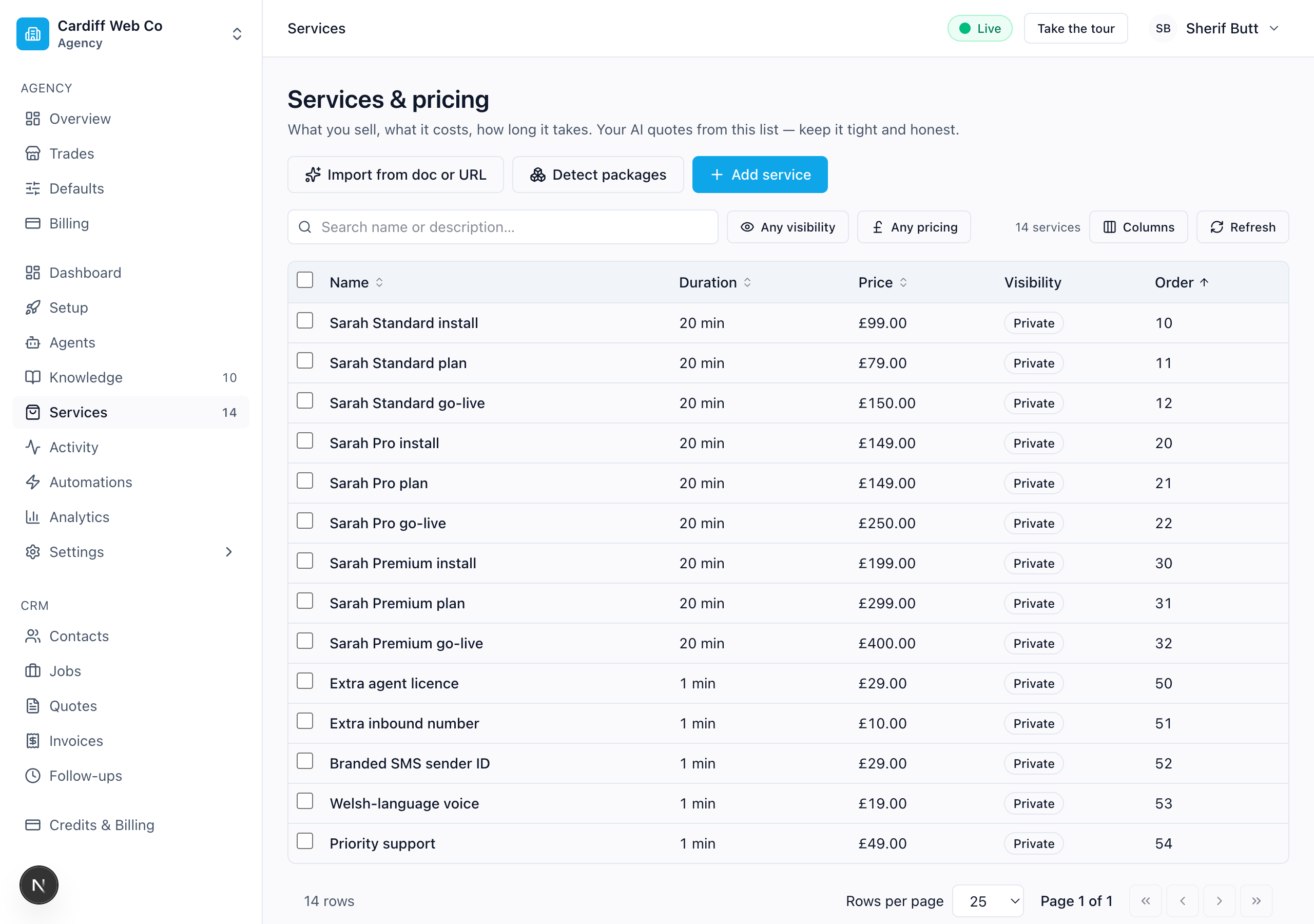 Services list. Mix of one-off install fees, monthly plans, bundles that compose install + first month, and add-ons.
Click any row to open the edit drawer. It's grouped into four sections — Basics, Labour & billing, Booking flow, and Catalogue.
The form only shows what applies to you. A service has 33 settings and the form needs two of them — a name and a duration. Everything else that cannot change anything for your business is hidden with the reason why. Smart dispatch off? No Required skill. Flat price? No Minimum charge — a flat price is already its own minimum. A line at the top says 23 of 33 settings apply to your setup, and Show the other 10 reveals them, struck through, each with its reason. Turn a setting on elsewhere and the controls it governs appear here on their own.
Fill in the gaps with AI
Tick some services in the list and Fill with AI appears next to Delete. Say what you want filled — or press one of the chips — and you get a list of proposals to accept, edit or skip.
| It can fill | It never touches |
|---|---|
| Category, Description | Any price, cost or minimum charge |
| Qualifying questions | Any duration |
| What the price does not cover | Anything on a service you did not tick |
| Before you price, Prep notes | Grades — those are searched, see below |
| Skill needed, Ask for photos |
Three things worth knowing:
- It reads your whole catalogue for context and writes only to what you ticked. Your own categories and your existing wording are what make the suggestions sound like you.
- A blank is ticked for you; replacing your words is not. Anything that would overwrite something you wrote is flagged and left off until you say so.
- "I could not tell" is a real answer. A catch-all service like "Soft landscaping" gets no description rather than a guess, with the reason shown. Click any wording to change it before you apply.
There is also a Use search to find more information tick box. Off by default, because a search costs money, adds about ten seconds, and sends the service name to a search engine. With it on, the answer has to come from a page that was actually opened — if it answers from memory instead, we refuse it rather than pass it off as researched.
Ask for something it cannot do and it says why: "I never touch a price, a cost or a minimum charge. A wrong one goes out to a customer and nobody reads it again."
Find grades from UK suppliers
If you sell the same work at different grades — sandstone, limestone, porcelain — Find grades from UK suppliers in the Grades control searches real supplier pages and reads the price off each one.
You get, per result: the grade, the seller, the price exactly as printed, and a link to the page so you can check it. Pick the one you actually use.
What comes back is the material cost, not your rate. A sandstone slab is around £20 per square metre; laying it might be £150. So the found price is saved as the cost, and your rate is either left exactly as it is (for a grade you already sell) or worked out from your own pricing — the ratio between a grade's rate and its material cost, applied to the next one. If that suggestion lands outside every rate you charge today, it says so in amber.
Two honest limits:
- It only works where suppliers price the material by the same measure you do — per square metre, per metre, per step. A pergola is priced per pergola, and its "material" is a whole list of parts, so it declines and tells you to set those grades by hand.
- Every price is checked against the page's own text before it is saved. Some shops draw their prices with JavaScript, so nothing is there for us to confirm — you get "none of the prices could be confirmed on the page itself" rather than an unchecked number.
Basics
| Field | What it does |
|---|---|
| Name | "Boiler service", "Tap replacement (mixer / kitchen)". Shown on the public booking page AND used by Sarah to match the caller's words. |
| Description | One line. Optional but powerful — see "Write services Sarah can find" below. |
| Duration (min) | How long it blocks on the calendar. Used for the public booking page slot grid. On a package with derived duration, this is read-only — it adds up from the sub-tasks. |
| Price (£) | Fixed price. Leave blank only if it's genuinely quote-based. On a package with rolled-up pricing, this is the live sum of the sub-tasks. |
Labour & billing
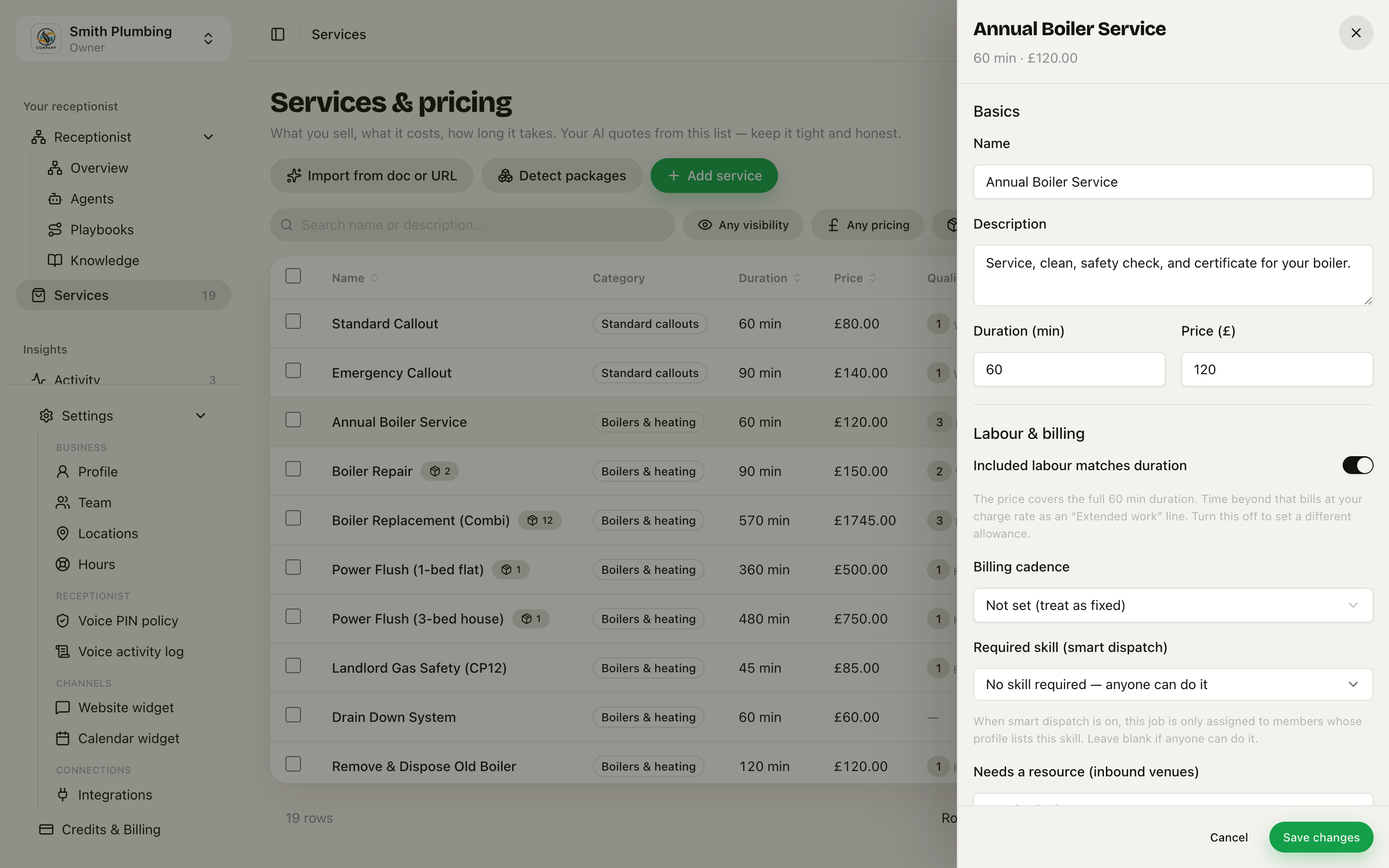 Labour & billing — included labour, billing cadence, required skill, resource kind.
| Field | What it does |
|---|---|
| Included labour matches duration | On by default: the price covers the full booked duration, and on-site time beyond it bills at your charge rate as an "Extended work" line at completion. Turn it off to set a different allowance in minutes — and set 0 for pure time-and-materials work where every minute bills. See Time tracking & field invoicing. |
| Billing cadence | How the price recurs: One-off fee (install fees, callouts), Monthly subscription, Annual subscription, Usage-based (per-message SMS etc), or Not set / fixed. The voice prompt renders the price differently per cadence ("£99 one-off" vs "£79/month recurring") so the caller hears it accurately. |
| Required skill (smart dispatch) | Free-text tag (e.g. gas-safe, colourist, bathroom) — when set and Settings → Team → Smart Dispatch is on, new bookings on this service get auto-assigned to a team member whose profile lists this skill, ranked nearest-first. Leave blank if anyone can do it. See Smart Dispatch. |
| Needs a resource (inbound venues) | For businesses customers come to: pick Chair, Room, or Bay and bookings for this service are capped by how many of that resource the venue has — booking refuses once every chair is in use, even if a person is free. See Locations & venues. |
The skill picker shows your trade's default skills first (e.g. plumbers get gas-safe, boiler-service, bathroom-fit, powerflush, leak-detection, central-heating, unvented-cylinder), then any custom tags your team's already used. Type into the search box to filter or to add a new tag — anything you add becomes part of the catalogue for everyone in the org.
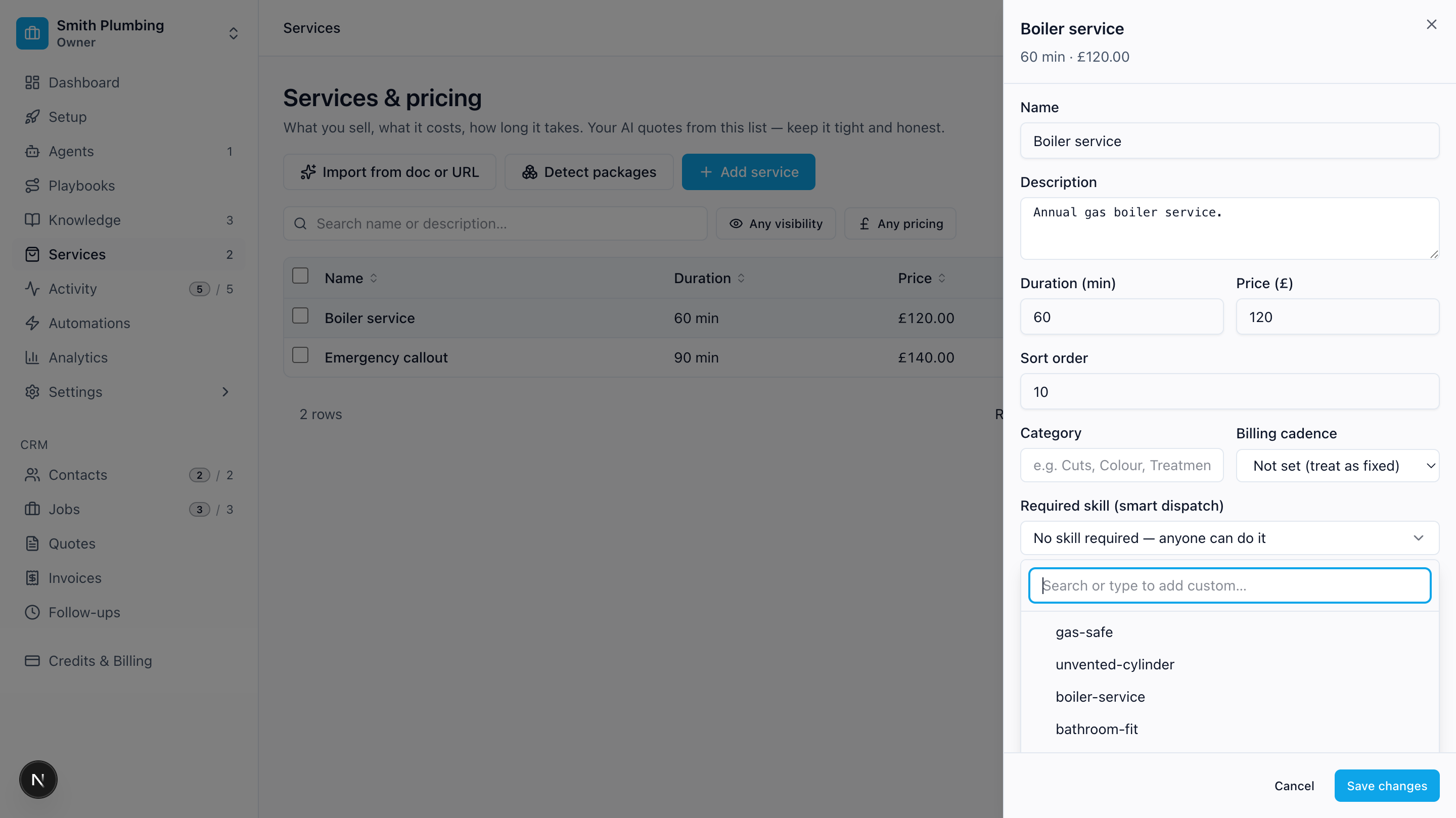 Picker open — plumbing defaults at the top, search/add-custom at the top of the dropdown.
Booking flow
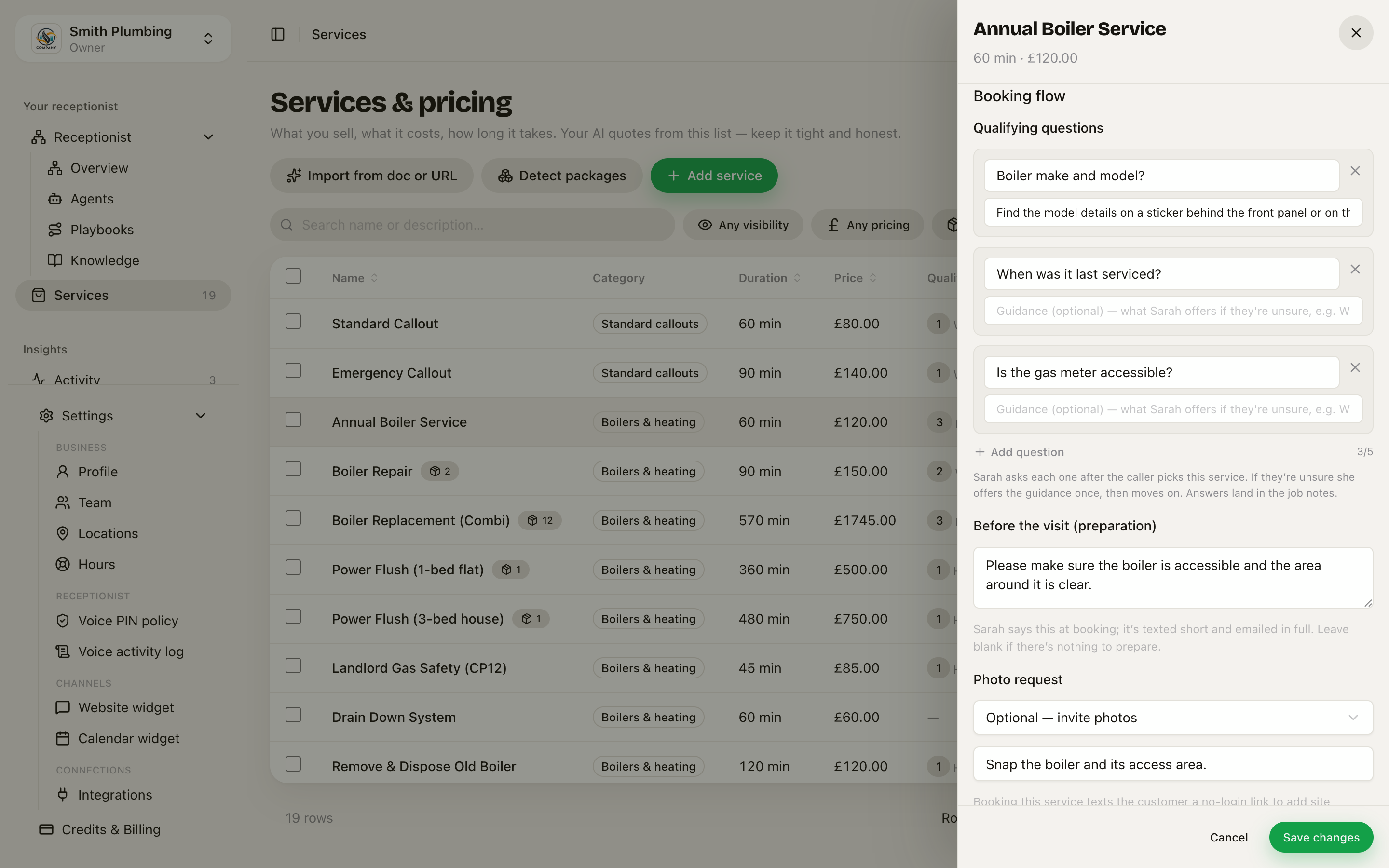 Booking flow — qualifying questions, preparation notes, photo request.
| Field | What it does |
|---|---|
| Qualifying questions | Up to 5 questions Sarah asks after the caller picks this service. See Qualifying questions below. |
| Before the visit (preparation) | Anything the customer should do before you arrive — "Please make sure all radiators are accessible and turned on" (max 600 chars). Sarah mentions it briefly at booking ("Before we come — …"), it's texted short, and emailed in full with the confirmation. Leave blank if there's nothing to prepare. |
| Photo request | Off / Optional — invite photos / Required — strongly request photos, plus an optional custom prompt ("Snap the boiler and the flue outside"). When on, booking this service texts the customer a no-login link to add site photos, so the engineer turns up prepared. See Job photos. |
Payment at booking. Services set up to collect payment at booking behave differently on the call: Sarah won't confirm the booking until she's captured the customer's email address, and the confirmation email carries the Stripe payment link and calendar invite. See Pricing & quotes for how that sounds on the call.
Catalogue
| Field | What it does |
|---|---|
| Category | Free-text grouping (e.g. "Install fees", "Subscriptions", "Bundles", "Add-ons"). When you have ≥2 categories, the prompt groups the catalogue under ### Section headers so the agent can navigate "we offer installs, plans, and add-ons" instead of reading a flat list. |
| Sort order | Lower numbers appear first. Use 10/20/30 with gaps so you can reorder without re-numbering everything. |
| Sub-tasks (package) | Bundle other services into this one — a "Bathroom install" built from strip-out + first-fix + tiling. Available once the service is saved. Full walkthrough: Packages & sub-tasks. |
| Package price | Packages only. Fixed — you set the headline price above and the invoice itemises the sub-tasks plus a reconciling line so the total matches. Roll up — the headline is the live sum of the non-optional sub-tasks. |
| Set booking time from the sub-tasks | Packages only. On: the slot length is the sum of the non-optional sub-task durations. Off: keep the duration you set (e.g. when two of the crew work in parallel). |
| Requires a quote (no fixed price) | When ticked, hides the price and Sarah says "the engineer will quote on the day" instead of a number. |
| Show on the public booking page | When ticked, customers see this service on the booking page. Untick to hide it from the public page only — Sarah still sees it and will quote it on a call. See What "public" actually means below. |
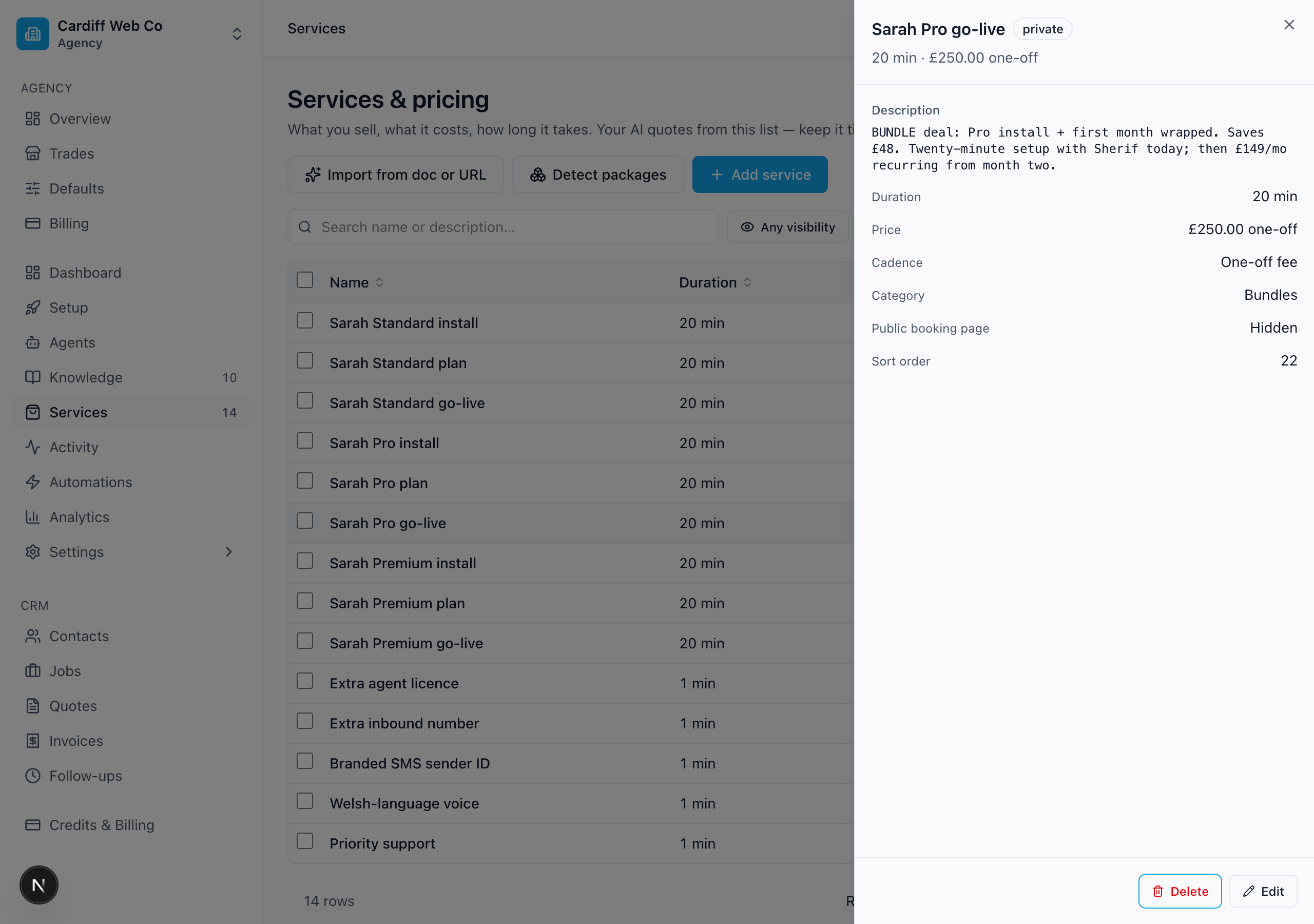 Drawer for Sarah Pro go-live — Cadence: One-off fee, Category: Bundles, price renders as £250.00 one-off.
Qualifying questions
For each service, set a few questions Sarah should ask the caller after they pick the service but before she books. The answers go into the job notes so the engineer arrives with context and the right parts — cuts the "what boiler model is it again?" call from the van.
The editor is structured: each question is a card with the question itself (max 200 chars) and an optional guidance line (max 400 chars) — what Sarah offers once if the caller is unsure ("what do you have?"). An Add question button adds cards up to the counter's cap of 5.
Good questions are short, trade-standard, and answerable in one sentence:
- Boiler service → "Boiler make and model?" · "When was it last serviced?" · "Is the gas meter accessible?"
- Tap repair → "Mixer or pillar taps?" · "Hot, cold, or both?" · "Is it dripping or completely stuck?"
- Bathroom install → "Roughly how big is the room?" · "Replacing like-for-like, or moving fittings?" · "Tile or vinyl on the floor?"
Five questions is the cap — keep them tight so the call doesn't drag.
You usually don't need to write these yourself. When you build the catalogue via Import from doc or URL, the AI fills in 2–4 trade-standard questions per service automatically. When you create new parts via Detect packages, it does the same — review and tweak after Apply.
What "public" actually means
The Show on the public booking page toggle controls one thing only: whether the service appears on book.loyalreception.co.uk/<slug> for customers to pick.
It does not control whether Sarah knows the service exists. Sarah always sees every non-deleted service in your catalogue. So:
- A boiler service at £85 with the toggle on → shows on the booking page AND Sarah quotes it on calls.
- A "Powerflush £400" with the toggle off → hidden from the booking page (it's not a service customers pick on its own — it's a part of a bigger job), but Sarah will still quote "that's £400 on its own, or £350 if we do it during your boiler service" if a caller asks about it on the phone.
This is why the Detect packages flow creates new parts with the toggle off by default — the booking page stays clean while Sarah gains coverage. Use the same pattern for any internal-only or component-only service.
Write services Sarah can find
Sarah looks up prices via the get_price_estimate tool on every call where the caller asks "how much?" It does a word-level match against your services — so the names and descriptions are how Sarah finds them.
The rule of thumb: include every word a caller might use, in any order.
A real example from a recent call. The catalogue had:
Tap replacement (mixer / kitchen) · 75 min · £130 Description: Including supply of mid-range mixer
A caller asked for "a kitchen mixer tap installation". Sarah called get_price_estimate("kitchen mixer tap installation"). The match succeeded because the service name contains every key word — kitchen, mixer, tap, replacement — and the matcher doesn't care about order, brackets, or filler.
Write the name as a phrase containing the synonyms. Don't just write what your supplier calls it.
| Better | Worse |
|---|---|
Tap replacement (mixer / kitchen) | Pillar mixer install |
Boiler annual service | Periodic combustion check |
Toilet repair (cistern / flush / leak) | WC remediation |
Emergency callout (out of hours) | Surge response |
Gas safe certificate (landlord CP12) | Annual inspection |
Use the description for callers' words. This is the killer field — it gives Sarah extra vocabulary without cluttering the customer-facing name. Pack it with synonyms a caller might say:
Toilet repair (cistern / flush / leak) · 45 min · £75 Description: Loo cistern fill valve, dual-flush, slow refill, running toilet, leak around the base. Replaces fill valve and flapper, includes parts.
A caller saying "my loo keeps running" matches because "loo" and "running" are both in the description.
Quote-based services still need searchable names. Tick "Requires a quote" if the work genuinely can't be priced in advance (site visits, complex installs), but write the name as if it had a price. Sarah will still find it; she'll just say "the engineer will quote when he arrives" instead of a number.
Each variant is a separate service. Don't try to cram pricing tiers into one row. A small tap repair (£60) and a full mixer replacement (£130) are two services with overlapping vocabulary in the name. That's fine — the matcher returns the cheapest match by default, and Sarah quotes the suitable one based on what the caller described.
Trade defaults
If you ran the Setup wizard (/docs/getting-started) and picked a trade, we seeded a handful of typical services for that trade — plumbing, electrical, heating, roofing, locksmith, cleaning, etc. Open them and tweak the prices to match your real rates.
If you skipped the wizard and want them now, change your trade in Settings → Org and re-run the wizard's services step.
What to do when callers ask for something you don't have
If get_price_estimate returns no match, Sarah falls back to "the engineer will quote when he arrives" — which loses about a third of price-shoppers. So when you see that pattern in the Activity feed (calls that ask "how much?" and end without booking), the fix is usually:
- Either add a new service for what they wanted.
- Or expand an existing service's Description to include the words the caller used.
The bigger your catalogue, the more callers convert.
How they reach the call
When a call starts:
- Agent identity (name, voice, accent, hours) controls how the call opens — greeting, language, voice.
- Personality rewrites the prompt's tone clauses.
- Behaviour chunks (this agent's) + Knowledge chunks (org-wide) are both pulled in, top 20 by priority.
- Services are loaded so the agent can quote durations and prices when a caller asks.
What's next
/docs/packages-and-sub-tasks— turn big jobs into packages built from the services you already sell/docs/playbooks— same agent, different situation: openers, rules, and escalation per call type/docs/quotes— send a written quote your customer can accept in one tap/docs/knowledge-base— what your business is (the facts)/docs/voice-pin-and-operator-mode— ring your own line to run the day by voice/docs/public-booking— the page customers land on when you share your booking URL/docs/receptionist— the Receptionist hub: trace any channel to its agent and playbook, and test the exact route in-browser