 Loyal Receptionist
Locations & venues
Two kinds of business, one product:
- You go to the customer — plumber, electrician, locksmith. Jobs happen at their address; your location is the depot the day starts from.
- Customers come to you — salon, clinic, solicitor's office. Every job happens at your address; what's scarce isn't drive time, it's a chair, a room or a practitioner at a given hour.
A location is any place you operate from or at, and each one carries the answer to one question — Customers come to us / We go to the customer / Both. That single choice is what flips how booking works: an outbound job asks for the customer's address; an inbound one skips the address entirely and asks who or what they're booking instead.
You don't set this up from scratch — your first location is seeded from your trade at signup. Most businesses only ever touch this page to add a second branch or a new stylist.
Your locations
Settings → Locations (/settings/locations).
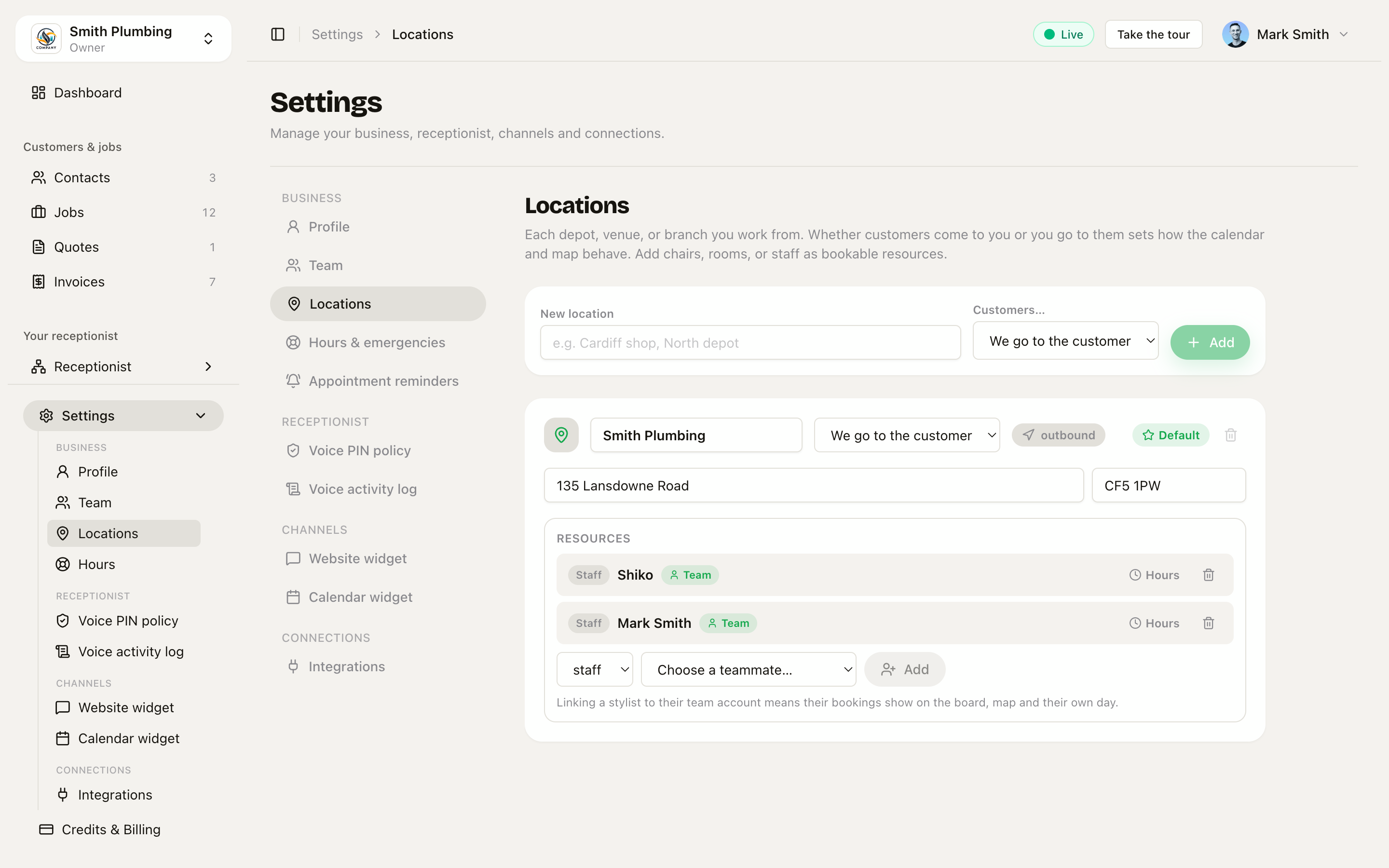 Each depot, venue or branch as a card — name, serves mode, address, and its bookable resources.
Each location is a card:
- Name — "Cardiff shop", "North depot".
- Customers… — come to us / we go to the customer / both.
- Street address + postcode — for a venue, add the street address so the receptionist can give callers your full address, not just the postcode.
- Default — one location is the default; new bookings land there unless a branch is chosen. You can't delete the default — make another location default first.
Resources — chairs, rooms, bays, staff
On a venue, the scarce thing is a resource, and each location card lists its own:
- Staff — the people customers book: stylists, practitioners, fee-earners. Add one by picking from your team (or "Someone not on the team…" for a name only).
- Chair / Room / Bay — capacity limits, not booked directly. Two chairs means two haircuts can run at once; a service can require a resource kind (set on the service's edit drawer on
/services), which caps how many of it can be booked at the same time.
Link staff to their team account. A linked stylist's bookings show up on the jobs board, the map and their own "My day" — an unlinked name books fine but is invisible to every team view. If they're not on the team yet, invite them first (Team & roles).
Each resource can carry its own hours ("Marta only works Tuesday–Saturday") — leave them blank to use the location's hours.
Booking at the right branch
Once locations exist, every booking channel knows about them:
- On the phone — at a salon, the receptionist asks "a particular stylist, or anyone?", books against that person's real availability, and remembers the preference — a regular's "Marta always does my colour" sticks for next time. She'll only offer times where the person (and a chair) is actually free.
- Per-branch phone numbers — with more than one location, each inbound number can be pinned to a branch on
/agents/[id]→ Routing, so calls to the Cardiff shop's number book at the Cardiff shop. - Public booking page — with more than one branch, the page opens with a "Which location?" chooser; add
?branch=<id>to the link for a per-branch link that skips it — one for each shop's Google listing. See Public booking page.
Running the day
- Branch picker on Jobs — with more than one location,
/jobsgets a branch picker, so each shop can look at its own day. - Calendar — an inbound venue's day view is columns per practitioner or chair, filling as it books out; an outbound depot's stays columns per engineer, as in Smart dispatch.
The map plots outbound routes today — venue pins for come-to-us branches aren't on it yet.
For law firms — the conflict check
A solicitor can't act against an existing client, so a legal practice gets an extra gate on phone bookings: before confirming a matter, the receptionist asks who the other side is and runs an automated first pass against your records. Clean, and the booking confirms as normal, marked conflict check clear. A possible conflict, and she never confirms — the enquiry lands on your board as pending with a Conflict check needed badge and the other side's name on the job, for a fee-earner to review first.
Related
- Public booking page — the location chooser and per-branch links.
- Agents & services — services, prices and the per-number Routing tab.
- Team & roles — inviting the people you'll link staff resources to.
- Smart dispatch — the outbound side: routes, geofences and arrival texts.