 Loyal Receptionist
For clinics — NHS, private and new patients
A dental practice offers NHS check-ups and private whitening. A GP surgery does NHS appointments and private letters. So a clinic is not one or the other — it is both, service by service. Everything on this page follows from that: you tell each service which it is, and Sarah does the rest.
This page is for clinical trades — GP, dental, and other clinics. If your business is not clinical, none of it appears.
Mark each service NHS or private
Open a service. On a clinical trade you will see a Funding choice: NHS or Private.
- NHS — free at the point of use. Sarah never charges for it, whatever else is set.
- Private — paid. Sarah can take payment at booking, like any other paid service.
That one setting drives all the behaviour below. There is no separate "is this an NHS clinic" switch — a clinic counts as NHS the moment it has one NHS service.
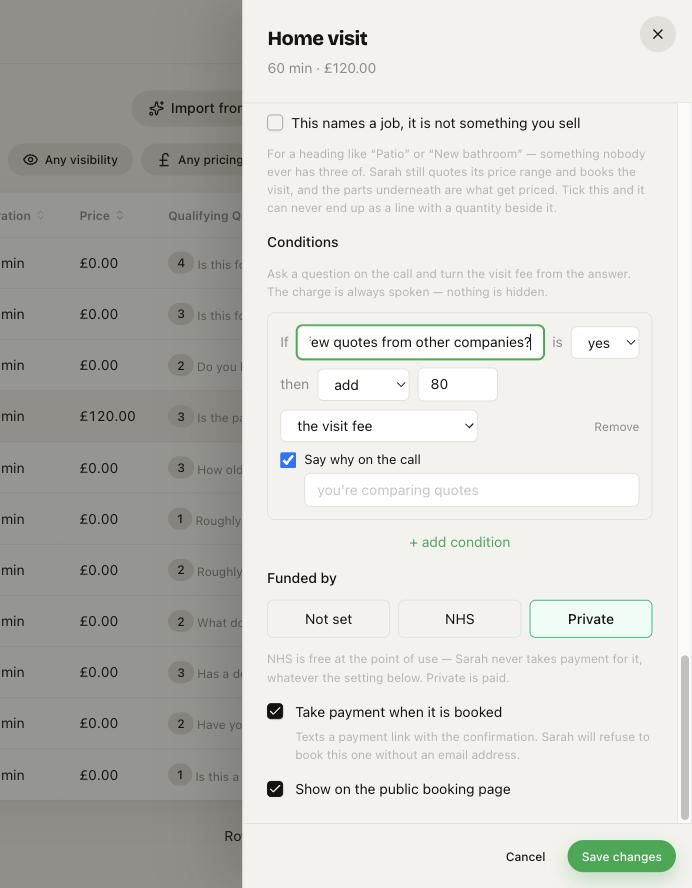 On a clinical trade, each service picks Not set / NHS / Private. Private services can take payment at booking; NHS is never charged.
Registration is asked only for NHS work
An NHS appointment needs the patient to be on your list. A private appointment is open to anyone. So Sarah:
- works out what the caller wants first,
- asks "are you registered with us?" only when it is an NHS service,
- and never asks it for a private service — she just books it.
Your own catchment (which postcodes or streets you take) still lives in your knowledge base and your reception playbook. This page is only about when the question is asked, and that is now driven by the service, not guessed.
New patients at a private clinic
For a private clinic with no NHS services (a podiatry or physio practice, say), Sarah opens by finding out if she already knows them:
"Have you visited us before, or is this your first time?"
- Been before — she looks up their record so she does not re-ask what you hold.
- First time — she welcomes them and takes full details.
She skips the question for a caller she already recognises from their number.
Cancellations and the waiting list
When a patient cancels, the people waiting for an earlier appointment can be texted within minutes, and the first to take it gets the slot. An NHS slot only ever goes to someone waiting for NHS work, and a private slot to private. See Fill cancellations from your waiting list.
When Sarah rings or texts a patient
If your practice asks callers to prove who they are, Sarah does the same when she gets in touch herself (a missed call, an unpaid invoice, after a visit):
- On a call, she asks for the patient by first name only, with no practice name: "Hello, it's Sarah, an AI assistant. Could I speak to Cerys, please?" She checks the date of birth or postcode. Only when it matches does she say where she is calling from and why.
- Wrong person, a failed check, or they hang up before the check: nothing is said about why she rang, and the call comes to a person at the desk with the reason.
- Texts back and the website chat ask for the check before any detail is given.
- The first text goes before anyone is checked. Others may see a shared phone, so keep it to who it is from, never what it is about. The reason's settings warn you about this.
See Getting in touch.
A consultation that leads to treatment
A consultation can be a separate appointment, with the treatment waiting behind it.
To set this up, open the treatment on Services and add the consultation as one of its parts. Then tick Own job. This tick means "a separate appointment". The patient books the consultation first, and the treatment waits.
A private consultation fee. On the consultation's service, find If they do not go ahead, the fee is. Pick Refunded, Kept or Kept as credit. The patient reads the sentence under that field on your booking page and on the invoice, before paying. Ask someone qualified to check that sentence for your practice.
If the patient does not go ahead. Open the appointment. Press More at the bottom left, then Did not go ahead. Pick the reason, then press Mark as did not go ahead. Keep any note to facts, because a patient can ask for the notes you hold on them.
If the patient paid a fee, the same window asks what happens to it: Refund, Keep or Keep as credit. Your terms are picked for you, and you can change the choice. The app never refunds by itself. A fee not paid by card through the app goes back by hand, and the window tells you so.
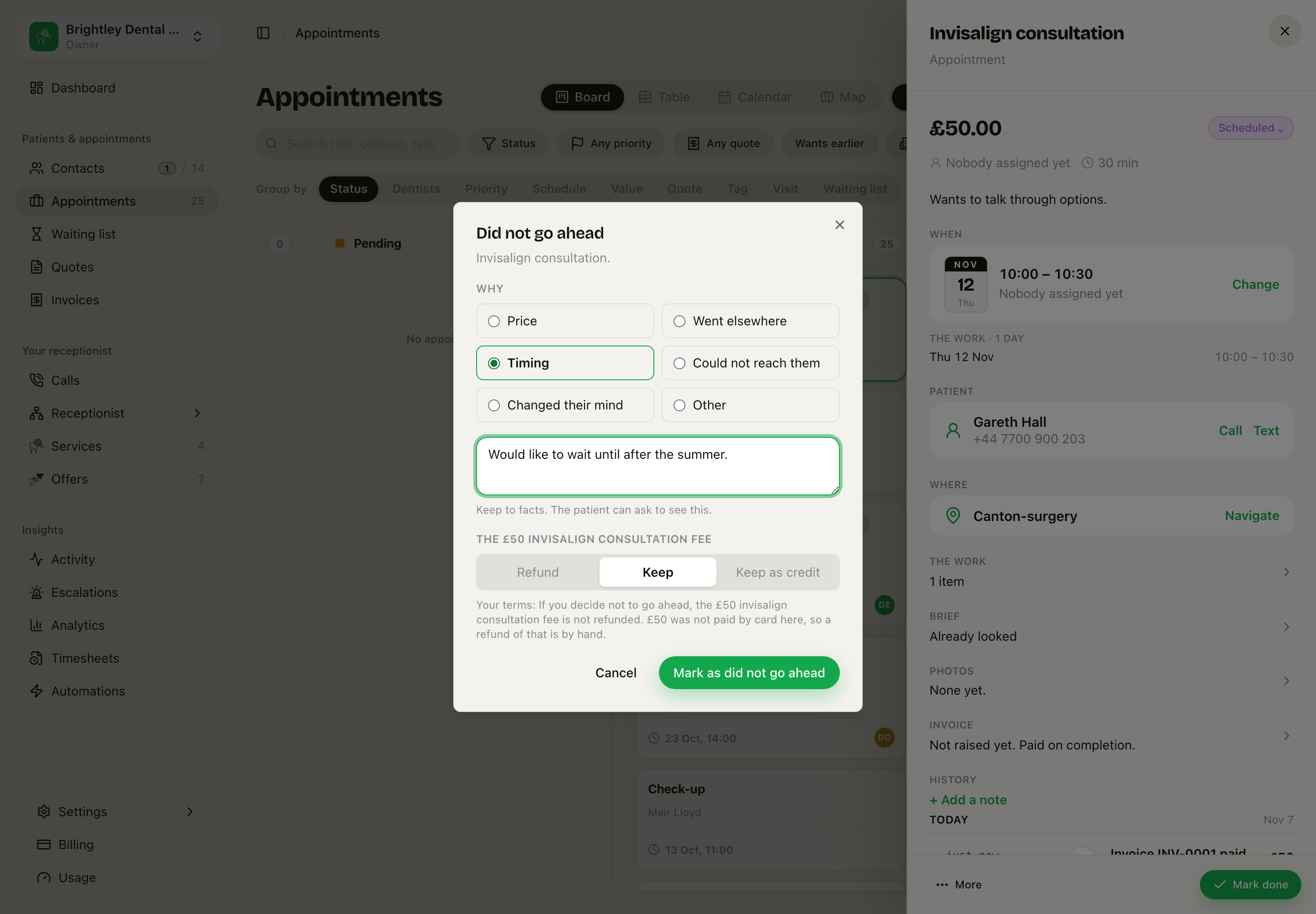 The reason, the note and the £50 fee, with the practice's terms under it.
The app does not take a fee up front on an NHS service, so those services have no terms and no fee to decide here.
See Pieces and plans.
The new-patient form
Give Sarah your own new-patient / medical-history form and she will send it to first-timers when she books them.
Set it in Settings → business identity, under New-patient form link — paste a link to your own form (a PDF, or your online form) and, if you like, how many minutes early they can come to fill it in at the clinic.
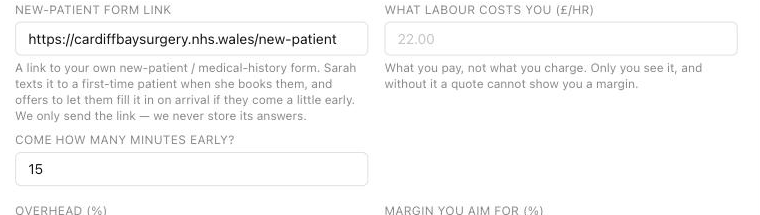 Settings → business identity — paste your own form link and set how early a first-timer can come to fill it in.
Then, on a booking of a patient who has not filled it in, Sarah says:
"I've texted you our new-patient form — please fill it in before you come, or arrive about 15 minutes early and you can do it here."
Two things to know:
- We only send the link. We never store the answers — the completed form goes back to you through your own form, exactly as it does now. No medical data sits with us.
- You tick "form filled" on the contact once it is back (open the contact, tick New-patient form filled). After that, Sarah never re-sends it — a returning patient is not asked again.
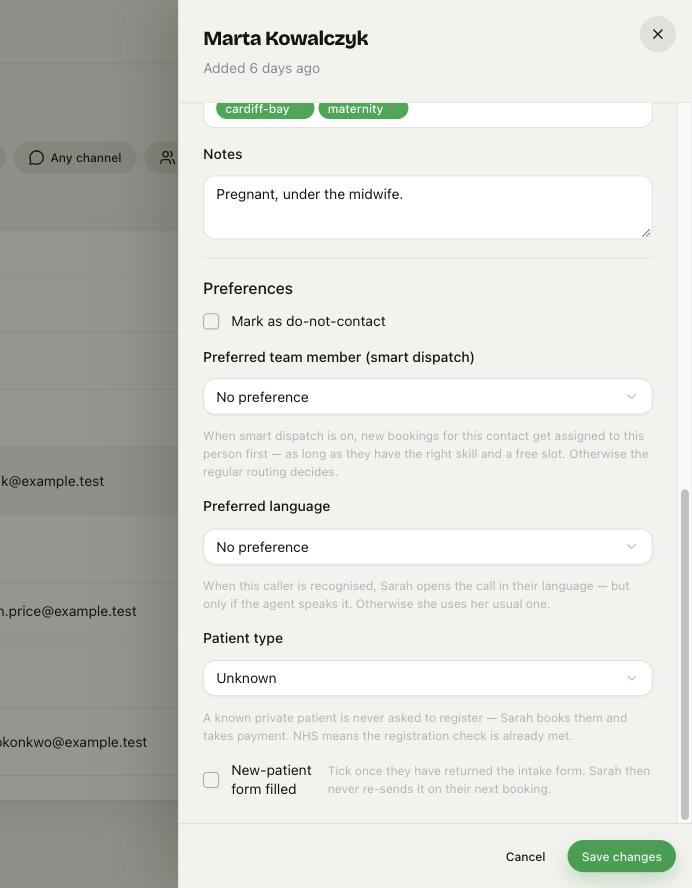 On a contact: Patient type (NHS / private) and the New-patient form filled tick that stops Sarah re-sending the form.
After-hours greeting
When a call lands outside your opening hours, Sarah opens differently — she says you are closed but she can still help, rather than a normal "how can I help today?". She can still book 24/7; she never tells anyone to call back.
You can leave the default, or set your own line per agent and per playbook. See Agents and services for the greeting fields.