 Loyal Receptionist
Escalations
Every business gets calls the receptionist can't finish — a genuine emergency, a complaint, a request outside anything you've configured. When that happens she doesn't just drop the caller: you're paged by SMS and email, the caller is told someone will ring back within 10 minutes, and a triage item lands in the Escalations queue — even if the page-out itself failed to send. Nothing falls through a gap.
Find it in the sidebar under Insights → Escalations, with a badge showing how many are waiting.
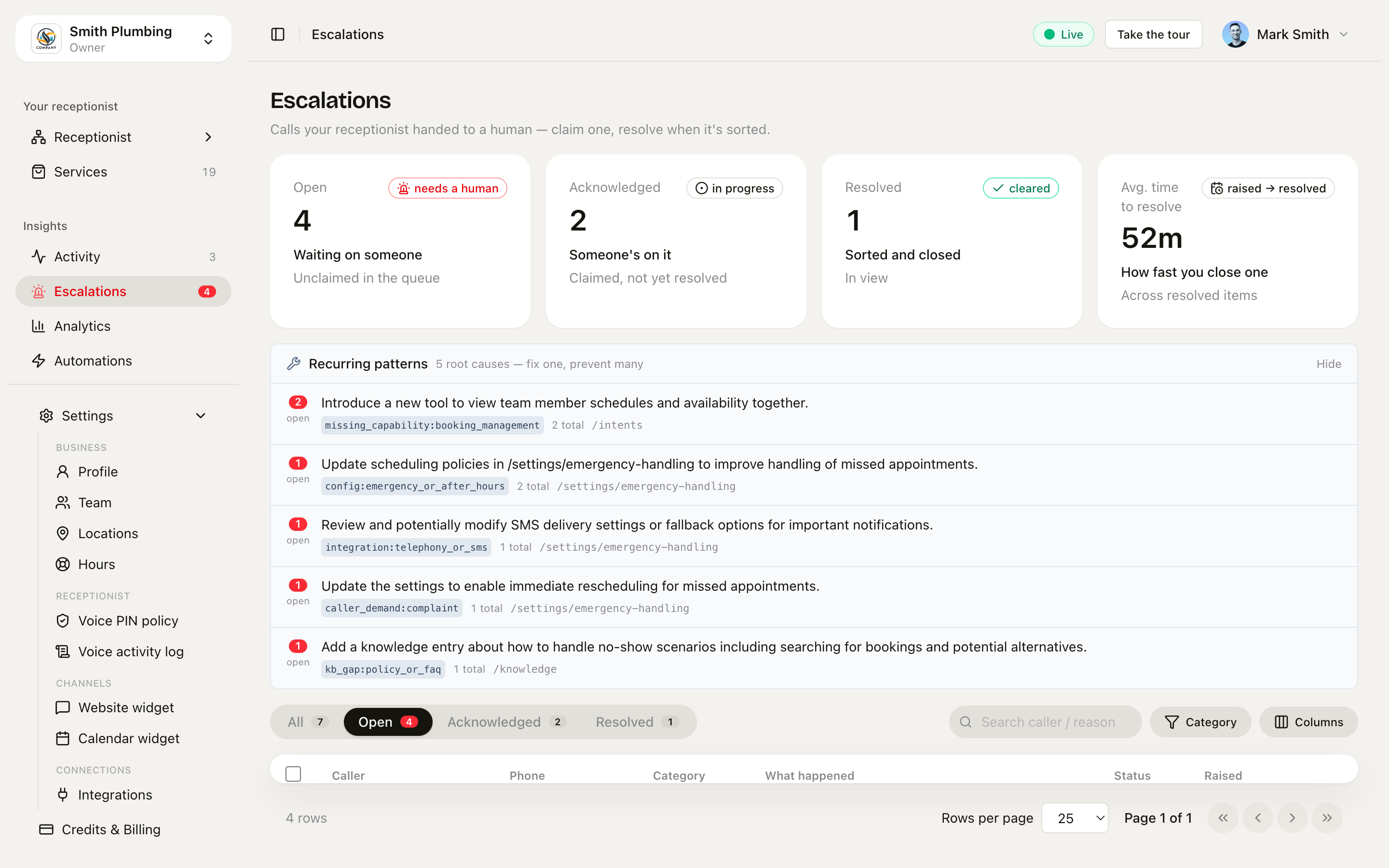 The queue — open items oldest-first, stat cards on top, category badges, and claim/resolve straight from the row.
The default posture is still never escalate — Sarah books the next available slot rather than giving up. What sends a call here is your emergency handling rules, a caller who insists on a human, or a genuine dead end.
Working the queue
The page is built for triage:
- Tabs — All / Open / Acknowledged / Resolved, each with a live count. The Open tab sorts oldest-first, so the caller who's been waiting longest is at the top.
- Stat cards — open (unclaimed), acknowledged (someone's on it), resolved, and your average time to resolve — the one number that tells you whether escalations are being worked or ignored.
- Search + categories — search by caller, phone or reason; filter by a category derived from the reason text: Emergency, Complaint, Billing, Booking, Out of scope, Other.
Each row is one hand-off: who called, their number, the category, what happened, and when it was raised. Two actions move it along:
- Acknowledge — claim it. Your name and avatar attach to the row so the rest of the team knows it's being handled.
- Resolve — you've rung the caller and sorted it. It drops off the open count.
Select several rows to acknowledge or resolve in bulk — useful after a busy morning.
The detail sheet
Click a row and the full picture opens on the right:
- What happened — the reason the agent escalated, in its own words.
- Suggested resolution — the AI's proposed fix (more below). Shows "Working out a suggested fix…" for a minute or two after the call.
- Links — jump to the call in Activity, open the contact record, or grab the number to ring back.
- Timeline — raised → acknowledged (by whom) → resolved (by whom).
- Conversation — the full turn-by-turn transcript, so you can read exactly where the call went wrong before you dial. Transcripts on escalated calls are kept for 90 days (routine calls: 30).
How to stop it happening again
An escalation is a symptom. A few moments after each one, an AI analysis reads the call — what the agent actually tried, which tools it called, where it hit the wall — and writes an owner-facing suggested resolution in two parts: how to handle this caller now, and the single highest-impact change that would have kept the call automated.
The suggestions are grounded in your real levers, not generic advice:
- Services and prices (/services) — add or correct a service so the agent quotes it instead of refusing
- Knowledge (/knowledge) — a missing policy or FAQ is the most common fix
- Emergency handling (settings) — how out-of-hours and urgent calls are handled
- Agent behaviour — greeting, tone, "always ask for X" rules
- Playbooks (/intents) — a situation-specific flow for a recurring call type
- Working hours and phone routing — availability and which agent a number runs
Owners also see a technical note on each item — a terser, developer-facing spec of the underlying gap, tagged with a pinned root-cause category. Both are AI-generated: treat them as a strong first draft, not gospel.
Patterns — fix one, clear the cluster
Above the queue, owners see a Recurring patterns panel: escalations grouped by root-cause tag and ranked by how many are still open. Ten open items sharing kb_gap:policy_or_faq isn't ten problems — it's one missing knowledge entry. Make the one change, and the whole cluster stops recurring. This is the highest-leverage five minutes in the app: work the patterns panel weekly and watch the queue shrink on its own.
Playbooks choose the escalation path
Escalation doesn't have to mean "page a human". Each playbook declares what the agent should do when it can't fully serve the caller — book a slot, request a callback, or transfer to a human — so a buyer-enquiry line can book a viewing while a complaints line pages you immediately.
What's next
- Conversations & Activity — where the escalated call itself lives, with its transcript and audio
- Emergency handling & service area — the rules that decide when a call escalates at all
- Knowledge base — the fix for most escalations is a fact the agent didn't have
- Playbooks — give a recurring call type its own flow instead of letting it dead-end