 Loyal Receptionist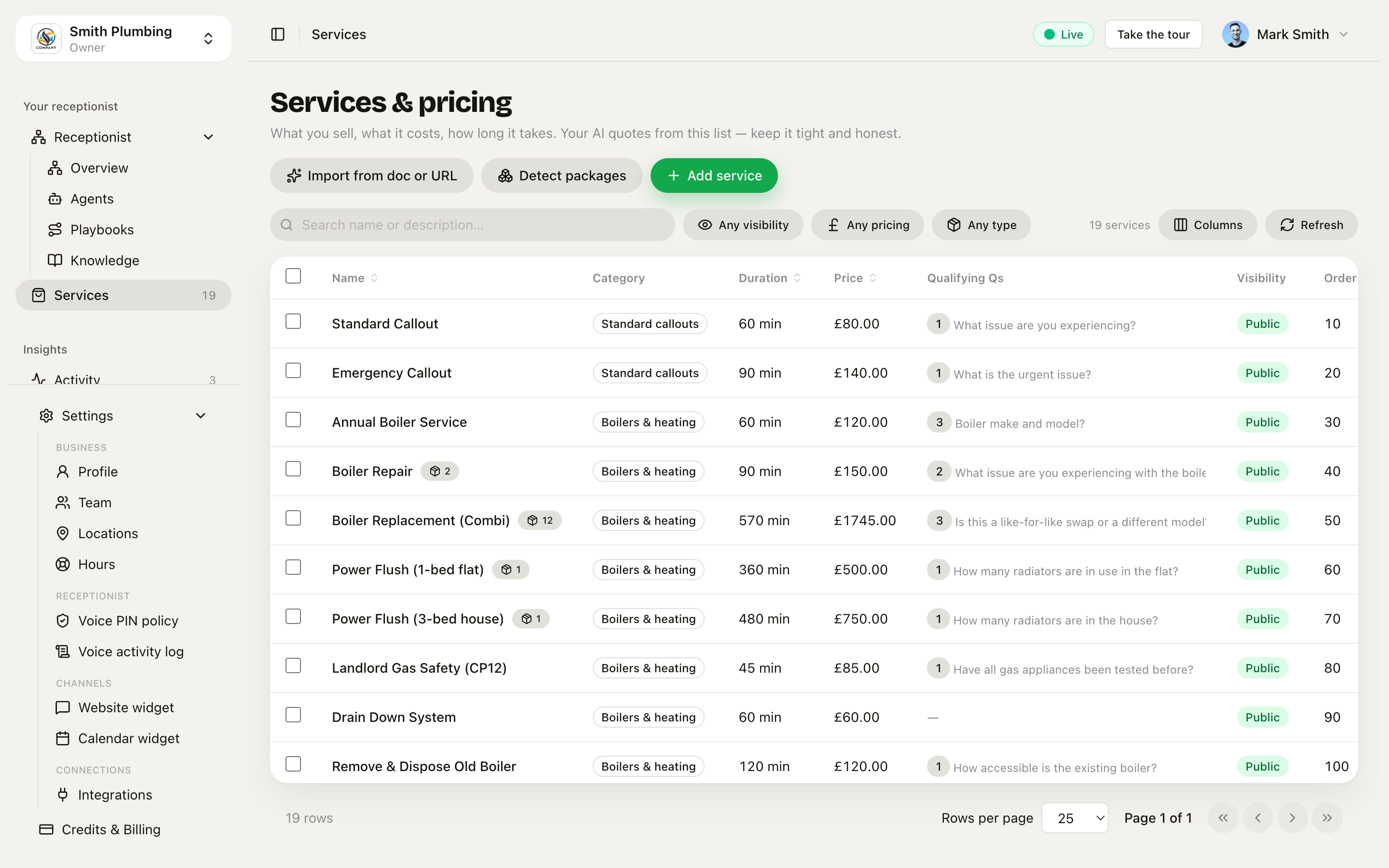
Pricing & quotes
Every domestic-trade call has the same moment: "how much would that be?" What Sarah says next decides whether the caller books, hangs up, or rings your competitor. This page is how the moment works, what controls it, and where to look when it doesn't.
How a price reads on the call
A service's Billing cadence (set on each service in Services) decides how the price is read aloud and how it lands on the booking:
| Cadence | What it sounds like | When to use |
|---|---|---|
| Not set / fixed (default) | "That's £130" | Most domestic trade work — one-off jobs at a fixed price. |
| One-off fee | "That's £99 one-off" | Install fees, callout fees, anything paid once but distinct from a recurring relationship. The cadence is named in the prompt so the agent doesn't conflate "install fee" with "first month". |
| Monthly subscription | "That's £79 a month" | Recurring plans (receptionist subscriptions, service contracts, maintenance plans). |
| Annual subscription | "That's £899 a year" | Annual gas-safety contracts, support contracts. |
| Usage-based | "That's £0.05 per message" | Per-use addons (SMS overages, per-minute rates). |
The voice agent NEVER reads the cadence aloud as the word "cadence" — it weaves it into natural phrasing ("a month", "a year", "one-off"). On the booking, the estimated price is the cadence's anchor value (e.g. £79 for a monthly plan); separate billing logic handles the actual recurring charge later.
Mixing one-off and recurring on the same call (e.g. install fee + subscription) is a natural sales motion — Sarah quotes both separately ("£149 install today, then £149 a month after that") rather than adding them. Use categories to group install fees, plans, and add-ons so the catalogue reads cleanly to her.
The two paths
Sarah handles a price question one of two ways:
| Path | When she takes it | What she says |
|---|---|---|
| Quote a number | She found a matching service in your catalogue with a fixed price. | "That's £130 — shall I book you in?" |
| Quote-on-the-day | Matched a service but it has Requires a quote ticked, OR no service matched at all. | "The engineer will quote when he arrives — when's good to come round?" |
The split matters because they convert differently. Callers who get a number book ~60% of the time. Callers who get "engineer will quote" book about half that. So the catalogue work in Services directly drives your conversion rate.
Three branches, not two
The two paths above are the old shape. From the quotation work there are three, and the third is the one that saves you money.
| Branch | When | What Sarah does |
|---|---|---|
| Quote on the call | Fixed-price service, and the caller answered your qualifying questions. | Says the number and books, or texts a written quote there and then. |
| Give a range, then a look | The service is Requires a quote and you typed a Typical range. | Says "typically £800 to £2,400, firm price after a site visit", then books the visit. |
| A look first, no number | Requires a quote and you left the range empty. | Gives no figure at all and books the visit or takes a callback. |
The middle branch is new. It exists because a caller who hears nothing usually rings someone else, and a caller who hears an invented number costs you the job twice: once when you turn up, and again when you have to argue the price up.
Set the range
Services → open a service → tick Requires a quote → fill in Typical range. Sarah says only what you typed. Leave it empty and she gives no number. She never works one out from a similar service.
Send on the call, or check it first
Every fixed-price service has a Written quotes setting.
- Send on the call is the default and is what happens today.
- Send to me to check first builds the quote, saves it as a draft in Quotes, and sends nothing. Sarah tells the caller you will look at it.
Use check-first on the jobs where the number is close to the line. The caller still gets a clean answer on the phone; the price stays in your hands.
Are they shopping around
On a big job priced after a look, Sarah asks once, lightly: "just so I point you right — are you getting a few quotes for this one?" The answer goes into the brief. She never asks it on a fixed-price job, because those quotes cost you nothing to send.
If the caller is collecting several quotes on a big job, one honest option is a paid survey. Add a service like Home survey and written quote at £45, one-off, with payment at booking, and say the fee comes off the job. Free quotes are still the norm for small work in the UK, so keep the survey for the large variable jobs only.
Pricing by the unit
A service can be priced per job, or per person, step, metre, square metre or hour. Set it on Services under Priced per.
When you pick a unit, three things happen and none of them need you to write anything:
- Sarah asks the right question. Per square metre gets "roughly how many square metres?"; per person gets "how many people?". You never type it.
- The slot grows with the answer. Set the time per unit and two people books two slots, not one.
- The price multiplies. Eighteen square metres at £150 quotes £2,700.
She will never ask how many hours or days a job takes. That is your estimate, not the customer's, so per-hour services generate no question at all.
Grades, and how hard the job is
These look like the same thing and are not, which is why they are two settings.
A grade is a different price for a different product: sandstone at £150 a square metre, porcelain at £190. Add them under Grades on the service. Sarah says "from £150 per square metre" and you pick the grade when you build the quote. She never asks the customer which grade they want.
How hard the job is is about the site, not the product: rear access, a 30 metre carry, hand-cut curves. Set your levels on Settings under How hard the job is (Standard, Awkward, Bespoke by default), then pick one per quote.
The uplift touches your work only. A skip or a bought-in gate stays at cost,
because marking those up because the garden is awkward is how a fair price turns
into a lost job. Mark each service as your work, materials, or bought in so the
software knows which is which. The customer never sees the percentage, and
/analytics tells you later whether the uplift covered it.
What it costs you, and what you keep
Put in what labour costs you per hour, on Settings, and add a cost to the materials you buy in. A quote then shows you three things it could not show before: what it costs you, what your overhead adds, and what you keep.
Two numbers, not one. Gross is before overhead, nett is after it. Set the margin you aim for and anything under it turns amber. It never stops you sending the quote. Under 25% most trades are working for nothing, which is what the amber is there to say.
If a line has no cost yet the panel greys out and says so. A margin worked out from half the costs is worse than no margin at all, because you would price against it.
Your crew never see any of this. They see the price.
Options the customer ticks
Mark a line Optional and it sits on the quote without being in the total. Mark it Recommended as well and it starts ticked. The customer adds or removes it on the page and the total moves with them.
Only what they tick becomes the job. The pergola they left unticked prints as "Not included" and never reaches the invoice.
Deposit, validity and a start date
A deposit turns Accept into "Accept and pay £X deposit". It is an ordinary invoice on your usual payment link, and it comes off the final bill, so nobody is charged twice. Set a default percentage on Settings or a figure per quote, and leave it blank if you do not take one.
A quote expires after the number of days you set. After that the customer cannot accept it, and you reissue it after a look. It is never re-priced behind your back, because you might be happy to honour the old number.
Past 30 days the quote carries a line saying prices depend on material costs at the time of order.
Minimum charge
A five square metre patio is not a quarter of a twenty square metre one. Setting up, digging and getting the muck away cost the same. Put a minimum on the service and any line under it charges the minimum instead. Sarah says why on the call, so the number never sounds like a mistake.
Which prices you win
/analytics splits your win rate by margin band. Winning nine in ten under 20%
is the number behind "your prices may be too low", and it tells you which
prices to move.
She will not quote without asking your questions
If a service has qualifying questions, Sarah cannot text a written quote until she has asked them. The server refuses. That is deliberate: a quote built on nothing is the one that turns into an argument on site.
How the matcher works
Under the hood, Sarah calls a tool named get_price_estimate with whatever the caller said — "kitchen mixer tap installation", "my loo's running", "boiler not firing". The tool:
- Splits the description into words, drops fillers ("a", "the", "my", "it's").
- Scores every service in your catalogue by how many of those words appear in the service's Name or Description.
- Returns the highest-scoring service. Ties break by price (cheaper first).
So "my kitchen tap is dripping" matches Tap replacement (mixer / kitchen) because the name contains kitchen and tap. The order of words doesn't matter, brackets don't matter, capitalisation doesn't matter.
What kills a match:
- The caller's words are nowhere in your service name or description. ("kitchen sink unblock" → no match if you've only got "Drain clearance".)
- All the caller's words are stop-words ("a thing", "that thing").
- Your service names are too vague ("General job") so they tie with everything and the matcher picks the cheapest, which is rarely what the caller wanted.
The fix in every case is in the Services page — extend the Description field with the words your callers actually use.
When Sarah won't quote — and why that's good
Three situations where she deliberately won't commit to a price:
- The matched service is
Requires a quote. Ticked when the work genuinely can't be priced in advance (full bathroom refit, complex install). She says "engineer will quote on the day" and books a quote visit if you have one configured. - The caller is outside your service area. Settings → Profile → Service area decides this. Out-of-area calls get "that's outside our patch — we can refer you to a partner" rather than a number.
- The caller asked for something dangerous or out-of-scope. Gas leak smells, electrics underwater, structural — Sarah refuses to quote and escalates immediately.
If you find Sarah quoting too cautiously (lots of "engineer will quote" in the Activity feed), the lever is your catalogue. Untick Requires a quote on services where you'd happily commit to a number, or add new entries for the variants your callers ask about.
Request a callback — the "I want a human" exit
Some calls aren't bookable from a script. Out-of-hours, complicated, sensitive, just needs a chat with the owner. For these, Sarah uses a separate tool called request_callback:
- She captures the caller's name, number, and best time (morning / afternoon / evening).
- Lands as a row in your Activity feed tagged
callback-requested. - An Automation can SMS the owner immediately or wait until the next working day.
You'll see her offer this when:
- The caller explicitly asks for "the owner" or "a human".
- The job needs photos / a site visit before a number is meaningful.
- The caller wants something you don't offer but is worth a courtesy call (a referral opportunity).
Treat callback requests as the second-highest-priority queue after escalations. Same-day callback turns most of them into bookings; next-day callback loses half.
What the caller hears, end-to-end
A real chat that worked. The catalogue had Tap replacement (mixer / kitchen) · 75 min · £130. The caller wrote:
"Hi — I want to book for tomorrow a kitchen mixer tap installation."
Sarah's reply was:
"That's £130 for a kitchen mixer tap replacement, 75 minutes on site. I've got tomorrow 09:00, 11:00 or 14:30 — which suits?"
Three things she did, all driven by your config:
- Quoted £130 —
get_price_estimatematched the service by word overlap. - Quoted the duration —
75 mincame from the service's Duration field. - Offered real slots — pulled from your working hours and existing bookings.
If any of those three felt wrong on a recent call, the fix is in that field's settings page — not in the AI's behaviour.
Two extras land in the same confirmation moment when you've configured them:
- Preparation cue. If the service has Before the visit notes set (in Services), the booking readback ends with a short "Before we come — please make sure all radiators are accessible." The full version goes in the confirmation email.
- Draft quote for bundles. Booking a package (a service built from sub-tasks) automatically generates a draft quote with the line-by-line breakdown, ready for you to review — you don't have to build it by hand the next morning.
Arrival windows — offering the band, not the minute
The exact-times offer above is what callers hear when your booking style is exact appointments. If you've turned on arrival windows (mobile trades that travel to the customer — see Arrival windows), Sarah collapses the day's slots into one offer per window instead:
"I can do Tuesday morning — that's 8am to 12pm. Does that suit?"
She books the band, reads the window back at confirmation, and your crew keep an exact internal target inside it — the "on my way" text does the narrowing on the day. Two cases always stay exact regardless of the setting: emergencies and businesses customers come to (salon chairs, meeting rooms — see Locations & venues).
Paid-at-booking services ask for an email first
Services set to collect payment at booking add one hard step to the call: Sarah won't confirm until she has the customer's email address — "Could you give me your email address — that's how I send your booking confirmation and payment link." She spells it back and waits for a clear yes.
That's because confirmation for these bookings is email-first: the email carries the Stripe payment link and the calendar invite (.ics). There's no automatic payment-link text — you can still send an SMS fallback from the job if the email bounces.
Where to look when something goes wrong
| Symptom | First place to check |
|---|---|
| Sarah quoted the wrong number | Services — was the matched service the one you'd have picked? |
| Sarah said "engineer will quote" on a callable job | The service's Requires a quote toggle, or extend its Description so the matcher catches the caller's words |
| Sarah offered a slot that's outside hours | Working hours or the agent's per-day schedule |
| Sarah refused to commit and escalated | Emergency handling — were the caller's words on the escalation keyword list? |
| Sarah never offered a callback | Confirm the request_callback tool is in the agent's allowed set on /agents/[id] |
The point of all of this: the more careful your catalogue and your service-area settings, the more often Sarah quotes a real number — which is the single biggest driver of "did this call turn into work".
A spoken price isn't a written quote
Everything above is the number Sarah says out loud — the fast yes on a callout or a tap. The bigger jobs need a figure in writing the customer can accept later: a bathroom, a boiler swap, a rewire. That's a separate workflow — raise it from the job, send a branded link, chase the quiet ones. See Quotes, and Packages & sub-tasks for quoting a big job from the parts you already sell.
What's next
- Quotes — the written quote you send for bigger jobs, and how to chase it
- Packages & sub-tasks — quote a big job from the smaller services it's built from
- Services — the catalogue Sarah quotes from, and how to write entries she can find
- Arrival windows — book the band, narrow it with the on-my-way text
- Emergency & service area — when she escalates instead of booking
- Activity & conversations — where to review what she actually said on every call