 Loyal Receptionist
Conditions
Most of the time a service behaves the same for everyone. Sometimes it should not. A site visit is free for a straight job but worth charging for when the caller is ringing round five firms. A one-room job takes half an hour; three rooms needs longer. An awkward job is worth a photo before you set off.
A condition handles exactly that: Sarah asks one question on the call, and the answer turns a knob. You set it once, on the service.
The shape of a condition
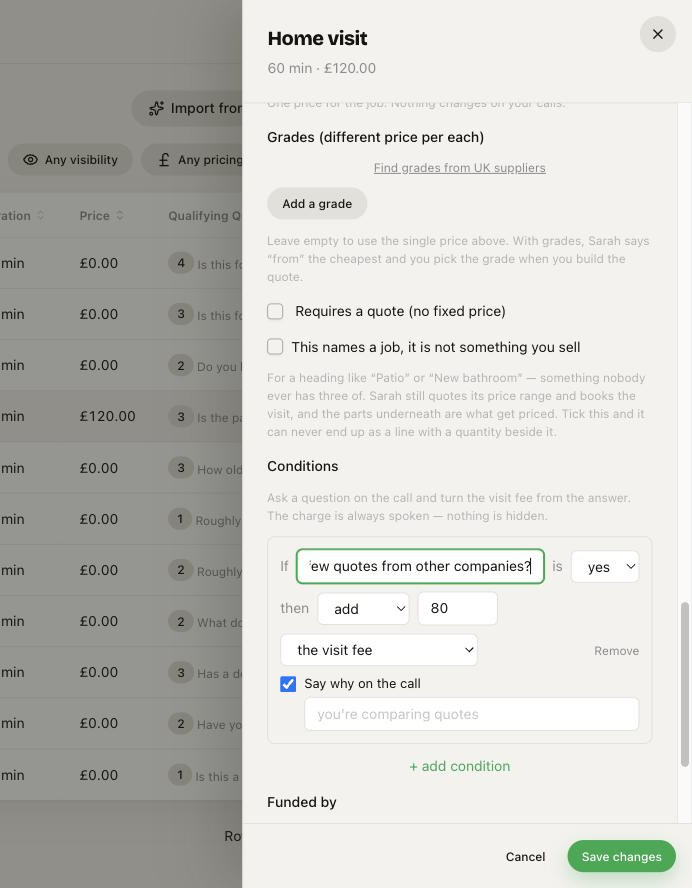
Open a service, scroll to Conditions, and press + add condition. Each one reads as a sentence:
If "Are you getting a few quotes from other companies?" is yes then add £80 to the visit fee
Left to right:
- If — the question Sarah asks, in your words.
- is yes / no — the answer that sets it off.
- then — what changes.
What you can turn
Three knobs, and only three — on purpose. Each one is either spoken to the caller or harmless, so a condition can never quietly change something big off a yes or no.
The visit fee. Add, deduct, or waive it. Sarah says the charge on the call — the caller always hears it before they commit. Use it for the classic case: the visit is free, but a price-shopper pays for it (and it comes off the price if they go ahead).
Ask for photos. If the answer fires, Sarah texts the customer your job link and asks for a couple of photos — even when the service itself is not set to ask. Good for "is it a big or awkward job?".
The appointment length. Add or take off minutes. The longer visit is booked from the start — Sarah offers slots that fit it, so nothing overlaps the next job.
You cannot use a condition to flip whether a job is NHS or private, whether it needs a quote, or whether payment is taken. Those are decisions, not things to hang on a caller's yes or no.
Say why, or don't
On a visit-fee condition there is a Say why on the call switch:
- On — Sarah leads with the reason: "Because you're comparing quotes, there's an £80 charge for the visit, and it comes off if you go ahead."
- Off — she just states it: "There's an £80 charge for the visit, off if you go ahead."
Some businesses like the transparency; some would rather not tell a caller they are being charged for shopping around. Your call, per condition.
What the caller hears
Sarah asks the question naturally, once, while she is booking. She never reads out the effect herself — the server does the sum and speaks the exact charge in the confirmation, so what is said and what lands on the invoice are always the same figure.
If the answer does not set the condition off, nothing happens — free visit, normal length, no photo request.
Worked example
A landscaper's Patio service:
- Condition 1 — If "Are you getting a few quotes from other companies?" is yes, then add £80 to the visit fee (Say why: on).
- Condition 2 — If "Is it more than one room or area?" is yes, then add 30 minutes to the appointment length.
A straightforward caller books a free, half-hour survey. A price-shopper with a big job hears the £80 charge and gets a booked slot long enough to do the measuring properly. Same service, one screen.