 Loyal Receptionist
Hours, emergencies & service area
Everything about when and where the receptionist books lives on one page: Settings → Hours & emergencies (/settings/emergency-handling, titled Receptionist hours & emergencies). Five cards, top to bottom — save once and the next call uses the new rules. No restart.
Your business name, contact details and address are elsewhere — on Settings → Profile.
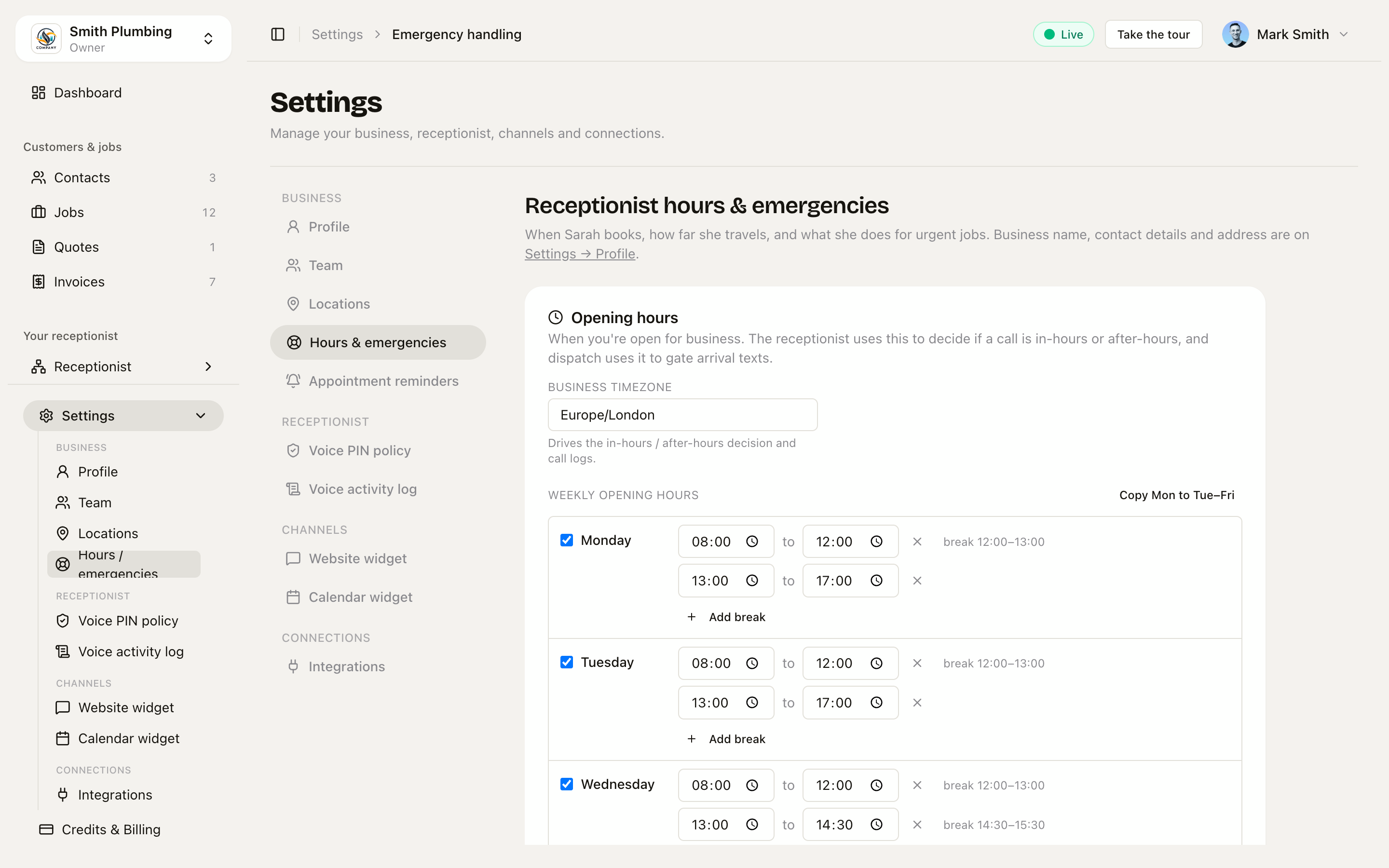 The five cards — Opening hours, Travel buffer, How customers book you, Service area, Emergency handling.
1. Opening hours
When you're open for business, per day, in your business timezone. Days can have split windows ("9–12 and 2–5").
These hours do three jobs:
- The receptionist uses them to decide whether a call is in-hours or after-hours.
- The public booking page computes its available slots — and its arrival windows — from them. Change your hours here and the booking page follows.
- Smart dispatch uses them to gate arrival texts.
2. Travel buffer
The minimum minutes between the end of one job and the start of the next, varying by time of day — Early morning, School rush, Midday, Afternoon. The receptionist won't offer a slot that doesn't leave enough drive time to get there.
Emergencies use a fraction of the bucket's buffer (default 30%) — an urgent job is worth driving harder for.
3. How customers book you
Whether customers pick an exact time or an arrival window (Morning / Afternoon, optionally End of day). It's pre-set from your trade at signup and you can change it here any time. The full story — what customers see, why windows suit mobile trades, and how the on-the-way text keeps a window honest — is on Arrival windows.
4. Service area
Moved here from the Profile page — if you're looking for it on
/settings/profile, this is where it lives now.
- Centre postcode — the middle of your service area (e.g.
CF10 1AA). - Radius (miles) — how far you'll travel. Default 15.
This applies to the whole business. It's different from the personal Base depot postcode on your Profile: the depot postcode is yours personally — the start-of-day point for ETA calculations on your jobs. The service-area centre is your business's — what every engineer's coverage is measured from. For a one-engineer business they're the same; for multi-engineer they can differ.
When a customer calls, the receptionist asks for their postcode early — before offering a slot — and runs it against your service area. Inside, she offers a time. Outside, she refers them to your partner number (if set, below) or politely declines.
5. Emergency handling
The default is never escalate to a human — the receptionist books emergencies in the next available slot within working hours. Escalation is the last resort, not the default. The settings below give her more room or add a fallback.
Booking rules
- Book emergencies in the next available slot within working hours (default on) — she'll stretch the day rather than turn an urgent job away.
- Offer slots during the engineer's break (default off) — only for genuine emergencies.
- Text me first before confirming an emergency slot (default off) — she'll tell the caller she's checking with you and call back in 10 minutes.
Partner / overflow
- Partner / overflow number — where to refer jobs you can't take (out of area, fully booked).
- Partner referral fee — optional, if you charge the customer for the referral. She'll mention it on the call.
Emergency pricing
Two figures she quotes up front when the caller says it's urgent:
- Emergency call-out fee — taken on arrival by card. The fixed bit they pay regardless.
- Emergency hourly rate — billed on the invoice after the visit, charged after the first hour.
Additional instructions
A free-text box. Anything you write here is baked into the receptionist's prompt in your own voice. Examples that work:
- "If the postcode is in CF24, ring Mark first — that area has parking issues."
- "Never quote prices over the phone — always say 'a written quote will follow'."
- "We don't do gas boiler installs, only repairs and services. Refer installs to the partner number."
What happens on save
The Save and sync to receptionist button writes everything to your business and re-syncs your receptionist immediately — you'll see "Saved. Sarah will use the new rules on the next call." That's literal: the very next call runs on the new settings.
What an urgent call sounds like
Caller: "Hi, I've got water coming through the kitchen ceiling."
Sarah: "Smith Plumbing, Sarah speaking — how can I help? Sorry, that sounds urgent. Can I get your name first?"
Caller: "Sherif, 07477 194809."
Sarah: "Right — 07477 194 809, got it. Your postcode and house number?"
Caller: "CF24 1AA, number 12."
Sarah: (silently checks your service area) "CF24 is about 2 miles out — well inside our area. For emergencies it's a £60 call-out on arrival, then £80 per hour billed after. Mark can be with you in about an hour — does that work?"
Caller: "Yes please."
Sarah: (books it) "Booked. Mark will be with you within the hour. You'll get a confirmation shortly. Anything else?"
No escalation, no waiting, no surprise pricing. If the postcode had been outside the radius and the partner number was set, she'd have said "about 22 miles out — outside our patch. Best bet is our partner on 07700 900 234" and offered to text the number across.
One nuance if you use arrival windows: ordinary bookings are offered as windows ("I can do Friday morning — 8am to 12pm"), but emergencies stay exact — a panicked caller hears "with you in about an hour", never "sometime this afternoon".
Related
- Arrival windows — exact times vs windows, in depth.
- Public booking page — the self-serve link that follows your opening hours.
- Smart dispatch — arrival texts, gated by the same hours.
- Locations & venues — depots, branches and venues, each with their own resources.